Tue, 26 March 2024
News
Hot Threads:
Obscure Feature of the Week: Proxy
|
Mon, 26 February 2024
News
Julie Shaffer
Secrets of the Scripts Panel
Obscure Feature of the Week: Wavy |
Wed, 31 January 2024
Links mentioned in this podcast
|
Thu, 28 December 2023
Links mentioned in this podcast
All about Pi…
|
Thu, 30 November 2023
Links mentioned in this podcast
|
Tue, 31 October 2023
Sponsor for this episode >> Priint:Suite is an enterprise platform that reduces the time to create marketing publications up to 80% and enables creative marketers to focus on being creative. Automate layouts following business/layout rules without limits on creative freedom. Instantly create personalized or language variants. Learn more about where and how to use it with InDesign here! Links mentioned in this podcast
|
Sat, 30 September 2023
Sponsor for this episode >> Adobe MAX 2023 Creativity Conference is happening October 8–12 in Los Angeles, California. Learn from experts and innovators, top creatives in design, photography, illustration, video, 3D, and more. Of course, the highlight is that many InDesign experts will be presenting, live and online — even the Adobe engineering team from India. Hope to see you there! Links mentioned in this podcast
|
Wed, 30 August 2023
Sponsor for this episode >> Santa Cruz Software is the maker of LinkerUI, a best-in-class extension that connects InDesign and other CC applications to your DAM and cloud-based services like Dropbox. Box, GoogleDrive and more. It enables direct searching, opening, placing, and syncing of assets. A new feature in LinkrUI called Smart-Linkr now automatically finds and fixes broken asset links at a single click, so you never need to search for lost assets again. Download LinkrUI for free today at SantaCruzSoftware.com Links mentioned in this podcast
|
Mon, 31 July 2023
Sponsor for this episode >>Santa Cruz Software: Did you know that 66% of sales professionals can’t get their sales or marketing collateral in time, often creating assets without oversight? Solve this with BrandingUI. Try it today at SantaCruzSoftware.com! Links mentioned in this podcast
|
Mon, 26 June 2023
Sponsor for this episode >> Noble Desktop: For over 30 years, Noble Desktop’s project-based classes and certificate programs have given professionals the tools to pursue creative careers in design, coding, and beyond. Learn more about them on our Training Provider page or at NobleDesktop.com. Links mentioned in this podcast
|
Mon, 29 May 2023
Links mentioned in this podcast Adobe MAX 2023 speakers
Fonts:
|
Wed, 3 May 2023
Sponsor for this episode >> Noble Desktop: For over 30 years, Noble Desktop’s project-based classes and certificate programs have given professionals the tools to pursue creative careers in design, coding, and beyond. Learn more about them on our Training Provider page or at NobleDesktop.com. Links mentioned in this podcast
|
Wed, 5 April 2023
Sponsors for this episode >>PageProof is the top online proofing workflow platform for your creative process: InDesign, Photoshop, Illustrator, PowerPoint, image files, and more. It’s free for reviewers, and flat rate pricing for you and your designers makes it easy to get started! Learn more about PageProof in David’s in-depth interview in this CreativePro Conversation on YouTube. >>Microsoft PowerPoint has a mission: To empower people and organizations to tell the world's most compelling stories to anyone, anywhere, at any time. Check out our newest feature, Cameo, which lets you integrate a live camera feed into your presentation. Learn more about Cameo here. Links mentioned in this podcast More on Measurements
|
Tue, 28 February 2023
In This Episode:
Sponsors for this episode >>PageProof is the top online proofing workflow platform for your creative process: InDesign, Photoshop, Illustrator, Powerpoint, image files, and more. It’s free for reviewers, and flat rate pricing for you and your designers makes it easy to get started! Learn more about PageProof in David’s in-depth interview in this CreativePro Conversation on YouTube. >>Microsoft PowerPoint has a mission: To empower people and organizations to tell the world’s most compelling stories to anyone, anywhere, at any time. Check out our newest feature, Cameo, which lets you integrate a live camera feed into your presentation. Learn more about Cameo here. Links mentioned in this podcast
|
Tue, 31 January 2023
Sponsor for this episode: >>PageProof is the top online proofing workflow platform for your creative process: InDesign, Photoshop, Illustrator, Powerpoint, image files, and more. It’s free for reviewers, and flat rate pricing for you and your designers makes it easy to get started! We interview Marcus Radich, CTO, in this episode, and you can hear David’s more in-depth interview in this CreativePro Conversation on YouTube. Links mentioned in this podcast: News
InDesign Dashboard
ChatGPT, DALL-E, and other Generative A.I.
Obscure Feature: Adjust spacing automatically when cutting and pasting words
|
Mon, 19 December 2022
In this episode…
Sponsor for this episode: >>PageProof is the top online proofing workflow platform for your creative process: InDesign, Photoshop, Illustrator, Powerpoint, image files, and more. It's free for reviewers, and flat rate pricing for you and your designers makes it easy to get started! We interview Marcus Radich, CEO, in this episode, and you can hear David's more in-depth interview in this CreativePro Conversation on YouTube. Links mentioned in this podcast: LinkedIn Learning Video Series for InDesign users
End of PostScript Type 1 Support
Pantone Libraries Disappearing
Parent pages: How to make running heads that change without using multiple parent/master pages: https://creativepro.com/indesign-how-to-automate-chapter-headers/ |
Sun, 27 November 2022
In this episode:
Sponsor for this episode: >> Santa Cruz Software is the creator of BrandingUI, LinkrUI, and PrintUI: BrandingUI empowers your global team to customize materials at scale, all while staying brand compliant. More on LinkrUI:
Links mentioned in this podcast:
|
Tue, 27 September 2022
In this landmark 300th episode…
Sponsors for this episode: >> Canto is a leader in digital asset management (DAM) software, with customers that include many of today’s top brands. This is an incredibly intuitive and easy to use platform that gives creative teams a centralized location to organize, find, and share all of their digital brand assets, including videos, images, graphics, etc. Canto integrates directly with Adobe Creative Cloud software. For more information and a personalized demo, visit https://go.canto.com/CreativePro. >> Adobe MAX is one of the largest gatherings of graphic, web, UX and multi-skilled designers, creative and art directors, illustrators, film, video, and motion graphics pros, photographers, and creative leaders. And this year, for the first time ever, you can attend in person or online (for free), so there’s a MAX for everyone. Save $400 off the live event's registration fee by using our promo code M22CPN Register at https://max.adobe.com Links mentioned in this podcast:
|
Thu, 30 June 2022
In this episode…
Sponsor for this episode: > > Santa Cruz Software has a solution for the “83% of respondents who have said they have to spend time finding a lost sset.” The answer is LinkrUI, a plugin that enables direct searching, opening, placing, and syncing of assets stored in a DAM or other storage services such as Box and Dropbox from within Photoshop, Illustrator, and InDesign. Download the free version here. Links mentioned in this podcast:
|
Tue, 31 May 2022
In this episode…
Sponsor for this episode: >> Canto is a leader in digital asset management (DAM) software, with customers that include many of today’s top brands. This is an incredibly intuitive and easy to use platform that gives creative teams a centralized location to organize, find, and share all of their digital brand assets, including videos, images, graphics, etc. Canto integrates directly with Adobe Creative Cloud software. For more information and a personalized demo, visit https://go.canto.com/CreativePro. Links mentioned in this podcast:
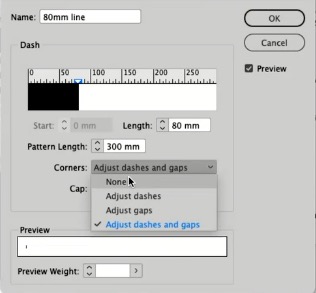
The settings for a custom stroke that Bart demonstrated, which can be used for a static rule length in Rule Above/Below:
|
Wed, 27 April 2022
In this episode…
Sponsors for this episode: >> Microsoft and Adobe! Both of these fine companies are CreativePro partners and will be represented at CreativePro Week 2022. Adobe is flying in a group of Adobe CC engineers from India, and MS Office product manager Stephanie Horn is doing a session on using video in Powerpoint. Links mentioned in this podcast:
|
Wed, 30 March 2022
In this episode…
Sponsor for this episode: >> Canto (they dropped the “Cumulus” name a few years ago) is a leader in digital asset management (DAM) software, with customers that include many of today’s top brands. This is an incredibly intuitive and easy to use platform that gives creative teams a centralized location to organize, find, and share all of their digital brand assets, including videos, images, graphics, etc. Canto integrates directly with Adobe Creative Cloud software. For more information, visit https://go.canto.com/CreativePro. Links mentioned in this podcast:
|
Sun, 27 February 2022
In this episode…
Links mentioned in this podcast:
|
Tue, 25 January 2022
In this episode…
Sponsors for this episode: >> Ajar Productions is the developer of the phenomenal in5 add-on for Adobe InDesign, which lets you export interactivity from InDesign to different formats that actually work. Create websites, digital magazines, mobile apps, animated banners and presentations, by simply using InDesign, no coding involved! They’re now adding accessibility features, see their YouTube video. Learn more and download a free trial of in5 at in5.us. Links mentioned in this podcast:
|
Fri, 26 November 2021
In this episode…
Sponsors for this episode: > 3M’s VAS: 3M’s Visual Attention Software (VAS) is powerful, science-based AI that simulates the human vision system to analyze visual content and predicts with 92% accuracy what is attracting viewer attention. VAS is available as a web app and plugins for Adobe Illustrator, Photoshop and XD. Start your free trial today, and enter promo code CREATIVEPRO5 for 5 additional trial credits! Links mentioned in this podcast:
|
Tue, 26 October 2021
In this episode…
Sponsors for this episode: > Santa Cruz Software has a solution for the "83% of respondents who have said they have to spend time finding a lost asset." The answer is LinkrUI, a plugin that enables direct searching, opening, placing, and syncing of assets stored in a DAM or other storage services such as Box and Dropbox from within Photoshop, Illustrator, and InDesign. Read about the freemium version here. Links mentioned in this podcast:
|
Mon, 27 September 2021
In this episode…
Sponsors for this episode: > Santa Cruz Software has a solution for the "83% of respondents who have said they have to spend time finding a lost asset." The answer is LinkrUI, a plugin that enables direct searching, opening, placing, and syncing of assets stored in a DAM or other storage services such as Box and Dropbox from within Photoshop, Illustrator, and InDesign. Read about the freemium version here. > Adobe MAX 2021: Once again, the Creativity Conference is online and free! Register today to see all the 300+ sessions covering everything from app "how-to's" to managing design and promoting creativity. Links mentioned in this podcast:
|
Tue, 31 August 2021
In this episode…
Sponsor for this episode: > Adobe MAX 2021: Once again, the Creativity Conference is online and free! Register today to see all the 300+ sessions covering everything from app "how-to's" to managing design and promoting creativity. Links mentioned in this podcast:
|
Tue, 27 July 2021
In this episode…
Sponsors for this episode: > 3M's VAS: 3M's Visual Attention Software (VAS) is powerful, science-based AI that simulates the human vision system to analyze visual content and predicts with 92% accuracy what is attracting viewer attention. VAS is available as a web app and plugins for Adobe Illustrator, Photoshop and XD. Start your free trial today, and enter promo code CREATIVEPRO5 for 5 additional trial credits! >> Ajar Productions is the developer of the phenomenal in5 add-on for Adobe InDesign, which lets you export interactivity from InDesign to different formats, that actually work. in5 supports all of InDesign’s native interactivity—like animation, buttons, object states, audio and video; and adds its own. Create websites, digital magazines, mobile apps, animated banners and presentations, by simply using InDesign, no coding involved! Learn more and download a free trial of in5 at in5.us. Links mentioned in this podcast:
|
Sun, 27 June 2021
In this episode…
Links mentioned in this podcast:
Using the Nonbreaking (Fixed Width) space to auto-feather a headline (set the Paragraph alignment to Justify All Lines first)
|
Mon, 31 May 2021
In this episode…
Links mentioned in this podcast:
|
Thu, 29 April 2021
In this episode…
News and special offers from our sponsors: >> Ajar Productions is the developer of the phenomenal in5 add-on for Adobe InDesign, which lets you export interactivity from InDesign to different formats, that actually work. in5 supports all of InDesign's native interactivity—like animation, buttons, object states, audio and video—and in5 adds additional interactivity to InDesign, like 3-D Flip Cards, Responsive Layouts, Parallax, and more. Create websites, digital magazines, mobile apps, animated banners and presentations, by simply using InDesign, no coding involved! Learn more and download a free trial of in5 at in5.us. >> Cacidi Systems has been developing solutions for Adobe InDesign users since InDesign began! They offer a number of plug-ins and workflow system for content integration and efficient marketing production. We especially love Cacidi Charts, which has been updated and leveled up for InDesign 2020 and 2021. No more need to jump into Illustrator or Powerpoint; create gorgeous charts right in InDesign. Free trial available! Links mentioned in this podcast:
|
Wed, 31 March 2021
In this episode…
Links mentioned in this podcast:
|
Sat, 27 February 2021
In this episode…
News and special offers from our sponsors: >> Cacidi Systems has been developing solutions for Adobe InDesign users since InDesign began! They offer a number of plug-ins and workflow system for content integration and efficient marketing production. We especially love Cacidi Charts, which has been updated and leveled up for InDesign 2020 and 2021. No more need to jump into Illustrator or Powerpoint; create gorgeous charts right in InDesign. Free trial available! Links mentioned in this podcast:
|
Sat, 30 January 2021
In this episode…
Links mentioned in this podcast:
|
Sun, 20 December 2020
Special episode recorded LIVE at our 2020 Holiday Special!
Links mentioned in this podcast:
|
Sun, 29 November 2020
In this episode:
Links mentioned in this podcast:
|
Sat, 31 October 2020
In this episode:
News and special offers from our sponsors: >> CI HUB is a platform for content integration and efficient marketing production. No more jumping between tools and windows to find the right asset! The CI HUB asset panel plugin for Adobe Creative Cloud and Microsoft Office applications essentially connects your brand assets living within your various asset repositories to your native creative apps. Check out David's interview with Andreas Michalski, CI HUB's CEO and founder. Links mentioned in this podcast:
|
Tue, 29 September 2020
In this episode:
News and special offers from our sponsors: >> Issuu is the all-in-one platform to create and distribute beautiful digital publications, from brochures to magazines to sales collateral and more. It’s perfect for creators, marketers, designers, educators, publishers, sales-people or anyone that wants to make eye-catching content. And Issuu makes it easy. Simply use the InDesign plug-in or upload your PDFs and files and Issuu transforms them using your vision and customizable templates to create the content you want. Check out their session at CreativePro Week 2020. >> Markzware offers so many solutions for InDesign users, it's hard to know where to start. Here are three: Check out IDMarkz for previewing InDesign files and converting them without needing to open (or own) InDesign; PDF2DTP for converting PDF files to editable InDesign files, and read about their File Recovery service for wonky InDesign files. Links mentioned in this podcast:
|
Mon, 31 August 2020
In this episode:
News and special offers from our sponsors: >> Issuu is the all-in-one platform to create and distribute beautiful digital publications, from brochures to magazines to sales collateral and more. It’s perfect for creators, marketers, designers, educators, publishers, sales-people or anyone that wants to make eye-catching content. And Issuu makes it easy. Simply use the InDesign plug-in or upload your PDFs and files and Issuu transforms them using your vision and customizable templates to create the content you want. Check out their session at CreativePro Week 2020. >> Avenza Systems' MAPublisher (for Illustrator) and Geographic Imager (for Photoshop) are powerful tools for all graphic designers who want to dive more deeply into cartography and map making. Learn more by watching David's recent Facebook Live interview with Avenza, and see their session from CreativePro Week 2020. Links mentioned in this podcast:
|
Wed, 29 July 2020
In this episode:
Links mentioned in this podcast:
|
Mon, 29 June 2020
In this episode:
News and special offers from our sponsors: >> Cacidi Systems, developers of awesome charts and barcode creation tools for InDesign. See their 15-minute session from CreativePro Week 2020 here. Cacidi just released a huge update to Cacidi Charts, which create many types of vector charts, easy to “convert” to InDesign for ultimate creative freedom. They offer a free 30-day trial version, and right now only for CreativeProWeek attendees 50% of the price, for a very, very limited time! Discount code: CREAPRO2020 (see Cacidi.com) >> Priint:Suite cuts up to 80% off of the creative process lifecycle for any kind of data-driven publications like catalogs, brochures, and datasheets, with the highest level of automation possible. Lay out entire pages, sections or publications with a single click, including complex, dynamic tables. See their 15-minute session from CreativePro Week here! Links mentioned in this podcast:
|
Thu, 30 April 2020
In this episode:
Links mentioned in this podcast:
|
Tue, 31 March 2020
In this episode:
Links mentioned in this podcast:
|
Fri, 28 February 2020
In this episode:
News and special offers from our sponsors: >> Ajar Productions is the maker of in5, the miraculous InDesign add-on that lets you create digital magazines, websites, mobile apps, animated banners, & more from Adobe InDesign ... without coding! in5 supports all the interactivity in InDesign — animations, buttons, object states, and more. They have tons of helpful material both to get you started and to help you get your projects to the finish line. Podcast listeners! Go to this special InDesignSecrets link for a limited time offer: A free video course and a 25% discount off all training videos. Links mentioned in this podcast:
|
Tue, 31 December 2019
In this episode:
Links mentioned in this podcast:
|
Thu, 21 November 2019
In this (super-sized) episode:
Links mentioned in this podcast:
|
Mon, 30 September 2019
In this episode:
Links mentioned in this podcast:
|
Fri, 30 August 2019
In this episode:
News and special offers from our sponsor: > The InDesign Conference Virtual Pass: Couldn't make it to Seattle for the InDesign event of the year? Register for a Virtual Pass to CreativePro Week 2019, and you'll be able to watch recordings of all the main conference sessions and tutorials as many times as you like, from your computer, tablet or smartphone, at your leisure. Includes all the speaker handouts (hundreds of pages), private forum, attendee discounts, and more. Invest in yourself, register today! Links mentioned in this podcast:
David on a camel!
|
Sat, 29 June 2019
In this episode:
News and special offers from our sponsor: > The InDesign Conference Virtual Pass: Couldn't make it to Seattle for the InDesign event of the year? Register for a Virtual Pass to CreativePro Week 2019, and you'll be able to watch recordings of all the main conference sessions and tutorials as many times as you like, from your computer, tablet or smartphone, at your leisure. Includes all the speaker handouts (hundreds of pages), private forum, attendee discounts, and more. Invest in yourself, register today! Links mentioned in this podcast:
|
Tue, 28 May 2019
In this episode:
News and special offers from our sponsor: > The InDesign Conference Virtual Pass: Can't make it to Seattle for the InDesign event of the year? Register for a Virtual Pass to CreativePro Week 2019, and you'll be able to watch recordings of all the main conference sessions and tutorials as many times as you like, from your computer, tablet or smartphone, at your leisure. Includes all the speaker handouts (hundreds of pages), private forum, attendee discounts, and more. Invest in yourself, register today! Links mentioned in this podcast:
|
Sun, 12 May 2019
In this episode: the
News and special offers from our sponsor: > The InDesign Conference: If you use Adobe InDesign, mark off June 10–13, 2019 in Seattle, WA, for the InDesign event of the year! Join InDesignSecrets hosts Anne-Marie Concepción and David Blatner, and dozens of top InDesign experts and members of the Adobe InDesign team, for over 30 sessions and four in-depth half-day tutorials. All registrations include session videos and in-depth speaker handouts. Invest in yourself, register today! Discounts available for groups, government, non-profits, schools, and alumni, contact us for details. Links mentioned in this podcast:
|
Fri, 26 April 2019
In this episode:
News and special offers from our sponsor: > The InDesign Conference: If you use Adobe InDesign, mark off June 10–13, 2019 in Seattle, WA, for the InDesign event of the year! Join InDesignSecrets hosts Anne-Marie Concepción and David Blatner, and dozens of top InDesign experts and members of the Adobe InDesign team, for over 30 sessions and four in-depth half-day tutorials. All registrations include session videos and in-depth speaker handouts. Invest in yourself, register today! Discounts available for groups, government, non-profits, schools, and alumni, contact us for details. Links mentioned in this podcast:
|
Mon, 8 April 2019
In this episode:
News and special offers from our sponsor: > The InDesign Conference: If you use Adobe InDesign, mark off June 10–13, 2019 in Seattle, WA, for the InDesign event of the year! Join InDesignSecrets hosts Anne-Marie Concepción and David Blatner, and dozens of top InDesign experts and members of the Adobe InDesign team, for over 30 sessions and four in-depth half-day tutorials. All registrations include session videos and in-depth speaker handouts. Invest in yourself, register today! Discounts available for groups, government, non-profits, schools, and alumni, contact us for details. Links mentioned in this podcast:
|
Thu, 21 March 2019
In this episode:
News and special offers from our sponsor: > The InDesign Conference: If you use Adobe InDesign, mark off June 10–13, 2019 in Seattle, WA, for the InDesign event of the year! Join InDesignSecrets hosts Anne-Marie Concepción and David Blatner, and dozens of top InDesign experts and members of the Adobe InDesign team, for over 30 sessions and four in-depth half-day tutorials. All registrations include session videos and in-depth speaker handouts. Invest in yourself, register today! Discounts available for groups, government, non-profits, schools, and alumni, contact us for details. Links mentioned in this podcast:
|
Thu, 28 February 2019
In this episode:
News and special offers from our sponsor: > The InDesign Conference: If you use Adobe InDesign, mark off June 10–13, 2019 in Seattle, WA, for the InDesign event of the year! Join InDesignSecrets hosts Anne-Marie Concepción and David Blatner, and dozens of top InDesign experts and members of the Adobe InDesign team, for over 30 sessions and four in-depth half-day tutorials. All registrations include session videos and in-depth speaker handouts. Invest in yourself, register today! Discounts available for groups, government, non-profits, schools, and alumni, contact us for details. Links mentioned in this podcast:
|
Mon, 21 January 2019
In this episode:
News and special offers from our sponsor: > The InDesign Conference: If you use Adobe InDesign, mark off June 10–13, 2019 in Seattle, WA, for the InDesign event of the year! Join InDesignSecrets hosts Anne-Marie Concepción and David Blatner, and dozens of top InDesign experts and members of the Adobe InDesign team, for over 30 sessions and four in-depth half-day tutorials. All registrations include session videos and in-depth speaker handouts. Invest in yourself, register today! Discounts available for groups, government, non-profits, schools, and alumni, contact us for details. Links mentioned in this podcast:
|
Wed, 31 October 2018
In this episode:
News and special offers from our sponsor: > The InDesign Conference: If you use Adobe InDesign, mark off June 10–13, 2019 in Seattle, WA, for the InDesign event of the year! Join InDesignSecrets hosts Anne-Marie Concepción and David Blatner, and dozens of top InDesign experts and members of the Adobe InDesign team, for over 30 sessions and four in-depth half-day tutorials. All registrations include session videos and in-depth speaker handouts. Invest in yourself, register today! Discounts available for groups, government, non-profits, schools, and alumni, contact us for details. Links mentioned in this podcast:
|
Sun, 30 September 2018
In this episode, Anne-Marie flies solo!
News and special offers from our sponsor: > Adobe MAX brings together the world’s top creatives and best-in-the-business experts to get inspired, learn skills, and play. October 15–17 in Los Angeles. Anne-Marie and David are both speaking at separate hands-on InDesign labs. Come to the Community Pavilion and say hi to us at the CPN booth (#408)! Use our code CDCcreate2018 to save $400 off registration! Links mentioned in this podcast:
|
Fri, 31 August 2018
In this episode:
News and special offers from our sponsor: > Adobe MAX brings together the world’s top creatives and best-in-the-business experts to get inspired, learn skills, and play. October 15–17 in Los Angeles. Anne-Marie and David are both speaking at separate hands-on InDesign labs. Come to the Community Pavilion and say hi to us at the CPN booth (#408)! Use our code CDCcreate2018 to save $400 off registration! Links mentioned in this podcast:
And here's that obscure alert!!!
|
Tue, 31 July 2018
In this episode:
Links mentioned in this podcast:
|
Sat, 30 June 2018
In this episode:
Links mentioned in this podcast:
Middle Eastern license plate with Eastern Arabic numerals on top and Western Arabic numerals underneath (photo by Jerry "Woody")
|
Fri, 25 May 2018
In this episode:
News and special offers from our sponsors: > Acuity Training, based in the UK, offers training in Adobe InDesign and the full range of Adobe products with Adobe qualified instructors, as well Microsoft and other software suites and programs. They’ve been awarded a Gold-Star Rating from Feefo.com for four years running. Up until July 31, 2018, InDesignSecrets podcast listeners can get 20% off Adobe training bookings by using the discount code indesignsecrets20. > Ripon Printers is a full-service commercial printer based in Wisconsin with clients around the country. They do the printing for our InDesignSecrets Keyboard Shortcut posters and a lot of the CreativePro Week conference materials. Our friend James Wamser has been their Customer Education Director for many years. James is the creator and maintainer of the InDesign New Features Guide that lists all the features added to the program with each version, starting with version 1.0! Check out the resources and blog at Ripon's web site, lots of great info there, and consider asking them for a quote for your next print job! Links mentioned in this podcast:
Here's the 256-level histogram (0 to 255) we were talking about:
|
Sat, 31 March 2018
In this episode:
News and special offers from our sponsors: > Acuity Training, based in the UK, offers training in Adobe InDesign and the full range of Adobe products with Adobe qualified instructors, as well Microsoft and other software suites and programs. They’ve been awarded a Gold-Star Rating from Feefo.com for four years running. Up until May 31, 2018, InDesignSecrets podcast listeners can get 20% off Adobe training bookings by using the discount code indesignsecrets20. Links mentioned in this podcast:
|
Thu, 1 March 2018
In this episode:
News and special offers from our sponsors: > The InDesign Conference 2018 is June 4–7 in New Orleans, one of four back-to-back conferences in the same venue during CreativePro Week. Dozens of speakers—returning favorites and new faces—are busy prepping right now for some of the most useful and exciting presentations on InDesign you'll ever encounter. Sign up for just this conference, two of them (maybe add the Ps/Ai: Photoshop and Illustrator Conference for Designers as well?) or the whole week! Premium members of InDesignSecrets.com get a discount code worth $150 off any multi-day registration. To find the discount code, click on the blue My Account button at the top of the InDesignSecrets site and then click Benefits. Links mentioned in this podcast:
|
Wed, 31 January 2018
In this episode:
News and special offers from our sponsors: > Acuity Training, based in the UK, offers training in Adobe InDesign and the full range of Adobe products with Adobe qualified instructors, as well Microsoft and other software suites and programs. They've been awarded a Gold-Star Rating from Feefo.com for four years running. Up until March 31, 2018, InDesignSecrets podcast listeners can get 20% off Adobe training bookings by using the discount code indesignsecrets20. Links mentioned in this podcast:
|
Tue, 26 December 2017
In this episode:
Links mentioned in this podcast:
In a heated discussion during the podcast, the question was debated: If you alias a spot ink to another spot ink, will it separate out to CMYK correctly? Answer: YES. David's report from his post-podcast testing (see the episode 251 Show Notes on our site for screenshots that illustrate these steps): STEP ONE: I placed an .AI file (it could also be a PDF) that contains two spot colors (Pantone Blue, and a yellow called Pantone 114). I then applied that Pantone Blue spot color to some text in a text frame. I also created a new color that is a spot color, but defined with a CMYK value, called "MyColor 50/10/85/0". STEP TWO: I opened Ink Manager (from the Swatches panel menu), selected the Pantone Blue and then chose MyColor from the Ink Alias popup menu. And then I selected MyColor and clicked on the icon in the left column, which means convert this color to process. STEP THREE: When I open the Separations Preview panel and turn the View popup menu to Separations, the Ink Aliasing kicks in, converting all instances of Pantone Blue to MyColor… and also showing that MyColor is being converted to CMYK (using the CMYK values I set up when I created the color).
|
Fri, 1 December 2017
In this episode:
News and special offers from our sponsors: >> FunctionFox is a leader in timesheets and project management for creative teams since 1999. Still using paper timesheets or Excel to track project hours? Use FunctionFox to help manage your workflow and increase billable hours! There's a free demo available, but you might want to jump on their introductory offer of 40% off for a new monthly or annual subscription. The offer ends Dec. 15, 2017, so get on over there! >> GoProof is an online proofing solution that makes it easy to upload your layouts directly from within InDesign (a free GoProof panel!) to your GoProof portal for client proofing and markup. On average it saves designers at least 1 hour every day by cutting out PDF exports and email trails. There's even an option to make certain text frames editable by your clients right in the browser, using the same fonts and formatting. Try for free, or if you want to upgrade, use voucher code CPN17 for special discounts and free usage periods!
|
Tue, 31 October 2017
In this episode:
News and special offers from our sponsors: >> Acuity Training, based in the UK, offers a full range of Adobe training courses, including InDesign and Photoshop, led by Adobe qualified instructors. They've also been awarded a Gold-Star Rating from Feefo.com for four years running. Up until November 30, 2017, InDesignSecrets podcast listeners can get 20% off Adobe training bookings by using the discount code indesignsecrets20. Links mentioned in this podcast:
Go to the show notes on the web site to see some pictures!
|
Sat, 14 October 2017
In this episode:
News and special offers from our sponsors: >> Certitec, an Adobe Authorized Training Centre in the UK, offers exceptional instructor-led training for Adobe InDesign and other software programs at London Covent Garden, Cardiff, Bristol, and now, live online! Their students are achieving a 98% pass rate on all Adobe Certified Associate exams, so you know the instructors are the best. Follow them on Twitter at @Certitec and keep up with their Facebook page. Enjoy a 20% discount on any class —including online!—if you mention InDesignSecrets and this podcast episode number while booking the class, on the phone or at their site. Links mentioned in this podcast:
David did it! To get InDesign's Preflight to report something incompatible with the Flash player. Place a MIDI Quicktime movie file, circa 1994, and click Continue at the alert.
|
Thu, 31 August 2017
In this episode:
News and special offers from our sponsors: >> Certitec, an Adobe Authorized Training Centre in the UK, offers exceptional instructor-led training for Adobe InDesign and other software programs at London Covent Garden, Cardiff, Bristol, and now, live online! Their students are achieving a 98% pass rate on all Adobe Certified Associate exams, so you know the instructors are the best. Follow them on Twitter at @Certitec and keep up with their Facebook page. Enjoy a 20% discount on any class —including online!—if you mention InDesignSecrets and this podcast episode number while booking the class, on the phone or at their site. Links mentioned in this podcast:
|
Mon, 31 July 2017
In this episode:
Links mentioned in this podcast:
|
Wed, 28 June 2017
In this episode:
News and special offers from our sponsors: > Acuity Training, based in the UK, offers training in Adobe InDesign and the full range of Adobe products with Adobe qualified trainers, as well Microsoft and other software suites and programs. They've been awarded a Gold-Star Rating from Feefo.com for four years running. Up until July 31, 2017, InDesignSecrets podcast listeners can get 20% off Adobe training bookings by using the discount code indesignsecrets20. Links mentioned in this podcast:
|
Wed, 31 May 2017
In this episode:
Links mentioned in this podcast:
|
Sun, 30 April 2017
In this episode:
News and special offers from our sponsors: > Acuity Training, based in the UK, offers training in Adobe InDesign and the full range of Adobe products with Adobe qualified trainers, as well Microsoft and other software suites and programs. They've been awarded a Gold-Star Rating from Feefo.com for four years running. Up until May 31, 2017, InDesignSecrets podcast listeners can get 20% off Adobe training bookings by using the discount code indesignsecrets20. Links mentioned in this podcast:
|
Fri, 31 March 2017
In this episode:
News and special offers from our sponsors: > CircularFLO from Circular Software is an InDesign add-on that lets you easily create true replicas of existing print layouts. Directly export to fixed layout EPUB3 or the Amazon KF8 fixed layout format. You can include Read Aloud with no coding — add paragraph, sentence or word highlighting in time with an audio track. All new customers contacting Circular Software in April either by entering 'InDesign Secrets Podcast' when downloading CircularFLO or contacting us on our website can get a free trial credit for CircularFLO and extended trials of our print workflow apps GreenLight and MasterPlan, too. Links mentioned in this podcast:
|
Mon, 27 February 2017
In this episode:
Links mentioned in this podcast:
|
Sun, 29 January 2017
In this episode:
Links mentioned in this podcast:
|
Thu, 29 December 2016
In this episode:
News and special offers from our sponsors: >> Certitec, an Adobe Authorized Training Centre in the UK, is a premiere provider of Adobe InDesign, Adobe Animate (née Flash) and Adobe AEM training, as well as many other software programs. All courses have been updated for CC 2017! Don't miss their 5-day InDesign zero-to-hero courses, culminating in taking the ACE exam at their site at the end. Certitec hold classes in Cardiff, London, or Bristol. Follow them on Twitter at @Certitec and keep up with their Facebook page. Enjoy a 20% discount on any class in London or Cardiff you mention InDesignSecrets while booking the class (on the phone or at their site). Links mentioned in this podcast:
|
Wed, 23 November 2016
A very special episode, recorded in front of a live audience at The InDesign Conference 2016! Scroll down to see a couple pictures. In this episode:
News and special offers from our sponsors: >> Teacup Software is a consulting firm and a vendor of simple, elegant, and unobtrusive plug-ins for InDesign, including BarCodeMaker, PatternMaker (developed with our own David Blatner), and DataLinker, for linking to databases. They've recently updated their plugins to support InDesign CC 2017, too. Support your local InDesign developer! Links mentioned in this podcast:
Here are a couple pictures from The InDesign Conference 2016:
|
Mon, 31 October 2016
In this episode:
News and special offers from our sponsors: Links mentioned in this podcast:
|
Fri, 30 September 2016
In this episode:
News and special offers from our sponsors: QUIZZLER ANSWER and WINNER: In podcast 235, we asked listeners to email us locations in InDesign where the command "Place" appears, other than File > Place. We were looking for Library panel menu, right-click menu on images in CC Library, and the obscure button lower right on the Media panel, Place Video or Audio file. Only one person submitted an answer, and none of these were included in her email. But she wins an InDesignSecrets Keyboard Shortcut poster anyway! Links mentioned in this podcast:
|
Wed, 31 August 2016
In this episode:
News and special offers from our sponsors: >> Teacup Software is a consulting firm and a vendor of simple, elegant, and unobtrusive plug-ins for InDesign, including BarCodeMaker, PatternMaker (developed with our own David Blatner), and DataLinker, for linking to databases. Teacup moved to a subscription-based pricing model earlier this year. You can take 15% off the first year of any subscription when you enter the code IDSECRETS15. Hurry, this offer will end in a few weeks. QUIZZLER: Listen to the podcast for the Quizzler, a simple question about InDesign that you can answer with a little searching. When you find the answer, email it to us at info at indesignsecrets.com with QUIZZLER in the Subject line (not in a comment here!). We'll choose a winner from all the correct answers we've received by SEPTEMBER 20. Winner will be notified by email and announced in the next podcast, and we'll send the prize to them too! Links mentioned in this podcast:
The mysterious Zoom Setting:
|
Wed, 29 June 2016
In this episode:
News and special offers from our sponsors: >> Certitec, an Adobe Authorized Training Centre in the UK, is a premiere provider of Adobe InDesign, Adobe Animate (née Flash) and Adobe AEM training, as well as many other software programs. Two of their trainers have been voted in as the top 10 trainers in the world! Marek Mularcyk and Martin Prehiniak have achieved this over the last 12 months and accredited by Metrics that Matter. Certitec hold classes in Cardiff, London, or Bristol. Enjoy a 20% discount on any class in London or Cardiff when you mention InDesignSecrets while booking the class (on the phone or at their site). Links mentioned in this podcast:
|
Wed, 1 June 2016
In this episode:
News and special offers from our sponsors: >> Certitec, an Adobe Authorized Training Centre in the UK, is a premiere provider of Adobe InDesign, Adobe Animate (née Flash) and Adobe AEM training, as well as many other software programs. Their students are achieving a 98% pass rate on all Adobe Certified Associate exams, so you know the instructors are the best! Certitec hold classes in Cardiff, London, or Bristol. Follow them on Twitter at @Certitec and keep up with their Facebook page. Enjoy a 20% discount on any class in London or Cardiff you mention InDesignSecrets while booking the class (on the phone or at their site).
Links mentioned in this podcast:
|
Sat, 30 April 2016
In this episode:
News and special offers from our sponsors: >> Certitec, an Adobe Authorized Training Centre in the UK, is a premiere provider of Adobe InDesign, Adobe Animate (née Flash) and Adobe AEM training, as well as many other software programs. Their students are achieving a 98% pass rate on all Adobe Certified Associate exams, so you know the instructors are the best! Certitec hold classes in Cardiff, London, or Bristol. Follow them on Twitter at @Certitec and keep up with their Facebook page. Enjoy a 20% discount on any class in London or Cardiff you mention InDesignSecrets while booking the class (on the phone or at their site). Links mentioned in this podcast:
|
Thu, 31 March 2016
In this episode:
News and special offers from our sponsors: >> PePcon (the Print + ePublishing Conference) is for anyone who's on the front lines of creating publications and wants to peek over their own cubicle to see how others are tackling the same challenges. In the two-day multitrack event (plus pre- and post-conference workshop days) we dive into the "how-to" and "why" of print and digital publishing in a broad and deep way, covering InDesign, HTML5, PDF, print production, iBooks Author, mobile app development, CMS's, Editorial workflows, EPUBs, Kindle publishing, and more. Each speaker provides a detailed PDF handout, and typically the final compiled Speaker Handout distributed to attendees is over 400 pages long(!). The seventh annual PePcon is in San Diego, June 5–8, 2016. Register and reserve your spot today! Links mentioned in this podcast:
Screenshots:
Choose Define Profiles from the Preflight panel menu to manage and edit Preflight Profiles. The "OHW" ones on the left are different "One Hit Wonder" profiles (as discussed in the podcast), like the active one, OHW - Interactive, that flags any interactive elements.  Choose which Preflight Profile you want Live Preflight to check against on the fly from the pop-up menu, found to the left of the Live Preflight reporting section (red dot or green dot) at the bottom of the window:
 |
Mon, 29 February 2016
In this episode:
News and special offers from our sponsors: >> Rorohiko is a fine purveyor of many InDesign scripts and plug-ins. One of our favorites is TextExporter, a utility that comes in so handy, so often, that you forget it's not part of InDesign itself! Use TextExporter for those times when you need to extract all the text from a layout and put it into a single external text file, as plain text or formatted (RTF). Free 20-day trial, and when you realize how essential it is, you'll be happy to see the affordable, flexible pricing for single users and groups.
Links mentioned in this podcast:
|
Wed, 27 January 2016
In this episode:
News and special offers from our sponsors: >> Rorohiko, owned by InDesign developer extraordinaire Kris Coppieters, is not just about plug-ins or scripts. They also provide expertise as scripters, software developers and consultants when it comes to automating part of a graphics workflow. Rorohiko's motto is 'Slash the time it takes' and that also applies to their 'Expertise on call' service. They have been instrumental in finding a simple, efficient solution to many of their customer's problems. Call on Kris and Rorohiko (or email dev@rorohiko.com) for help with publishing systems design, implementation, tech support, and debugging. They know their stuff! Links mentioned in this podcast:
|
Tue, 15 December 2015
In this episode:
News and special offers from our sponsors: >> Rorohiko, owned by InDesign developer extraordinaire Kris Coppieters, is not just about plug-ins or scripts. They also provide expertise as scripters, software developers and consultants when it comes to automating part of a graphics workflow. Rorohiko's motto is 'Slash the time it takes' and that also applies to their 'Expertise on call' service. They have been instrumental in finding a simple, efficient solution to many of their customer's problems. Call on Kris and Rorohiko (or email dev@rorohiko.com) for help with publishing systems design, implementation, tech support, and debugging. They know their stuff! Links mentioned in this podcast:
Watch this video from the 3 Minutes Max final session at the InDesign Conference 2015! (if you can't see this in your feed reader, please visit the Show Notes page at InDesignSecrets.com: http://indesignsecrets.com/watch_listen/indesignsecrets-podcast-228)
|
Fri, 30 October 2015
In this episode:
News and special offers from our sponsors: >> Rorohiko, owned by InDesign developer extraordinaire Kris Coppieters, is not just about plug-ins or scripts. They also provide expertise as scripters, software developers and consultants when it comes to automating part of a graphics workflow. Rorohiko's motto is 'Slash the time it takes' and that also applies to their 'Expertise on call' service. They have been instrumental in finding a simple, efficient solution to many of their customer's problems. Call on Kris and Rorohiko for help with publishing systems design, implementation, tech support, and debugging. They know their stuff! Links mentioned in this podcast:
|
Wed, 30 September 2015
In this episode:
News and special offers from our sponsors: >> The Photoshop Conference, aka "The Photoshop Conference for the rest of us," is making its debut in November 16–18 in beautiful Denver, Colorado! Come and rub elbows with other designers, publishers, and production artists who want to learn from Photoshop pros like Deke McClelland, Lesa Snider, and Colin Smith. Optional: Register for an All-Access pass so you go back and forth between this conference and The InDesign Conference, happening on the other side of the hall! InDesignSecrets paid subscribers get $75 off registration using the code found in your Member Benefits (click "My Account" button at the top of the page). Links mentioned in this podcast:
Thank you to Adobe's Michael Ninness for the following examples of what folks are doing with interactivity and rich media with Publish Online! Brown University football:
John Kelly's interactive art catalog
SHIFT online catalog:
Kia SUV Sportage brochure:
https://indd.adobe.com/view/a68c4aec-906a-44b8-9656-6be52fbb18be
|
Mon, 31 August 2015
In this episode:
News and special offers from our sponsors: >> The Photoshop Conference, aka "The Photoshop Conference for the rest of us," is making its debut in November 16–18 in beautiful Denver, Colorado! Come and rub elbows with other designers, publishers, and production artists who want to learn from Photoshop pros like Deke McClelland, Lesa Snider, and Colin Smith. Optional: Register for an All-Access pass so you go back and forth between this conference and The InDesign Conference, happening on the other side of the hall! InDesignSecrets paid subscribers get $75 off registration using the code found in your Member Benefits (click "My Account" button at the top of the page). Links mentioned in this podcast:
|
Fri, 31 July 2015
In this episode:
News and special offers from our sponsors: >> The Photoshop Conference, aka "The Photoshop Conference for the rest of us," is making its debut in November 16–18 in beautiful Denver, Colorado! Come and rub elbows with other designers, publishers, and production artists who want to learn from Photoshop pros like Deke McClelland, Lesa Snider, and Colin Smith. Optional: Register for an All-Access pass so you go back and forth between this conference and The InDesign Conference, happening on the other side of the hall! InDesignSecrets paid subscribers get $75 off registration using the code found in your Member Benefits (click "My Account" button at the top of the page).
Links mentioned in this podcast:

|
Sun, 28 June 2015
In this episode:
News and special offers from our sponsors: >> The InDesign Conference is coming up in November in beautiful Denver, Colorado! Come and join us for this deep dive into your favorite program, and leave with a truckload full of new tools and techniques you can apply to your projects. Optional: Register for an All-Access pass so you go back and forth between this conference and The Photoshop Conference, happening on the other side of the hall! InDesignSecrets paid subscribers get $75 off registration using the code found in your Member Benefits (click "My Account" button at the top of the page). Links mentioned in this podcast:
|
Fri, 29 May 2015
In this episode:
News and special offers from our sponsors: >> ID-Extras has a cool range of InDesign add-ons and scripts. Some are especially for book and other long-document publishing, but many are great for any kind of publishing work you do in InDesign. For example, wouldn't you love to be able to carry over all the font specs from the form fields you create in InDesign over to Acrobat? Of course you would! That's what the FormMagic scripts do. There's a free version and a Pro version, check them out! You can get a special podcast-only 20% discount price until June 30, 2015 on ANY ID-Extras product by using the coupon code save20. >> Certitec, an Adobe Authorized Training Centre in the UK, is a premiere provider of Adobe InDesign, EPUB, and Adobe DPS training. Certitec hold classes in Cardiff, London, or Bristol. Get booked today onto a Certitec course and experience the latest and greatest software experience from Adobe. Follow them on Twitter at @Certitec and keep up with their Facebook page. If you sign up for a seminar or class in London or Cardiff, and mention you heard about them on InDesignSecrets, you get 20% off the fee! Links mentioned in this podcast:
|
Fri, 1 May 2015
In this episode:
News and special offers from our sponsors: >> movemen (pronounced move-eh-men) is the developer of MathTools, an outstanding equation editor plug-in for InDesign and InCopy. It's the tool of choice for science, math, and engineering textbook publishers worldwide. New in MathTools v2.0 is the ability to convert the equations to MathML (open source industry standard for math equations in XML/HTML5 /CSS3) upon export to HTML, XML, and EPUB! Learn more about MathTools v2.0 on movemen's site, and about its MathML feature in this FAQ.
Links mentioned in this podcast:
|
Sat, 28 March 2015
In this episode:
News and special offers from our sponsors: >> Certitec, an Adobe Authorized Training Centre in the UK, is a premiere provider of Adobe InDesign, EPUB, and Adobe DPS training. Certitec hold classes in Cardiff, London, or Bristol. Get booked today onto a Certitec course and experience the latest and greatest software experience from Adobe! Follow them on Twitter at @Certitec and keep up with their Facebook page. If you sign up for a seminar or class in London or Cardiff, and mention you heard about them on InDesignSecrets, you get 20% off the fee! Links mentioned in this podcast:
|
Sun, 1 March 2015
In this episode:
News and special offers from our sponsors: >> Recosoft makes the amazing PDF2ID, PDF-to-InDesign conversion tool for InDesign CS4 through CC 2014. They also offer ID2Office v2 which converts InDesign files to Word, PowerPoint, and Keynote format. ID2Office v2.0 now adds support for InDesign CC and converts InDesign nested tables into Word nested tables and Apple Keynote format. Get 15% off with special promo code ID_TIP_OF_THE_WEEK. Links mentioned in this podcast:
|
Wed, 21 January 2015
In this episode:
News and special offers from our sponsors: >> Recosoft makes the amazing PDF2ID, PDF-to-InDesign conversion tool for InDesign CS4 through CC 2014. They also offer ID2Office v2 which converts InDesign files to Word, PowerPoint and Keynote format. ID2Office v2.0 now adds support for InDesign CC and converts InDesign nested tables into Word nested tables and Apple Keynote format.
Links mentioned in this podcast:
   
|
Wed, 31 December 2014
In this episode:
News and special offers from our sponsors: >> ID-Extras has a cool range of InDesign add-ons and scripts especially for book and other long-document publishing, many of which are great for any kind of publishing work you do in InDesign. For example, wouldn't you love to be able to do a Find/Change for attributes in your Paragraph Styles, and the Change step would update all your styles at once? Of course you would! That's what the Search In Styles script does. You can get a special podcast-only discount price ($39 instead of $49) until Jan. 31, 2015 by going to this special page: http://www.id-extras.com/searchinstylesextendedoffer and use the password "podcast" (no quotes).
>> Certitec, an Adobe Authorized Training Centre in the UK, is a premiere provider of Adobe InDesign, EPUB, and Adobe DPS training. Certitec hold classes in Cardiff, London, or Bristol (in newly expanded offices). Get booked today onto a Certitec course and experience the latest and greatest software experience from Adobe, including their latest, "Illustrator for Fashion"! Follow them on Twitter at @Certitec and keep up with their Facebook page. If you sign up for a seminar or class in London or Cardiff, and mention you heard about them on InDesignSecrets, you get 20% off the fee!
QUIZZLER answer and winner!
There are 32 (yes that many) trash can/dust bin icons "littered" (sorry) throughout the InDesign interface. Intrepid listener Jim Leonardson of Chicago, Illinois came up with the top answer, which you'll find below the show links. Honorable mention to blog contributor/InDesign author Sandee Cohen, who sent us a PDF containing screen shots of the 27 that she found. Jim won two of our eb0oks, our Top Forty InDesign Tips and the Guide to Graphic Effects bundle by Mike Rankin.
Links mentioned in this podcast:
It's all about the Trash:
|
Sun, 30 November 2014
In this episode:
News and special offers from our sponsors: >> Recosoft makes the amazing PDF2ID, a PDF-to-InDesign conversion tool for InDesign CS4 through CC 2014 (Creative Cloud). Recosoft also just released ID2Office v2.0 which converts InDesign files to Word, PowerPoint, and Keynote format. ID2Office v2.0 now adds support for InDesign CC 2014 and converts InDesign nested tables into Word nested tables and Apple Keynote format. SPECIAL OFFER: ID Secrets Users get 15% off PDF2ID or ID2Office Standard v2.0 with coupon code ID_Secrets for a limited time.
>> eDocker: Convert your InDesign files to HTML5 digital publications with eDocker Create! A major new upgrade allows you to "interactivate" your publications with hyperlinks, slideshows, pop-up windows, videos (MP4 or YouTube), HTML windows, even a text reading mode and snippets. A new Adobe InDesign extension called eDocker Tools lets you add almost all of these features directly in InDesign. You can even host your publications with their eDocker Publish service.
>> Certitec, an Adobe Authorized Training Centre in the UK, is a premiere provider of Adobe InDesign, EPUB, and Adobe DPS training. Certitec hold classes in Cardiff, London, or Bristol (in newly expanded offices). Get booked today onto a Certitec course and experience the latest and greatest software experience from Adobe, including their latest, "Illustrator for Fashion"! Follow them on Twitter at @Certitec and keep up with their Facebook page. If you sign up for a seminar or class in London or Cardiff, and mention you heard about them on InDesignSecrets, you get 20% off the fee!
QUIZZLER!
Listen to the podcast (towards the end) to hear this episode's Quizzler. If you think you know the answer, email it to info@indesignsecrets.com with the phrase "Quizzler 216" in the Subject line! Deadline for Quizzler answers is midnight December 15, 2014. In the case of a tie, we'll randomly choose one submittal from the correct answers. We'll announce the winner in the next podcast, and contact them by email too, with information on how to get their FABULOUS PRIZES! (see below)
Links mentioned in this podcast:
|
Mon, 27 October 2014
In this episode:
News and special offers from our sponsors:
>> Recosoft makes the amazing PDF2ID, a PDF-to-InDesign conversion tool for InDesign CS4 through CC 2014 (Creative Cloud). Recosoft also just released ID2Office v2.0 which converts InDesign files to Word, PowerPoint and Keynote format. ID2Office v2.0 now adds support for InDesign CC 2014and converts InDesign nested tables into Word nested tables and Apple Keynote format. SPECIAL OFFER: ID Secrets Users get 15% off PDF2ID or ID2Office Standard v2.0 with coupon code ID_Secrets good till Nov. 30, 2014.
>> Rorohiko: You know them as a prolific source of free and low-cost scripts and plug-ins for InDesign (e.g. TextExporter, Sudoku Generator, EPUBCrawler) but did you know the bulk of their business is doing custom scripting and workflow analysis for publishers just like yourselves? Learn more about how this works by reading about (and downloading) the SwatchWatch script, presented as a case study for their custom automation solutions. They will be at the InDesign Conference in Seattle if you'd like to talk about a project, and you can email them at dev@rorohiko.com.
>> Certitec, an Adobe Authorized Training Centre in the UK, is a premiere provider of Adobe InDesign, EPUB, and Adobe DPS training. Certitec hold classes in Cardiff, London, or Bristol (in newly expanded offices). InDesignSecrets.com contributor and popular PePcon speaker Bart Van de Wiele will be conducting a "celebrity" 2-day Photoshop class with them in early November. Get booked today onto a Certitec course and experience the latest and greatest software experience from Adobe! Follow them on Twitter at @Certitec and keep up with their Facebook page. If you sign up for a seminar or class in London or Cardiff, and mention you heard about them on InDesignSecrets, you get 20% off the fee!
Links mentioned in this podcast:
|
Tue, 30 September 2014
In this episode:
News and special offers from our sponsors:
>> Rorohiko: You know them as a prolific source of free and low-cost scripts and plug-ins for InDesign (e.g. TextExporter, Sudoku Generator, EPUBCrawler) but did you know the bulk of their business is doing custom scripting for publishers just like yourselves? Learn more about how this works by reading about (and downloading) the SwatchWatch script, presented as a case study for their custom automation solutions.
>> Certitec, an Adobe Authorized Training Centre in the UK, is a premiere provider of Adobe InDesign, EPUB, and Adobe DPS training. Certitec hold classes in Cardiff, London, or Bristol. Get booked today onto a Certitec course and experience the latest and greatest software experience from Adobe! Follow them on Twitter at @Certitec and keep up with their Facebook page. If you sign up for a seminar or class in London or Cardiff, and mention you heard about them on InDesignSecrets, you get 20% off the fee!
Links mentioned in this podcast:
|
Thu, 28 August 2014
In this episode:
News and special offers from our sponsors:
>> Recosoft: Open and convert PDF and Windows XPS documents directly in Adobe InDesign CS4 to CC 2014 right from InDesign's File menu with their latest version of PDF2ID, the amazing InDesign plug-in. Be sure to check out their other amazing plug-in for InDesign users, ID2Office: export your InDesign files to Word or Powerpoint! And just released: iPad and iPhone apps to convert PDFs to Office and iWorks. So cool.
Links mentioned in this podcast:
|
Thu, 31 July 2014
In this episode:
News and special offers from our sponsors:
>> Rorohiko: Check out Rorohiko's upcoming "Crawler," a new InDesign plug-in that will let you export a layout's content to HTML, ePub, Fixed Layout, and even Markdown (like the "RTF" of HTML). Its Fixed Layout output will have an option to export "Clean CSS" and "Clean HTML" making the files much easier to edit than the ones InDesign creates. Go to the Crawler page to learn more, and click the link there to contact Kris at Rorohiko with your questions about it. Or if you're in the mood for something that you can download and use today to make your InDesign-ing easier (like Sodoku Generator and Text Exporter, mentioned in the podcast), visit the main Rorohiko.com site and just click on the Products List button. Whoa! So much too choose from, and many of them free!
Links mentioned in this podcast:
Officer Glyph (the Obscure InDesign Feature of the Week) is on the case:
 |
Sun, 29 June 2014
In this episode:
News and special offers from our sponsors: >> Managing Editor (MEI): Their new service TruEdit is a turnkey solution that integrates with InDesign and DPS, allowing your teams to collaboratively create, manage and deliver digital content -- regardless of whether contributors are remote or working within InDesign. Learn more about TruEdit here. Links mentioned in this podcast:
|
Fri, 30 May 2014
In this episode:
News and special offers from our sponsors:
>> eDocker: With eDocker CREATE! it's very easy to build interactive publications directly from Adobe InDesign to be published as standalone HTML5 web-app or eDocker PUBLISH! publication. With eDocker PUBLISH! service anyone can easily share eDocker CREATE! files or plain PDF to all computer and iPad users, publications can be free/public, paid/subscribed or private. Special offer for InDesignSecrets podcast listeners saves hundreds of dollars off either or both services, check it out!
>> Recosoft makes the amazing PDF2ID, PDF-to-InDesign conversion tool for InDesign CS4 through CC (Creative Cloud). Recosoft also just released ID2Office v2.0 which converts InDesign files to Word, PowerPoint and Keynote format. ID2Office v2.0 now adds support for InDesign CC and converts InDesign nested tables into Word nested tables and Apple Keynote format. ID Secrets Users get 15% off PDF2ID v3.5 or ID2Office Standard v2.0 with coupon code ID_Secrets, offer good until June 30, 2014.
Links mentioned in this podcast:
|
Sun, 27 April 2014
In this episode:
News and special offers from our sponsors:
>> PePcon: The Print + ePublishing Conference is the place to be to learn more about using Adobe InDesign for print, PDF, epub, and tablet publication projects. Come to Chicago June 15–18 and join us and hundreds of your hard-working colleagues from around the world, from all sorts of companies and universities, all there for the same purpose: to learn, to share, and be inspired. Special for InDesignSecrets podcast listeners: Use the coupon code CH73G to receive $50 off your PePcon registration!
>> The long-running InDesign Conference is now part of the InDesignSecrets family, and plans are in the works for the next event. We'll make an announcement in the upcoming few months. Keep an eye on the blog and in your email's inbox!
Links mentioned in this podcast:
Here are some of examples of Ben Schott's writing and artwork (click each thumbnail to enlarge):        |
Thu, 27 March 2014
EpubSecrets.com, InCopySecrets.com, Spring-loaded shortcuts, Chad Chelius interview, Obscurity of the Week: Indic Script Preferences In this episode:
News and special offers from our sponsors:
>> InfoLogic's MathMagic Pro lets you quickly insert mathematical equations and scientific symbols into your InDesign document. It anchors an EPS of the equation at the text insertion point, automatically aligning the baseline of the equation to the text baseline, and can accept incoming equations from Word's Equation Editor, MathML, MathType, or LaTeX. Just double-click the anchored EPS to edit! Available for InDesign CS3 to CC, Mac or Windows. Special for InDesignSecrets listeners: Follow the instructions on this page to receive a free two-month subscription to MathMagic Pro ($100 value). Offer expires March 31, 2014!
>> Recosoft makes the amazing PDF2ID, PDF-to-InDesign conversion tool for InDesign CS4 through CC (Creative Cloud). They also just released ID2Office v2.0 which adds support for InDesign CC and converts InDesign files to Word, PowerPoint and (new!) Keynote format. Special offer just for InDesignSecrets listeners, through April 15 2014, get 15% discount off PDF2ID v3.5 or ID2Office v2.0 with code ID_Secrets
Links mentioned in this podcast:
|
Wed, 26 February 2014
InDesign Magazine; PePcon 2014; Typekit; Hyperlinks; Workspaces; OFOTW: Clear All Details below! ------------------------
News and special offers from our sponsors: >> InfoLogic's MathMagic Pro lets you quickly insert mathematical equations and scientific symbols into your InDesign document. It anchors an EPS of the equation at the text insertion point, automatically aligning the baseline of the equation to the text baseline, and can accept incoming equations from Word's Equation Editor, MathML, MathType, or LaTeX. Just double-click the anchored EPS to edit! Available for InDesign CS3 to CC, Mac or Windows. Special for InDesignSecrets listeners: Follow the instructions on this page to receive a free two-month subscription to MathMagic Pro ($100 value). Offer expires March 31, 2014!
Links mentioned in this podcast:
|
Wed, 22 January 2014
In this Very Special New Year's episode:
News and special offers from our sponsors:
>> Certitec, an Adobe Authorized Training Centre in the UK, is a premiere provider of Adobe InDesign, EPUB, and Adobe DPS training. They have just been awarded the CompTIA Trustmark award in the UK, which affords them recognition as a modern I.T. training company with standards. Certitec hold classes in Cardiff, London, or Bristol. Get booked today onto a Certitec course and experience the latest and greatest software experience from Adobe! Follow them on Twitter at @Certitec and keep up with their Facebook page. If you sign up for a seminar or class and mention you heard about them on InDesignSecrets, you get 20% off the fee!
Links mentioned in this podcast:
|
Sat, 7 December 2013
In this episode:
News and special offers from our sponsors:
>> Em Software is the developer of DocsFlow Pro (among other cool InDesign plug-ins) that allows you to do real-time collaboration with off-site editors using Google Docs. Place early-draft stories or spreadsheets from Google Docs into your layout, map its styles to your InDesign styles and start your production work while your authors and editors continue working on the original documents. Merge their updated work at any time into your InDesign layouts with a single command, without losing anything, and with InDesign notes left at any points of conflicts. Special offer just for InDesignSecrets listeners: Pro 2.0 is 25% off in the EmSoftware.com store (for new licenses only) using the code DFP1213 until the end of December 2013!
>> Recosoft: Open and convert PDF and Windows XPS documents directly in Adobe InDesign CC right from InDesign's File menu with their latest version (4.0) of PDF2ID, the amazing InDesign plug-in. Earlier 3.5 version still available for InDesign versions CS4 to CS6. Be sure to check out their other amazing plug-in for InDesign users, ID2Office: export your InDesign files to Word or Powerpoint! Special offer just for InDesignSecrets listeners, through January 2014, get 25% discount off PDF2ID v3.5 or ID2Office v1.5 with code ID_Secrets
Links mentioned in this podcast:
 |
Fri, 15 November 2013
CreativePro.com reader survey; Getting started with InCopy; Obscurity of the Week: Apply Gamma Correction In this episode:
News and special offers from our sponsors:
>> Lynda.com is the nation's premiere provider of online instruction for creatives in the design, photography, and publishing fields. Check out David's latest title: Insider InDesign Training: Interactive PDFs, and Anne-Marie's Using Word and InDesign Together. They also have an ongoing series of free and subscriber-only videos called InDesign Secrets. Check out all the InDesign videos at lynda.com!
Links mentioned in this podcast:
 |
Wed, 30 October 2013
The transcript of this podcast will be posted soon. In this episode:
News and special offers from our sponsors: >> Rorohiko has this neat add-on called Frame Reporter. It adds a little label next to any page object which you can configure to show whatever information you need to see without having to dig through panels: Effective resolution, Name and/or path of the placed image, so many more, and now, stacking order, crucial to creating accessible PDFs. They've written up a detailed explanation of all the options and how their customers have used FrameReporter to streamline their work. Normally $39.00 US, you can get it for 30% off if you enter the coupon code INDESIGNSECRETS203 upon purchase. >> Recosoft: Open and convert PDF and Windows XPS documents directly in Adobe InDesign CC right from InDesign's File menu with their latest version (4.0) of PDF2ID, the amazing InDesign plug-in. Earlier 3.5 version still available for InDesign versions CS4 to CS6. Be sure to check out their other amazing plug-in for InDesign users, ID2Office: export your InDesign files to Word or Powerpoint! Special offer just for InDesignSecrets listeners, until Nov. 30, get 25% discount off PDF2ID v3.5 or ID2Office v1.5 with code ID_Secrets Links mentioned in this podcast:
|
Wed, 23 October 2013
Call for speakers; TypeKit; Text Wrap Rap; Obscurity of the Week: Largest Area -----------
News and special offers from our sponsors:
>> Em Software is the developer of DocsFlow and WordsFlow, two "time machine" plug-ins for your production workflow. Place early-draft stories or spreadsheets from Google Docs with DocsFlow, or Word/Excel documents with WordsFlow, and start your production work while your authors and editors continue working on the original documents. Merge their updated work at any time into your InDesign layouts with a single command, without losing anything, and with InDesign notes left at any points of conflicts. Special offer just for InDesignSecrets listeners: DocsFlow Pro 2.0 is 25% off in the EmSoftware.com store until the end of October 2013! Grab it now.
>> Certitec, an Adobe Authorized Training Centre in the UK, is a premiere provider of Adobe InDesign, EPUB, and Adobe DPS training. They are officially in the Cloud! (Creative Cloud that is.) Certitec hold classes in Cardiff, London, or Bristol. Get booked today onto a Certitec course and experience the latest and greatest software experience from Adobe! Follow them on Twitter at @Certitec and keep up with their Facebook page. If you sign up for a seminar or class and mention you heard about them on InDesignSecrets, you get 20% off the fee!
Links mentioned in this podcast:
|
Mon, 30 September 2013
PePcon.com is live; Word to InDesign Nightmares and Fixes; Obscurity of the Week: InDesign 2.0 Compatibility -----------
News and special offers from our sponsors:
>> Rorohiko brings the illusion of multiple strokes and fills to InDesign frames with its Magneto Paths plug-in for InDesign! Only $19.00, or try a fully-functional (time limited) demo. Illustrator's Attributes panel ... we're coming for ya!
Links mentioned in this podcast:
|
Sun, 15 September 2013
200th episode spectacular extravaganza; Memories, time travel, and outtakes; Obscurity of the Week: Credits -----
News and special offers from our sponsors:
>> Recosoft: Open and convert PDF and Windows XPS documents directly in Adobe InDesign CC right from InDesign?s File menu with their latest version (4.0) of PDF2ID, the amazing InDesign plug-in. Earlier 3.5 version still available for InDesign versions CS4 to CS6. Be sure to check out their other amazing plug-in for InDesign users, ID2Office: export your InDesign files to Word or Powerpoint! Special offer just for InDesignSecrets listeners, until Sept 30, get 25% discount off PDF2ID v3.5 or ID2Office v1.5 with code ID_Secrets
Links mentioned in this podcast:
 |
Wed, 28 August 2013
News; Five Gotchas and their fixes; Obscurity of the Week: Comb -------------- The transcript of this podcast will be posted soon.
News and special offers from our sponsors:
>> Certitec, an Adobe Authorized Training Centre in the UK, is a premiere provider of Adobe InDesign, EPUB, and Adobe DPS training. Certitec hold classes in Cardiff, London, or Bristol.Their "Uncovered Series" seminars cover the cutting-edge technologies in Adobe's latest products — view them all at seminars.certitec.com. If you sign up for a seminar or class and mention you heard about them on InDesignSecrets, you get 20% off the fee!
>> Rorohiko has two things they want InDesignSecrets podcast listeners to know about. First, they have a 20% discount off their QR plug-in for InDesign CS5 and later, "Tada QR!" (which Sandee and David talked about in the last podcast episode, and you can watch Rorohiko's video on it here). Enter the code INDESIGNSECRETS199 at the Rorohiko store and get the Tada QR! plug-in for $12.00 instead of $15.00. Second, they're in early beta for a new plug-in that adds an Actions panel to InDesign, similar to the ones in Photoshop and Illustrator. Record a series of actions and then play them back on another selection or page ... very cool. If you want to beta test ActionRecorder, click the link and read the instructions. (Here's a video on how it works!)
Links mentioned in this podcast:
|
Wed, 21 August 2013
QR Codes; Sandee Cohen guest co-host; Obscurity of the Week: Warn if Link Update Will Overwrite Local Edits -----------
News and special offers from our sponsors:
>> Em Software is the developer of DocsFlow and WordsFlow, two plug-ins for Adobe InDesign that dynamically link your text frames to online Google Docs (DocsFlow) or placed Word files (WordsFlow). These products enable a breakthrough publishing workflow, one where your authors and editors can keep changing the source document, and you can merge in their changes automatically and painlessly, even after you?ve made changes to the InDesign story (without losing your changes or formatting!). Special offer just for InDesignSecrets listeners: Use the coupon code ids0813 in the EmSoftware.com store when buying either of these plug-ins and get 20% off! This code is only good until August 31 2013, so grab them both!
Links mentioned in this podcast:
|
Sun, 14 July 2013
Getting HTML out of InDesign; Obscurity of the Week: Create Acrobat Layers -----
News and special offers from our sponsors:
>> Recosoft: Open and convert PDF and Windows XPS documents directly in Adobe InDesign CC right from InDesign’s File menu with their latest version (4.0) of PDF2ID, the amazing InDesign plug-in. Earlier 3.5 version still available for InDesign versions CS3 to CS6. Be sure to check out their other amazing plug-in for InDesign users, ID2Office — export your InDesign files to Word or Powerpoint! Special offer just for InDesignSecrets listeners, until July 31, get 25% discount off PDF2ID or ID2Office with code ID_Secrets
>> Rorohiko has this neat add-on called Frame Reporter. It adds a little label next to any page object which you can configure to show whatever information you need to see without having to dig through panels: Effective resolution, Name and/or path of the placed image, Name of the currently selected story, word count, and many more (you can even make your own if you know a little Javascript!). They’ve written up a detailed explanation of all the options and how their customers have used FrameReporter to streamline their work. Normally $39.00 US, you can get it for 50% off if you enter the coupon code INDESIGNSECRETS197 upon purchase.
Links mentioned in this podcast:
|
Mon, 1 July 2013
HOWDesign and print; Paper love; Obscurity of the Week: Candy -----
News and special offers from our sponsors:
>> Em Software is the developer of DocsFlow and WordsFlow, two plug-ins for Adobe InDesign that dynamically link your text frames to online Google Docs (DocsFlow) or placed Word files (WordsFlow). These products enable a breakthrough publishing workflow, one where your authors and editors can keep changing the source document, and you can merge in their changes automatically and painlessly, even after you’ve made changes to the InDesign story (without losing your changes or formatting!). Special offer just for InDesignSecrets listeners: Use the coupon code ids0613 in the EmSoftware.com store when buying either of these plug-ins and get 20% off! This code is only good until July 31, so grab them both!
>> Certitec, an Adobe Authorized Training Centre in the UK, is a premiere provider of Adobe InDesign, EPUB, and Adobe DPS training. Adobe and Certiport released the InDesign (and Illustrator) ACA qualification a month ago – so visit Certitec, take one of their InDesign ACA courses and get Certified! Certitec hold classes in Cardiff, London, or Bristol. If you sign up for a class and mention you heard about them on “InDesignSecrets,” you get 20% off any class!
Links mentioned in this podcast:
|
Mon, 24 June 2013
InDesign CC ships; Upcoming appearances; All About Frames; Obscurity of the week: Link Images Direct Link http://traffic.libsyn.com/indesignsecrets/InDesignSecrets-195.mp3 --------- Show Notes:
News and special offers from our sponsors:
>> Rorohiko: Check out their newest plug-in, RepeatAfterMe (CS1 to CS6). It lets you make simple changes to a single object, and then repeat those changes for all similar objects throughout your entire document! You get to pick in which way the other objects must be similar from a dropdown list. It's like a combination of Illustrator's "Select Similar" and "Transform Again. RepeatAfterMe is $19.00 per seat, but you can use the coupon code: INDESIGNSECRETS195 to get 30% off.
Links mentioned in this podcast:
|
Thu, 30 May 2013
PEPCON 2013 recap; InDesign CC new features; Creative Cloud pros and cons; Obscurity of the week: Autotag In this episode (41:01 minutes):
News and special offers from our sponsors: >> Recosoft: Open and convert PDF and Windows XPS documents directly in Adobe InDesign CS4/CS5/CS5.5/CS6 right from InDesign’s File menu with their latest version (3.5) of PDF2ID, the amazing InDesign plug-in. Be sure to check out their other amazing plug-in for InDesign users, ID2Office — export your InDesign files to Word or Powerpoint! Special offer just for InDesignSecrets listeners, until June 30, get 25% discount off PDF2ID or ID2Office with code ID_Secrets Links mentioned in this podcast:
|
Tue, 21 May 2013
Diane Burns guest co-host; Multilingual Publishing; Sharing DPS apps; Obscurity of the Week: Swap Fill and Stroke -- Listen in your browser: InDesignSecrets-193.mp3 (17.8 MB, 33.54 minutes) See the Show Notes for links mentioned in this episode.
Special! David and guest co-host Diane Burns rock this episode.
--
News and special offers from our sponsors:
>> Rorohiko has this neat add-on called Frame Reporter. It adds a little label next to any page object which you can configure to show whatever information you need to see without having to dig through panels: Effective resolution, Name and/or path of the placed image, Name of the currently selected story, word count, and many more (you can even make your own if you know a little Javascript!). They’ve written up a detailed explanation of all the options and how their customers have used FrameReporter to streamline their work. Normally $39.00 US, you can get it for 50% off if you enter the coupon code INDESIGNSECRETS193 upon purchase.
--
Links mentioned in this podcast:
> This episode was recorded a few days before PEPCON (our Print + ePublishing Conference)
> Diane's company: TransPacificDigital
> Diane's titles at lynda.com include Multilingual Publishing Strategies in InDesign and InDesign Tables in Depth
> World Tools plug-in for multilingual publishing
> InDesignSecrets posts about multilingual publishing: Diacritics, Typesetting Hebrew, Foreign Language Characters, Non-English Placeholder Text, Changing the Language with Find/Change, Change UI Language, Bilingual Documents
> Diane and Sandee Cohen's Digital Publishing with InDesign book has a companion web site
> In the podcast, Diane mentioned running a VMware version of the Mac OS inside Mac OS so you can have more than one language running, or for testing. Here's how to do that with Mountain Lion
|
Mon, 22 April 2013
News, Kelly Vaughn co-host, Conditional Text; Quizzler 190 Answer; Obscurity of the Week: Hidden Destination ----- Listen in your browser: InDesignSecrets-192.mp3(14.4 MB, 27:45 minutes) See the Show Notes for links mentioned in this episode.
A very special episode with guest co-host Kelly Vaughn!
News and special offers from our sponsors:
>> Em Software is the developer of DocsFlow and WordsFlow, two plug-ins for Adobe InDesign that dynamically link your text frames to online Google Docs (DocsFlow) or placed Word files (WordsFlow). These products enable a breakthrough publishing workflow, one where your authors and editors can keep changing the source document, and you can merge in their changes automatically and painlessly, even after you’ve made changes to the InDesign story (without losing your changes or formatting!). Special offer just for InDesignSecrets listeners: Use the coupon code ids413 in the EmSoftware.com store when buying either of these plug-ins and get 20% off! This code is only good until May 31, so grab them both!
--
QUIZZLER 190: Here is the image we talked about in episode 190 and continued in episode 191. As revealed in episode 192, what makes this line's bounding box turn into a lovely rainbow is that it's been anchored to some text and then multiple — 5, to be exact — conditions (from Conditional Text) were applied to the text containing the anchor. So you're looking at non-printing Conditional Text markup.
 Links mentioned in this podcast:
> Come to PEPCON! Our annual Print + ePublishing Conference, this year April 28–May 1 in Austin, Texas
> Kelly Vaughn's wonderful DocumentGeek blog
> Kelly's posts here on InDesignSecrets
> The Obscure Error Message of the Week-eek-eek, courtesy of Kelly:
 |
Sat, 30 March 2013
CreativePro and InDesign Magazine now part of InDesignSecrets; PEPCON networking and sponsors; Spell checking tips; Quizzler reminder; Obscurity of the Week: Sort Items ----- Listen in your browser: InDesignSecrets-191.mp3(13.1 MB, 23:53 minutes) See the Show Notes for links mentioned in this episode. The transcript of this podcast will be posted soon.
News and special offers from our sponsors:
>> Recosoft: Open and convert PDF and Windows XPS documents directly in Adobe InDesign CS4/CS5/CS5.5/CS6 right from InDesign’s File menu with their latest version (3.5) of PDF2ID, the amazing InDesign plug-in. Be sure to check out their other amazing plug-in for InDesign users, ID2Office — export your InDesign files to Word or Powerpoint! Special offer just for InDesignSecrets listeners, get 25% discount off PDF2ID or ID2Office with code ID_Secrets.
--
QUIZZLER 190: Here is the image we talked about in episode 190 and continued in episode 191. The multicolored rectangle is the non-printing frame edge defining the line's bounding box. Don't know the Quizzler question? Listen to the episode Send your answer to us by email with QUIZZLER in the subject line, don't answer in the Comments!!!! You have until April 1 to send in your answer (no, this is not an April Fool's joke, btw). In the case of multiple correct answers, we'll do a random draw. Winner receives something fabulous and InDesign related!
--
Links mentioned in this podcast:
> Come to PEPCON! Our annual Print + ePublishing Conference, this year April 28–May 1 in Austin, Texas
> Thanks to Lisette for the coffee care package!
> Check out the PEPCON sponsors!
> Check out Mindsteam's Mindspell for ways to power up InDesign's spell checking
> As promised ...
 |
Mon, 18 March 2013
Conference News; Overlooked InDesign Resources; Wacky New Quizzler; Obscurity of the Week: Desaturate Black --- Listen in your browser: InDesignSecrets-190.mp3 (12.5 MB, 23:17 minutes) See the Show Notes for links mentioned in this episode. The transcript of this podcast will be posted soon.
News and special offers from our sponsors:
>> Rorohiko has this neat add-on called Frame Reporter. It adds a little label next to any page object which you can configure to show whatever information you need to see without having to dig through panels: Effective resolution, Name and/or path of the placed image, Name of the currently selected story, word count, and many more. They've written up a detailed explanation of all the options and how their customers have used FrameReporter to streamline their work. Normally $39.00 US, you can get it for 50% off if you enter the coupon code INDESIGNSECRETS190 upon purchase. This limited time offer expires at the end of PEPCON on May 1, 2013.
--
QUIZZLER 190: Here is the image we talked about in the episode. Don't know the Quizzler question? Listen to the episode, it starts at 15:25 in. Send your answer to us by email with QUIZZLER in the subject line, don't answer in the Comments!!!! You have until April 1 to send in your answer. In the case of multiple correct answers, we'll do a random draw. Winner receives something fabulous and InDesign related!
--Links mentioned in this podcast:
> Come to PEPCON! Our annual Print + ePublishing Conference, this year April 28–May 1 in Austin, Texas
> David's half-day InDesign workshop at HOW Design Conference
> Anne-Marie's week-long Enhanced eBook class at Maine Media Workshop
> Grant Gamble's book on InDesign Automation with Javascript and XML
> Our "rescued" free InDesign templates from Adobe, free PaperMill templates
> Free InDesign templates found on the Adobe Exchange ("classic") web site
> Peter Kahrel's page of free InDesign Scripts
> InDesign Pro Community Facebook list (curated by Anne-Marie)
> Appearance of Black was the Obscure Feature in episode 19!
> 150 other InDesign resources we collected in a single blog post
|
Thu, 28 February 2013
PEPCON Facebook page, Creative Cloud news, Vectors and Bitmaps in InDesign, Obscurity of the Week: Show Linked Files ----- Listen in your browser: InDesignSecrets-189.mp3 (13.9 MB, 25:45 minutes) See the Show Notes for links mentioned in this episode. The transcript of this podcast will be posted soon.
News and special offers from our sponsors:
>> Certitec, an Adobe Authorized Training Centre in the UK, is a premiere provider of Adobe InDesign, EPUB, and Adobe DPS training. Their InDesign classes are so great, their Intro to InDesign course is the most popular one they offer, even beating out their Photoshop classes! Certitec hold classes in Cardiff, London, or Bristol. If you sign up for a class and mention you heard about them on “InDesignSecrets,” you get 20% off any class!
--
INDESIGN "PRODUCTION NIGHTMARES FROM THE TRENCHES" STORIES: We want to hear your stories! Send us a short (less than 3 minutes) "InDesign doc/client/user/coworker Horror Story" that we can play on the air (you'll be anonymous) in an upcoming episode: leave us a voice message at +1-801-459-4477 to record it, or send in your own voice recording. Please follow-up with an e-mail, which we will keep private, including any additional information that you'd like us to know. You'll get a nifty gifty from us if we play it in a podcast!
--
Links mentioned in this podcast:
> Come to PEPCON! Our annual Print + ePublishing Conference, this year April 28–May 1 in Austin, Texas
> See what PEPCON registrants and speakers are already discussing at our networking site
> We need you to click Like on PEPCON's new Facebook page -- thank you!
> You know that we have an active InDesignSecrets Facebook page?
> While you're there, please hit Like on Certitec's page too! And leave them a love note!
> Adobe has new, lower Creative Cloud fees for Australia and New Zealand
> Is Adobe responding to this Parliamentary summons?
> Vote Yes on including InCopy in Creative Cloud subscriptions!
> What is a K-cup? (David's reference)
> Sandee issued a $100 EPS Challenge a while back
> Vectors can sometimes increase the size of a PDF!
> We covered the "new" Object Export Options feature in a video cast
> Exporting JPGs from InDesign
|
Fri, 22 February 2013
Listen in your browser: InDesignSecrets-188.mp3(12.5 MB, 23:20 minutes) See the Show Notes for links mentioned in this episode. The transcript of this podcast will be posted soon.
News and special offers from our sponsors:
>> Em Software is the developer of DocsFlow and WordsFlow, two plug-ins for Adobe InDesign that dynamically link your text frames to online Google Docs (DocsFlow) or placed Word files (WordsFlow). These products enable a breakthrough publishing workflow, one where your authors and editors can keep changing the source document, and you can merge in their changes automatically and painlessly, even after you've made changes to the InDesign story (without losing your changes or formatting!). Special offer just for InDesignSecrets listeners: Use the coupon code ids0213 in the EmSoftware.com store when buying either of these plug-ins and get 20% off! This code is only good until March 31, 2013, so grab them both!
>> Rorohiko offers many free scripts for InDesign (their commercial ones and their custom jobs allow them to do this), and one that's very cool is called TextStitch. This script lets you easily thread multiple text frames together, manually or automatically. It's just the ticket for managing the order of content when you're exporting stories to RTF, EPUB, or HTML. To see how it works, Keith Gilbert wrote a great blog post extolling its wonderfulness. Download TextStitch for free, but tell Rorohiko where you heard about it, please!
--
INDESIGN "PRODUCTION NIGHTMARES FROM THE TRENCHES" STORIES: We want to hear your stories! Send us a short (less than 3 minutes) "InDesign doc/client/user/coworker Horror Story" that we can play on the air (you'll be anonymous) in an upcoming episode: leave us a voice message at +1-801-459-4477 to record it, or send in your own voice recording. Please follow-up with an e-mail, which we will keep private, including any additional information that you'd like us to know. You'll get a nifty gifty from us if we play it in a podcast!
--
Links mentioned in this podcast:
> Fritz, David, and Anne-Marie will be presenting seminars and labs at Adobe MAX, May 4–8, 2013 (right after PEPCON!)
> Come to PEPCON! Our annual Print + ePublishing Conference, this year April 28–May 1 in Austin, Texas
> Neat new script for exporting InDesign pages to JPEGs with custom filenames
> Never watched Sesame Street? Here's the "brought to you by the Letter V" reference
> Other forbidden formats we've ranted about > The file format that goes "Ping" Monty Python reference
> Letter V and other View Pages commands in CS6
|
Mon, 28 January 2013
Listen in your browser: InDesignSecrets-187.mp3(18.6 MB, 34:47 minutes) See the Show Notes for links mentioned in this episode. Special episode with Anne-Marie and co-host James Fritz!
News and special offers from our sponsors:
>> Certitec, an Adobe Authorized Training Centre in the UK, is a premiere provider of Adobe InDesign, EPUB, and Adobe DPS training. Their InDesign classes are so great, their Intro to InDesign course is the most popular one they offer! Certitec hold classes in Cardiff, London, or Bristol. If you sign up for a class and mention this podcast, you can get 10% off any class!
--
INDESIGN "PRODUCTION NIGHTMARES FROM THE TRENCHES" STORIES: We want to hear your stories! Send us a short (less than 3 minutes) "InDesign doc/client/user/coworker Horror Story" that we can play on the air (you'll be anonymous) in an upcoming episode: leave us a voice message at +1-801-459-4477 to record it, or send in your own voice recording. Please follow-up with an e-mail, which we will keep private, including any additional information that you'd like us to know. You'll get a nifty gifty from us if we play it in a podcast!
--
Links mentioned in this podcast:
> David's speaking at Macworld where he'll be talking about his new book, Spectrums: Our Mind-Boggling Universe from Infinitesimal to Infinity
> Anne-Marie is presenting a workshop at O'Reilly's TOCCON, Feb 12–14 in NYC, titled, "Beautiful Typography in EPUBs"
> Fritz, David, and Anne-Marie will be presenting seminars and labs at Adobe MAX, May 4–8, 2013 (right after PEPCON!)
> Let's give our conference its own line: Come to PEPCON! Our annual Print + ePublishing Conference, this year April 28–May 1 in Austin, Texas
> Here's Fritz's author page on this blog and at lynda.com
> Willie Nelson's 80th birthday bash!
> Fritz was probably thinking of TypeFitterPro from Teacup Software
> Harb's Freeze Composition script
> Adobe's Muse Site of the Day
> Moo.com! The online business card provider that Fritz did that cool project for
> Mike Rankin's awesome InDesignFX ebook (comes with editable sample files!) and lynda.com videos
> More on the protractor
See for yourself!
 |
Sun, 13 January 2013
Listen in your browser: InDesignSecrets-186.mp3 (17.4 MB, 32:37 minutes) See the Show Notes for links mentioned in this episode. The transcript of this podcast will be posted soon.
News and special offers from our sponsors:
>> Rorohiko’s TextExporter 3.1 plug-in makes exporting text out of InDesign CS2-CS6 so simple! You can export all the stories in an ID file into one single RTF, plain text, or ID tagged text file, and you control how it orders the text as it extracts and concatenates it. The RTF Export option now supports nested styles, which InDesign's own RTF Export does not! Special for InDesignSecrets listeners: Use the coupon code INDESIGNSECRETS186 in the Rorohiko.com store to get 25% off the TextExporter plug-in.
--
INDESIGN "PRODUCTION NIGHTMARES FROM THE TRENCHES" STORIES: We want to hear your stories! Send us a short (less than 3 minutes) "InDesign doc/client/user/coworker Horror Story" that we can play on the air (you'll be anonymous) in an upcoming episode: leave us a voice message at +1-801-459-4477 to record it, or send in your own voice recording. Please follow-up with an e-mail, which we will keep private, including any additional information that you'd like us to know. You'll get a nifty gifty from us if we play it in a podcast!
--
Links mentioned in this podcast:
> David's speaking at Macworld where he'll be talking about his new book, Spectrums: Our Mind-Boggling Universe from Infinitesimal to Infinity
> Anne-Marie is presenting a workshop at O'Reilly's TOCCON, Feb 12–14 in NYC, titled, "Beautiful Typography in EPUBs"
> David and Anne-Marie will be presenting InDesign seminars and labs at Adobe MAX, May 4–8, 2013 (right after PEPCON!)
> Adobe's InDesign User Group web site is still down, as of this podcast
> Indicies or Indexes? Actually, both are correct
> EPUB Indexes: Overview from EPUBSecrets.com, Ben Milander's Index for EPUB script, DTPTool's CrossReferencesPRO
> Anne-Marie's lynda.com video tutorial, Social Media Marketing with Facebook & Twitter
> Our Quizzler winner is from Khartoum, Sudan
We'll miss you Zoey! Good girl.
|
Thu, 20 December 2012
Layout Adjustment; Dear Santa; Quizzler Winners; New Quizzler; Obscurity of the Week: Load Conveyor ----- Listen in your browser: InDesignSecrets-185.mp3(15.8 MB, 29:16 minutes) See the Show Notes for links mentioned in this episode.
News and special offers from our sponsors:
>> Rorohiko’s StoryTweaker ($99) plug-in lets editors and writers access your InDesign file’s text without needing to own InDesign or InCopy. The plug-in lets one InDesign user do a Save As to create an unlimited number of AssignmentTweaker sets, which is what the editors open and work on. The workflow is spelled out on the StoryTweaker site, and there’s a 20-day free trial available. Special for InDesignSecrets listeners: Get 30% the StoryTweaker plug-in (reducing the cost from $99 to $69) if you use the code INDESIGNSECRETS185 when you buy it.
>> Mag+ (magplus.com) is an efficient and affordable digital publishing platform to create apps for tablet devices straight from InDesign. In the latest version (4.0), you can now publish to Smartphones as well –including iPhone 5. The Mag+ tools are FREE to download from their website, and work with CS4, CS5 and CS6. You can use the bundled InDesign templates, and take advantage of their innovative Review button to quickly see fully-functional touchscreen previews. For more information go to www.magplus.com.
--
INDESIGN "PRODUCTION NIGHTMARES FROM THE TRENCHES" STORIES: We want to hear your stories! Send us a short (less than 3 minutes) "InDesign doc/client/user Horror Story" that we can play on the air (you'll be anonymous) in an upcoming episode: leave us a voice message at +1-801-459-4477 to record it, or send in your own voice recording. Please follow-up with an e-mail, which we will keep private, including any additional information that you'd like us to know. You'll get a nifty gifty from us if we play it in a podcast!
--
QUIZZLER: To enter this episode’s Quizzler, send an email to info@indesignsecrets.com with the word QUIZZLER in the subject line and the correct answer to the puzzle (as described in the podcast). You have until December 31, 2012 at midnight CDT to send in your answer, one per user! We will randomly choose a winner from the correct answer(s). Winner will be announced in the first podcast in 2013, and receives the prize: InDesign CS6 Essential Training DVD, a $149.95 value!
--
Links mentioned in this podcast:
> Is it (or was it) the end of the world? See what they say on Slate
> Layout Adjustment blog posts on InDesignSecrets.com
> Who is Rabbi Hillel?
> You can post your InDesign wishlist items to the InDesign User Voice site
> David's favorite Christmas movie
> All about preserving vectors in Photoshop files
> Creating a custom bullet character
> More info the wonderful More Info button inside Find Font
> Content Placer tool ("Bucket of Peas" tool) is discussed here, briefly
|
Wed, 28 November 2012
PEPCON 2013; Animation in InDesign; Horror Story; Quizzler; Obscurity of the Week: Convert to Motion Path ---------- Listen in your browser: InDesignSecrets-184.mp3(13 MB, 24:17 minutes) See the Show Notes for links mentioned in this episode.
News and special offers from our sponsors:
>> Mag+ (magplus.com) is an efficient and affordable digital publishing platform to create apps for tablet devices straight from InDesign. In the latest version (4.0), you can now publish to Smartphones as well –including iPhone 5. The Mag+ tools are FREE to download from their website, and work with CS4, CS5 and CS6. You can use the bundled InDesign templates, and take advantage of their innovative Review button to quickly see fully-functional touchscreen previews. For more information go to www.magplus.com.
>> Rorohiko’s StoryTweaker ($99) plug-in lets editors and writers access your InDesign file’s text without needing to own InDesign or InCopy. The plug-in is associated with one InDesign seat, but allows that user to create an unlimited number of AssignmentTweaker sets, which is what the editors open and work on. The workflow is spelled out on the StoryTweaker site, and there’s a 20-day free trial available. Special for InDesignSecrets listeners.
--
INDESIGN HORROR STORIES: We want to hear your stories! Send us a short (less than 3 minutes) "InDesign doc/client/user Horror Story" that we can play on the air (you'll be anonymous) in an upcoming episode: leave us a voice message at +1-801-459-4477 to record it, or send in your own voice recording. Please follow-up with an e-mail, which we will keep private, including any additional information that you'd like us to know. You'll get a nifty gifty from us if we play it in a podcast!
--
QUIZZLER: To enter this episode’s Quizzler, send an email to info@indesignsecrets.com with the word QUIZZLER in the subject line and the correct answer to the puzzle (as described in the podcast). You have until December 9, 2012 at midnight CDT to send in your answer, one per user! We will randomly choose a winner from the correct answer(s). Winner will be announced in the first podcast in December, and receives the prize: a copy of three of our eBooks!
--
Links mentioned in this podcast:
> All about QuarkImmedia and here's David's Real World Quark Immedia book!
> Blog post, Adding animations to PDFs, and an even easier 1-step way
> PDF of Adobe Success Story, Belle & Wissel's Born Magazine (SWF Magazine)
> Anne-Marie's blog post with links to Born Magazine source files
> eDocker Publisher enhances InDesign SWF magazines & makes HTML5 tablet apps
> PressRun converts InDesign animations to HTML5/CSS3 for its tablet apps
> SWFPresenter script from Martinho DeGloria's Automatication website
> Fritz's blog post about the SWFPresenter script
> Anne-Marie's free lynda.com video on Making Your Own Motion Paths in InDesign
|
Fri, 26 October 2012
Listen in your browser: InDesignSecrets-183.mp3 (17.1 MB, 32:02 minutes)
See the Show Notes for links mentioned in this episode.
News and special offers from our sponsors:
>> Mag+ (magplus.com) is an efficient and affordable digital publishing platform to create apps for tablet devices straight from InDesign. In the latest version (4.0), you can now publish to Smartphones as well –including iPhone 5. The Mag+ tools are FREE to download from their website, and work with CS4, CS5 and CS6. You can use the bundled InDesign templates, and take advantage of their innovative Review button to quickly see fully-functional touchscreen previews. For more information go to www.magplus.com.
>> Rorohiko’s StoryTweaker ($99) plug-in lets editors and writers access your InDesign file’s text without needing to own InDesign or InCopy. The plug-in is associated with one InDesign seat, but allows that user to create an unlimited number of AssignmentTweaker sets, which is what the editors open and work on. The workflow is spelled out on the StoryTweaker site, and there’s a 20-day free trial available. Special for InDesignSecrets listeners.
--
We still want to hear your stories! Send us a short (less than 1 minute) "worst InDesign training/support story" that we can play on the air (you'll be anonymous) in an upcoming episode: leave us a voice message at +1-801-459-4477 to record it, or send in your own voice recording. Please follow-up with an e-mail, which we will keep private, including any additional information that you'd like us to know. You'll get a nifty gifty from us if we play it in a podcast!
--
Links mentioned in this podcast:
> Teachers and students get 1 yr of Creative Cloud for $19.99/mo if they sign up by Nov 4, 2012!
> Erica Gamet's new ID Power Pack, enter IDS50 discount code for 50% off! > Amazon's Kindle Plug-in for InDesign v0.972 (beta, still!)
> Teacup Software's new 2D barcodes in latest version of their BarCodeMaker
> For a free QR Code Maker plugin, check out the offer from Meadows
> EmSoftware has a new WordsFlow plugin for InDesign
> Overlooked features: Listen to podcast 182 for the first 5
> Posts about these features: Autocorrect, Place and Link, Slug, Discretionary Hyphen, (nothing on Split Window yet)
> Post about David's issue during the podcast, Rebuilding Prefs
Couple of screen shots that you'll find interesting:From the Export to Kindle plug-in, note the IDML option!
 and, here's the dialog box containing the Obscure InDesign Feature of the Week:
 |
Thu, 18 October 2012
News; 5 Overlooked Features; Training Client from Hell story; Obscurity of the Week: Jumbo Listen in your browser: InDesignSecrets-182.mp3(14.8 MB, 28:12 minutes)
See the Show Notes for links mentioned in this episode. The transcript of this podcast will be posted soon.
News and special offers from our sponsors:
>> Mag+ (magplus.com) is an efficient and affordable digital publishing platform to create apps for tablet devices straight from InDesign. In the latest version (4.0), you can now publish to Smartphones as well –including iPhone 5. The Mag+ tools are FREE to download from their website, and work with CS4, CS5 and CS6. You can use the bundled InDesign templates, and take advantage of their innovative Review button to quickly see fully-functional touchscreen previews. For more information go to www.magplus.com.
>> Recosoft: This company's amazing plug-in, PDF2ID, lets you open and convert PDF docs to editable InDesign files directly from the InDesign's File menu! PDF2ID has a slew of additional features and it works with any Mac or Windows version of InDesign CS4 to CS6. EXCLUSIVE for our listeners, you can use use the discount code ID_Secrets to save 20% off the purchase price of PDF2ID Standard/Professional v3.5. This generous offer expires after October 31, 2012, so be sure to take advantage of it today. While you're at the Recosoft site, check out their other amazing plug-in for InDesign users, ID2Office — export your InDesign files to Word or Powerpoint! --
We still want to hear your stories! Send us a short (less than 1 minute) "worst InDesign training/support story" that we can play on the air (you'll be anonymous) in an upcoming episode: leave us a voice message at +1-801-459-4477 to record it, or send in your own voice recording. Please follow-up with an e-mail, which we will keep private, including any additional information that you'd like us to know. You'll get a nifty gifty from us if we play it in a podcast!
--
Links mentioned in this podcast:
> Steve Werner's post about the CS6.01 update
> Teachers and students get 1 yr of Creative Cloud for $19.99/mo if they sign up by Nov 4, 2012!
> Check out the new Acrobat XI and the free Reader XI
> David's post (from 2008!) about Making Perfect Triangles
|
Thu, 27 September 2012
David and Anne-Marie trips; News; Data Merge Tips and Tricks; Obscurity of the Week: Delete End Punctuation Listen in your browser: InDesignSecrets-181.mp3(15 MB, 28:06 minutes)
See the Show Notes for links mentioned in this episode.
News and special offers from our sponsors:
>> Recosoft: Open and convert PDF and Windows XPS documents directly in Adobe InDesign CS4/CS5/CS5.5/CS6 right from InDesign's File menu with their latest version (3.5) of PDF2ID, the amazing InDesign plug-in. Be sure to check out their other amazing plug-in for InDesign users, ID2Office — export your InDesign files to Word or Powerpoint! >> Rorohiko: They just keep making ePubCrawler better, and it's still donation-ware! ePubCrawler is a Fixed Layout ePub Assistant for InDesign. The highly-customizable script takes an InDesign document and converts it to a fixed-layout ePub (think kid's books, cookbooks, photography books, etc.) ready to upload to your favorite reseller. This turns a job that normally takes dozens of hours into minutes! Watch any of their six tutorial videos to see how it works. For InDesignSecrets fans: anybody who donates US$50 or more now will get a free license if and when they release it commercially, like a home-grown Kickstarter!
--
We still want to hear your stories! Send us a short (less than 1 minute) "worst InDesign training story" that we can play on the air (you'll be anonymous) in an upcoming episode: leave us a voice message at +1-801-459-4477 to record it, or send in your own voice recording. Please follow-up with an e-mail, which we will keep private, including any additional information that you'd like us to know.
--
Links mentioned in this podcast:
> The Mac-only ePub Reader utility Bookle
> New open source Open Type fonts from Adobe
> David's post about using Data Merge for yearbook layouts
> Steve Werner's excellent Data Merge tutorials (oldies but still goodies)
> Loic Aignon's Data Merge to Table script blog post (translated from the original French) > PowerHeaders from In-Tools
|
Wed, 12 September 2012
Creative Cloud discount extended; All About GREP; Quizzler Results (filenames of links); Obscurity of the Week: Jump Object ------------- Listen in your browser: InDesignSecrets-180.mp3 (18.8 MB, 35:30 minutes) See the Show Notes for links mentioned in this episode. The transcript of this podcast will be posted soon.
News and special offers from our sponsors:
>> Certitec, an Adobe Authorized Training Partner in the UK, offers Adobe DPS (Digital Publishing Suite) 2-day Pro and Enterprise courses in London and Cardiff. NEW for students who are funding their training themselves (not from a company): a 25% discount on any course when you quote "InDesign Secrets." (If you forget to say "InDesignSecrets" then you only get 20% off.) That's a great deal!
>> Rorohiko: They just keep making ePubCrawler better, and it's still donation-ware! ePubCrawler is a Fixed Layout ePub Assistant for InDesign. The highly-customizable script takes an InDesign document and converts it to a fixed-layout ePub (think kid's books, cookbooks, photography books, etc.) ready to upload to your favorite reseller. This turns a job that normally takes dozens of hours into minutes! Watch any of their six tutorial videos to see how it works. For InDesignSecrets fans: anybody who donates US$50 or more now will get a free license if and when they release it commercially, like a home-grown Kickstarter!
--
We want to hear your stories! Send us a short (less than 1 minute) "worst InDesign training story" that we can play on the air (you'll be anonymous) in an upcoming episode: leave us a voice message at +1-801-459-4477 to record it, or send in your own voice recording. Please follow-up with an e-mail, which we will keep private, including any additional information that you'd like us to know.
--
Links mentioned in this podcast:
> Creative Cloud subscription offer is $29.99/mo instead of $49.99/mo for first year for any CS3+ upgrader
> Adobe's Creative Cloud product page
> Our stab at explaining why CC users get new features on the fly but "perpetual" licensees have to wait
> We talked about GREP way back in episode 80! Here's the transcript
> Our favorite GREP Resources and GREP Expressions for InDesign
> David's lynda.com video InDesign CS4: 10 Things to Know About GREP
> Michael Murphy's Learning GREP with InDesign lynda.com course
> Clients from Hell web site
--
QUIZZLER ANSWERS
In podcast 179, we asked listeners:
"How many ways in InDesign can you figure out the filename of a placed image without using the Links panel or Links panel menu?"
The winning entry was submitted by Jim Leonardson, InDesign freelancer in Chicago! For his prize, he chose an autographed copy of Real World InDesign CS6, which is on its way. Here is Jim's list:
A wonderful effort, but Jim missed a few. Here are additional correct answers, compiled from all the entries we received:
|
Mon, 27 August 2012
Collaborating with non-InDesign users; Quizzler!; Obscurity of the Week: Complex Rasterized Regions
-----
Listen in your browser: InDesignSecrets-179.mp3(16.8 MB, 31:28 minutes)
See the Show Notes for links mentioned in this episode.
News and special offers from our sponsors:
>> Rorohiko: They just keep making ePubCrawler better, and it's still donation-ware! ePubCrawler is a Fixed Layout ePub Assistant for InDesign. The highly-customizable script takes an InDesign document and converts it to a fixed-layout ePub (think kid's books, cookbooks, photography books, etc.) ready to upload to your favorite reseller. This turns a job that normally takes dozens of hours into minutes! Watch any of their six tutorial videos to see how it works. For InDesignSecrets fans: anybody who donates US$50 or more now will get a free license if and when they release it commercially, like a home-grown Kickstarter!
Quizzler Instructions: If you know the answer to this episode’s Quizzler, e-mail it (don’t post it here!) to info@indesignsecrets.com before midnight on Sunday, Sept. 9, 2012. Please put the word “Quizzler” in your Subject line. The winner will be chosen randomly from all correct responses received, and announced in the next podcast, along with the answer. --
Links mentioned in this podcast:
> Creative Cloud subscription offer ends Aug 31, 2013 ($29.99/mo instead of $49.99/mo for first year)
> Forum post about collaborating with non-InDesign users
> Docs Flow, InCopy, Annotations plug-in and blog, PDF2ID, PDF2Office, ID2Office, StoryTweaker, Media Trad
> Anne-Marie's Acrobat X Essential Training at lynda.com (see chapter 11 on PDF Reviews)
ERRATA: After the show, Anne-Marie realized her Creative Cloud rant was partially wrong, you can log on to your CC from the Creative Cloud product page (problem was her browser). But she still feels it should be much better integrated into the Adobe site.
|
Mon, 13 August 2012
Find Color; Ridiculous Features; Obscurity of the Week: Save Query ----------------- Listen in your browser: InDesignSecrets-178.mp3(16.5 MB, 30:32 minutes)
[media id=99 width=* height=20]
See the Show Notes for links mentioned in this episode. The transcript of this podcast will be posted soon.
News and special offers from our sponsors:
>> Em Software: You must check out their InData plug-in for InDesign. Do a little set-up in InDesign, point it at a tab-delimited text file exported from a database or spreadsheet, and bam, you have a fully-formatted, sorted, tabbed publication, ready for distribution. InData makes the job easy for simple cases, and makes it possible for tough jobs. They're offering a 25% discount to InDesignSecrets fans for 1-packs of InData, expiring on August 31 2012. Just use coupon code IDS812 in the EmSoftware site when you purchase InData.
--
Links mentioned in this podcast:
> Anne-Marie's post from 2006 on Find Where That Color's Used
> Video demo of the Find Color feature in the Blatner Tools plug-in
> Readers comment on Ridiculous Features in InDesign with their nominees
> Transcript of our Podcast (episode 139) where we discuss the Floppy Disk icon in InDesign
> Where Saved Queries live
|
Thu, 26 July 2012
Listen in your browser: InDesignSecrets-177.mp3 (16.5 MB, 30:32 minutes)
See the Show Notes for links mentioned in this episode.
News and special offers from our sponsors:
>> lynda.com is an online learning company that helps anyone learn software, creative, and business skills to achieve their personal and professional goals. With a lynda.com subscription, members receive unlimited access to a vast library of high quality, current, and engaging video tutorials. Many InDesignSecrets.com contributors have authored titles at lynda.com, including Anne-Marie and David, covering InDesign basics (of course) and beyond, such as EPUBs, interactive PDFs, DPS, GREP, and InCopy workflows. Get a one-week free trial to the entire lynda.com online training library. And don't forget to check out our InDesign Secrets video title on lynda.com, with two new free videos every month!
--
Links mentioned in this podcast:
   > More about Ansel Adams (duotones/tritones) and Alfred Stieglitz (Camera Work magazine)
> LensWork uses an InCopy workflow for its print and PDF editions
> Brooks moved to InCopy after watching Anne-Marie's lynda.com video tutorial about it
> Golden Oldie post: Select Text All the Way to the End
|
Tue, 17 July 2012
New bug fixes from Adobe; Cool Keyboard Shortcuts; CS6 Features for EPUBs; Obscurity of the Week: Insert Number Placeholder
-----
Listen in your browser: InDesignSecrets-176.mp3(18.1 MB, 34:25 minutes)
See the Show Notes for links mentioned in this episode.
News and special offers from our sponsors:
>> Real World InDesign CS6: Get this book! You'll find everything you need to successfully master InDesign’s advanced page-layout tools; manage color; build XML templates; and run your own custom InDesign scripts. You’ll also find complete coverage of all of InDesign’s new features. This is the reference book of all books on InDesign, written by Olav Martin Kvern, David Blatner, and Bob Bringhurst; published by Peachpit Press in print, EPUB, and Kindle editions.
--
Links mentioned in this podcast:
> David's blog post on the release of Real World InDesign CS6
> Steve Werner's post about the 2012 Macs bug for InDesign CS6 and Adobe's fix
> When CS6 Reverts to Trial Mode (post) and Adobe's fix
> Interesting InDesignSecrets forum thread on cool keyboard shortcuts from users
> New EPUB Features in InDesign CS6 , recording of the Adobe CSPro webinar by Anne-Marie
> More info on using Insert Number Placeholder in this blog post
|
Wed, 4 July 2012
Creative Cloud; Option-double-click; Obscurity of the Week: Split Cell Vertically
--
Listen in your browser: InDesignSecrets-175.mp3(19.5 MB, 35:32 minutes)
See the Show Notes for links mentioned in this episode.
News and special offers from our sponsors:
>> Em Software: Check out their InData and InCatalog add-ons for InDesign, by themselves or as a powerful team for data-driven publishing. Use InData to build price lists, catalogs, directories, and much more, all hands-off. InCatalog is a bidirectional linking tool to keep your layouts and spreadsheets in sync, great for last-minute price updates.
>> eDocker: With the eDocker Tablet Publisher® program you can create, from InDesign, an HTML5 Web publication that works in all devices, including iPads, and that you can publish through your own server. There is no need for complicated certificates, developer memberships or distribution channels like the Apple AppStore. Special offer: $100 off the Tablet Publisher for the near future (sorry, we don't have anything more concrete) with code 10IDS2012
>> Rorohiko: Download Kris Coppieters' free script, SizeLabels.zip, for adding labels showing each frame's size in a document. (Be sure to extract the contents of the ZIP, then open the .jsx document in a text editor and read the instructions in the beginning). Check out Rorohiko's other wonderful scripts on their website, and donate if you find them useful!
--
Links mentioned in this podcast:
> Adobe's comprehensive Creative Cloud FAQ
> View your Adobe Creative Cloud portal > David's Cloud licensing problem/bug
> The trick about putting panels on the left side of the screen that David was trying to remember
> Kris's ePubCrawler script (automates InDesign > Fixed Layout EPUB) is getting new features almost daily
|
Wed, 20 June 2012
IDSLive-NYC recap; EPUB3 and Fixed Layout; Options for iPad publishing; hyperlinks myths; Obscurity of the Week: Copy Platform Style Path
---
Listen in your browser: InDesignSecrets-174.mp3 (23.1 MB, 41:06 minutes) (Yikes!)
See the Show Notes for links mentioned in this episode.
News and special offers from our sponsors:
>> Recosoft: Special offer: 40% off PDF2ID or 25% off ID2Office (until mid-July), for converting PDF files to editable INDD files, or INDD files to Word/Powerpoint documents. Use discount code: IDSecrets
>> PrintUI.com / In-Tools.com: If you need a web-to-print automation solution, PrintUI.com is your answer. (If Harbs from In-Tools is part of it, you know it has to be great!)
>> Mediatrad, a great new tool for translators and InDesign users who need document language translation. It's free for non-commercial purposes. You can create a free trial 30-day account and translate up to 100 pages. Entering the special code: "indesignsecrets.com" gives you 100 additional pages!
--
Links mentioned in this podcast:
> AM was channelling Homer Simpson ("tool for digging in ice cream")
> Example of what EPUB3 can do (video); by Studio Walrus
> Making a Web app in HTML to save onto home page of iPad
|
Fri, 25 May 2012
New eBook on InDesign CS6; PePcon 2012 and 2013; Charts and Graphs; Obscurity of the Week: Monochromatic
-----
Listen in your browser: InDesignSecrets-173.mp3 (15.4 MB, 27:20 minutes)
See the Show Notes for links mentioned in this episode. The transcript of this podcast will be posted soon.
News and special offers from our sponsors:
>> Em Software: DocsFlow is a plugin for InDesign that marries the layout and design power of InDesign to the shared editing power of Google Docs, resulting in "editorial Nirvana!"
>> eDocker: HTML5 Tablet Publisher is made for everyone who wants to create HTML5 publications from InDesign. Use the software to create and sell tablet-ready web apps (no app store required!). Special offer: $100 off (valid to 6/15/2012) with code 10IDS2012
--
Links mentioned in this podcast:
> Check out Kelly's DocumentGeek posts about the PatternMaker plug-in for InDesign
> eBook: Guide to InDesign CS6 (and 5.5) New Features (free sample and write-up to come soon on our eBooks page)
> As mentioned: Twixl Media and Mag+ were in the PePcon house
> Typefi is looking for a team of freelance template designers, interested? E-mail info [at] indesignsecrets.com w/TYPEFI in Subject
> Free Column and Bar Graph Scripts (scroll down)
> Video on Vimeo on how the Chartwell font works
> Anne-Marie's InDesign Secrets movie about Chartwell (movie #005) on lynda.com
> Claquos Pie Chart script and our blog post about it
|
Thu, 17 May 2012
New lynda.com InDesign videos; Creative Cloud; Acrobat forms tools in InDesign CS6; Obscurity of the Week: World-Ready Composer Listen in your browser: InDesignSecrets-172.mp3(18.5 MB, 33:21 minutes)
See the Show Notes for links mentioned in this episode. Yikes! We recorded this on May 9 (pre-PePcon), but didn't get a chance to publish it until today, a week later (post-PePcon). Apologies for time-shifted content!
News and special offers from our sponsors:
>> PrintUI.com / In-Tools.com: Get free setup on an InDesignServer solution from PrintUI.com! Or, if you're more into EPUB, contact Harbs to learn more about a cool soon-to-come tool that provides EPUB preview and editing CSS files inside InDesign!
>> Mediatrad, a great new tool for translators and InDesign users who need document language translation. It's free for non-commercial purposes. You can create a free trial 30-day account and translate up to 100 pages. Entering the special code: "indesignsecrets.com" gives you 100 additional pages!
>> Rorohiko has a new script that helps InDesign users create fixed-layout EPUBs from InDesign files! Check out the free CSSGeometry.jsx script to quickly get the CSS markup for all your absolutely-positioned text frames, ready for copying and pasting into your CSS document. While you're there, be sure to check out all of their other neat InDesign scripts and plug-ins Kris and his crew at Rorohiko offer that are designed to "slash the time it takes!"
--
Links mentioned in this podcast:
> Adobe Creative Cloud was released
> Adobe's redesigned online InDesign Help site
> New lynda.com videos: InDesign CS6 New Features and InDesign CS6 Essential Training
> David's rant/post about the split in PDF Export methods in InDesign
> Another post about single page vs. spread Interactive PDF export
> Harb's plug-in for World Ready typesetting, "WorldTools Pro"
> Adobe blog post about the surprise indicpreferences.js script in InDesign CS6
|
Mon, 30 April 2012
Japanese Dots; CS6 Launch Event, Creative Cloud, Grayscale Export; Obscurity of the Week: Change Time
--
Listen in your browser: InDesignSecrets-171.mp3(18.5 MB, 33:21 minutes)
See the Show Notes for links mentioned in this episode.
News and special offers from our sponsors:
>> Em Software: Until May 15 2012, InDesignSecrets listeners get 20% OFF any full product, such as the excellent InData plug-in for database publishing! Visit: http://emsoftware.com/offers/indesign-secrets-special-offer. "Let software robots do your work!"
>> eDocker: makes HTML5 export for InDesign, so you an make web apps for iPad and other tablets (no app store required!). Special offer: $100 off (valid to 5/31/2012) with code 10IDS2012
>> Recosoft: Special offer: 25% off PDF2ID or ID2Office (until May 10), for converting PDF files to editable INDD files, or INDD files to Word/Powerpoint documents. Use discount code: IDSecrets
--
Links mentioned in this podcast:
> Adobe Global Benchmark Study on Attitudes on Creativity (PDF) / Another article about this
> David's hunt for Japanese Dots
> PEPCON sponsors (such as Twixl, Mag+, PressRun, and others!) with great solutions you need to know about! Check out their sites, and meet many of them at PEPCON
> Adobe Creative Cloud basic information and FAQ.
> Information about Creative Suite 6
> Little Lord Fauntleroy: the grayscale movie
> Mr. Smith Goes to Washington (filibustering InDesign grayscale issues)
> Exporting Grayscale PDF files in older versions (this is a new feature in CS6)
|
Thu, 26 April 2012
PEPCON discount; Underappreciated IDCS6 features; Obscurity of the Week: Auto-Size Link Info Listen in your browser: InDesignSecrets-170.mp3 (18.5 MB, 33:21 minutes) See the Show Notes for links mentioned in this episode.
News and special offers from our sponsors:
>> PrintUI.com / In-Tools.com: Get free setup on an InDesignServer solution from PrintUI.com! Or, if you're more into EPUB, contact Harbs to learn more about a cool soon-to-come tool that provides EPUB preview and editing CSS files inside InDesign!
>> Mediatrad, a great new tool for translators and InDesign users who need document language translation. It's free for non-commercial purposes. You can create a free trial 30-day account and translate up to 100 pages. Entering the special code: "indesignsecrets.com" gives you 100 additional pages!
>> Rorohiko makes a wide range of excellent add-ons, including the must-have "Soxy" — it opens the right file in the right application! Use the code INDESIGNSECRETS170 for 25% off single installs of Soxy.
--
Links mentioned in this podcast:
> PEPCON social networking site
> IGNITE InDesign (PEPCON event) info & sign-up sheet
> Anne-Marie's InDesign CS6 New Features title at lynda.com
> David's hunt for Japanese Dots
|
Tue, 20 March 2012
News; Keith Gilbert Interview, Changing Document Size, Obscurity of the Week: Scissors Tool -------- Listen in your browser: InDesignSecrets-169.mp3 (18.2 MB, 32:32 minutes) See the Show Notes for links mentioned in this episode. The transcript of this podcast will be posted soon.
News and special offers from our sponsors:
>> eDocker, has a new InDesign digital publishing solution called eDocker Tablet Publisher. With this program you can create, from InDesign, an HTML5 Web publication that works in all devices, including iPads, and that you can publish through your own server. Normally $995 for a Single User edition, InDesignSecrets users can get Tablet Publisher for only $895 through April 30 2012 with the coupon code 10IDS2012. For more details and more discounts for InDesignSecrets fans, go to http://www.edocker.com/ids.
>> Certitec, an Adobe Authorized Training Center based in the UK, has an InDesign ACE Prep exam training class on March 22 and 23 for "wannabe InDesign Certified Experts." Mention "InDesignSecrets" when registering for 40% off the cost of the class! Also, Certitec is one of the first companies to offer Adobe's official Digital Publishing Suite courses for all you budding tablet publishers out there! See details on their 2-day courses for Single Edition DPS and Enterprise Pro DPS. Mention "InDesignSecrets" when registering for any course and get 25% off the fee! That's an incredible deal. If you're near one of their regional training centers in London Covent Garden or Cardiff, you're a lucky chap.
>> Recosoft continues to improve and enhance their breakthrough product, PDF2ID, now at v3.0. PDF2ID is a cross-platform plug-in for Adobe InDesign that enables you to directly open and convert PDF documents within Adobe InDesign CS3/CS4/CS5. It supports multiple languages and can even pull in PDF annotations (comments) into the InDesign layout! LATE-BREAKING NEWS Recosoft's incredible InDesignSecrets discount has been extended to March 31, 2012! Purchase now using Promo Code IDSECRETS and receive a 50% discount for PDF2ID Standard v3.0 and PDF2ID Professional v3.0 AND, a newly-offered 25% discount on ID2Office v1.1.
--
Links mentioned in this podcast:
> Register for PePCon to reserve your place, it's sold out every year since we started > PePCon 2012 Event on LinkedIn; see which of your contacts are attending
> Info and registration for our 2-day, single track InDesignSecretsLive! in NYC, June 12-13, 2012
> Is it aitch or haitch?
> Keith Gilbert's company is Gilbert Consulting
> Keith was trying to remember the ASOS "magalog" tablet publication, "from the UK's top fashion design and beauty store"
> All about Fargo, the Movie
> Apple's new iPad
> Gridify Tips on the InDesignSecrets forum and a blog post
> Adobe's new Digital Publishing Suite Developer Center (yes we're developers now!)
> Posts about Changing the Size of an InDesign document:
|
Tue, 13 March 2012
Drawing in InDesign; Quizzler Winner (finally); Shortcut of the Week: Paste Into; Obscurity of the Week: Convert Direction Point Listen in your browser: InDesignSecrets-168.mp3 (18.2 MB, 32:32 minutes) [media id=89 width=* height=20]
See the Show Notes for links mentioned in this episode. The transcript of this podcast will be posted soon.
News and special offers from our sponsors:
>> Rorohiko has a cool plug-in, FrameReporter, that wins the award for Best Plug-in Icon Ever (a newspaper reporter inspecting a text frame with a magnifying glass!). Oh, and it also provides a slew of useful features for anyone who works with text and image frames in InDesign—in other words, everyone. For example, with FrameReporter you can name some frames and then use those names for quickly navigating to them! Special for InDesignSecrets listeners: Use the coupon code INDESIGNSECRETS168 in the Rorohiko.com store to get 20% off FrameReporter's regular price of $39US.
>> Recosoft continues to improve and enhance their breakthrough product, PDF2ID, now at v3.0. PDF2ID is a cross-platform plug-in for Adobe InDesign that enables you to directly open and convert PDF documents within Adobe InDesign CS3/CS4/CS5. It supports multiple languages and can even pull in PDF annotations (comments) into the InDesign layout!
--
Links mentioned in this podcast:
> Register for PePCon to reserve your place, it's sold out every year since we started
> PePCon 2012 Event on LinkedIn; see which of your contacts are attending
> Info and registration for our 2-day, single track InDesignSecretsLive! in NYC, June 12-13, 2012
> Other articles about drawing in InDesign:
> Free Speech Bubble (and perhaps Snowman Head) script for InDesign
> We talked about Script Labels in this podcast
> A post about Paste Into
> The Aachen font (city where our Quizzler is from)
> Birgit won every one of our InDesignSecrets eBooks!
--
Quizzler!
Birgit from Aachen, Germany, was the winner of the random drawing of correct answers to this Quizzler from a couple podcasts ago. In response to the question "What does this cryptogram made up of dingbats spell out," Birgit answered "WE LIKE LEGOS." (David must have been surrounded by the Legos™ his kids play with.)
Our friend Brad Walrod, book compositor extraordinaire, kindly created a graphic of the solution for us. Thank you Brad!
 |
Tue, 28 February 2012
InDesign Events; ID to EPUB scripts; Shortcut of the Week; Quizzler Update; Obscurity of the Week: Japanese Dots Listen in your browser: InDesignSecrets-167.mp3 (15.9 MB, 28:51 minutes) See the Show Notes for links mentioned in this episode. The transcript of this podcast will be posted soon.
News and special offers from our sponsors:
>> Rorohiko’s TextExporter 3.1 plug-in makes exporting text out of InDesign CS2-CS5.5 so simple! You can export all the stories in an ID file into one single RTF, plain text, or ID tagged text file, and you control how it orders the text as it extracts and concatenates it. Special for InDesignSecrets listeners: Use the coupon code INDESIGNSECRETS167 in the Rorohiko.com store to get 25% off the TextExporter plug-in.
>> In-Tools is the developer of AutoFlow Pro, an InDesign plug-in that lets you fully control the layout of both text and images by dynamically shrinking and expanding individual text frames and threaded stories using your settings. (And it’s a great solution for easy alternate layouts for DPS.) Check out their AutoFlow page for details, screenshots, documentation, and to download a free trial!
--
Links mentioned in this podcast:
> Register for PePCon by March 2 for up to $200 off
> PePCon 2012 Event on LinkedIn; see which of your contacts are attending
> Diane Burns' Creating Digital Publications with InDesign, UC Berkeley
> Info and registration for our 2-day, single track InDesignSecretsLive! in NYC, June 12-13, 2012
> Forum discussion about Jongware's preptext.jsx script
> David's PowerStyles plug-in can also do what PerfectPrepText does (and more)
> Cari Janssen's article about TomaxxiLinkRename script
> Anne-Marie's post about TextExporter & exporting text from ID
> Japanese dots post by Cari
> Orthogonal paste (or "paste without formatting") post by David
--
Quizzler!
Listeners: The mystery image is below. CLUE: The last character is Sonata, here's a character map
 To enter this episode’s Quizzler: Send an email to info@indesignsecrets.com with the word QUIZZLER in the subject line and the correct answer to the puzzle (as described in the podcast). You have until February 29 2012 at midnight CDT to send in your answer, one per user! We will randomly choose a winner from the correct answer(s). Winner will be announced in the first podcast in February, and receives the prize: a copy of every single one of our eBooks!
|
Sun, 19 February 2012
Upcoming events and deadlines; TOCCON recap; John McWade Interview; Quizzler Results; Obscurity of the Week: Sample Buttons ------------- Listen in your browser: InDesignSecrets-166.mp3 (19.8 MB, 35:56 minutes) See the Show Notes for links mentioned in this episode.
News and special offers from our sponsors:
>> eDocker, the fine people who sell the InDesign > Flash magazine solution (now known as eDocker2 Desktop Publisher) that we've talked about before, just released a new InDesign digital publishing solution called eDocker Tablet Publisher. With this program you can create, from InDesign, an HTML5 Web publication that works in all devices, including iPads, and that you can publish through your own server. Normally $995 for a Single User edition, InDesignSecrets users can get Tablet Publisher for only $895 through April 30 2012 with the coupon code 10IDS2012. For more details and more discounts for InDesignSecrets fans, go to http://www.edocker.com/ids.
>> Recosoft continues to improve and enhance their breakthrough product, PDF2ID, now at v3.0. PDF2ID is a cross-platform plug-in for Adobe InDesign that enables you to directly open and convert PDF documents within Adobe InDesign CS3/CS4/CS5. It supports multiple languages and can even pull in PDF annotations (comments) into the InDesign layout! As an InDesignSecrets fan, you can get an incredible 50% off of PDF2ID Standard or Professional with the promo code IDSECRETS. Note this promotion ENDS on March 9, 2012!
--
Links mentioned in this podcast:
> Register for PePCon by March 2 for up to $200 off
> Diane Burns' Creating Digital Publications with InDesign, UC Berkeley
> Info and registration for our 2-day, single track InDesignSecretsLive! in NYC
> Anne-Marie's Professional Web Site Design book
> Presentation Zen that very few presenters paid any attention to
> Mike's and Anne-Marie's PDF slides (include links to InDesign scripts) from TOCCON
> EPUB 3 Resources from TOCCON, collected by Matthew Diener from EPUBSecrets.com
> John McWade's Before&After Magazine
> MOO.com Luxe Cards
> All about QR Codes and Teacup Software's solution
> Our post about the Reappearing Sample Button Library
--
Quizzler!
Listeners: The mystery image is below. CLUE: There are THREE E's in this!
To enter this episode’s Quizzler: Send an email to info@indesignsecrets.com with the word QUIZZLER in the subject line and the correct answer to the puzzle (as described in the podcast). You have until February 29 2012 at midnight CDT to send in your answer, one per user! We will randomly choose a winner from the correct answer(s). Winner will be announced in the first podcast in February, and receives the prize: a copy of every single one of our eBooks!
|
Sat, 21 January 2012
Chris Kitchener interview; Quizzler, Obscurity of the Week: Butt Cap Listen in your browser: InDesignSecrets-165.mp3 (16.2 MB, 30:11 minutes) See the Show Notes for links mentioned in this episode. The transcript of this podcast will be posted soon.
News and special offers from our sponsors:
>> Certitec, an Adobe Authorized Training Center based in the UK, is one of the first companies to offer Adobe's official Digital Publishing Suite courses for all you budding tablet publishers out there! See details on their 2-day courses for Single Edition DPS and Enterprise Pro DPS. Mention "InDesignSecrets" when registering for any course and get 25% off the fee! That's an incredible deal. If you're near one of their regional training centers in London Covent Garden or Cardiff, you're a lucky chap.
>> Rorohiko offers dozens of cool plug-ins and scripts for InDesign users that slash the amount of time it takes to get something done! For example, have you checked out their free plug-in called Like Finds Like? Just select an item on the page and with a simple click (or with a keyboard shortcut you assign) you can have InDesign select all other "matches" to the selection on the page or spread. Check out the LikeFindsLike product page at Rorohiko.com, and be sure to mosey around their other offerings while you're there. --
Links mentioned in this podcast:
> Check out PePConference.com, register by March 2 2012 for $200 early bird discount
> David's The Creative Sweet at the 2012 Macworld/iWorld in San Francisco, Jan 26
> Anne-Marie's InDesign to EPUB & Beyond workshop at the O'Reilly TOCCON, Feb 13
> Mike Rankin's Renovating Print Assets for Digital session at TOCCON, Feb 14
> Save 15% off any TOCCON registration with the coupon code AMCon
> Kiyo Toma's sneak peak of InDesign liquid layout from Adobe MAX
--
Quizzler!
Listeners: The mystery image is below.
To enter this episode’s Quizzler: Send an email to info@indesignsecrets.com with the word QUIZZLER in the subject line and the correct answer to the puzzle (as described in the podcast). You have until January 31 2012 at midnight CDT to send in your answer, one per user! We will randomly choose a winner from the correct answer(s). Winner will be announced in the first podcast in February, and receives the prize: a copy of every single one of our eBooks!
|
Sat, 7 January 2012
Layer Tricks; Hides/Show keyboard shortcuts; Obscurity of the Week: Stylistic Sets Listen in your browser: InDesignSecrets-164.mp3 (15.8 MB, 28:55 minutes) See the Show Notes for links mentioned in this episode. The transcript of this podcast will be posted soon.
News and special offers from our sponsors:
>> In-Tools is the developer of AutoFlow Pro, an InDesign plug-in that lets you fully control the layout of both text and images, using both master frames and non-master frames, with minimal user intervention. (And it's a great solution for easy alternate layouts for DPS.) Company founder Harbs is also the “Guru” of PrintUI.com, which provides a number of custom InDesign Server-based solutions.
>> Recosoft makes PDF2ID (converts PDFs to editable InDesign files), ID2Office (converts InDesign files to editable Word or Powerpoint files) and PDF2ID Enterprise, which batch converts PDFs to InDesign and/or to the IDML format; just the ticket for automating workflows. Check them out! --
Links mentioned in this podcast:
> Check out PePConference.com, register by March 2 2012 for $200 early bird discount
> David (and Recosoft) will be at the 2012 Macworld/iWorld in San Francisco
> Blog post: Hidden Layer Tricks in CS5
> "Betcha By Golly Wow," the famous Stylistic set AM was singing
> More info on Open Type alternate glyphs and stylistic sets
> Adobe page about Tom Phinney's Hypatia Sans typeface
> Check out the stylistic sets in Gabriola, an OT font free with Office 2010 and Windows 7
--
Minion Pro's Stylistic set 1
 Hypatia Light Stylistic set 1 (top) vs. set 2 (bottom) showing the difference in the lowercase "g's"
 |
Fri, 30 December 2011
John McWade; InDesign CS6+ Wishlist; WTH - Allow Document Pages to Shuffle; Obscurity of the Week: Star Inset ----------- Listen in your browser: InDesignSecrets-163.mp3 (17.5 MB, 32:06 minutes) [media id=84 width=* height=20]
See the Show Notes for links mentioned in this episode. The transcript of this podcast will be posted soon.
News and special offers from our sponsors:
>> Andromeda Software lets you untether your desktop with their new CollabSystem for InDesign users and the clients who love them. It’s a collaborative environment; a central, cloud-based community where you can share your works in progress from within InDesign. Upload your work to the cloud from within InDesign and share access with up to 30 users via a simple URL or free iTunes app for the iPhone, iPad and iPod Touch. --
Links mentioned in this podcast:
> Check out PePConference.com for updated speaker info and bios
> Register for the 2012 PePConference by March 2 2012 for $200 earlybird registrations
> Tony Harmer's poem (performed at PepCon 2011) asking for PDF Form objects
> Marijan Tompaa's script solution for ID > Acro forms
> Anne-Marie was actually recalling how InDesign CS could "hotlink" export to GoLive (not Dreamweaver)
> InDesign UserVoice (wishlist) web site
> MiniBridge in InDesign basics
> Starbursts and star insets free scripts
|
Fri, 16 December 2011
PePConference News; Matthew Diener interview; Keyboard Shortcut of the Week; Obscurity of the Week: Create Guides --------------------- Listen in your browser: InDesignSecrets-162.mp3 (15.2 MB, 28:04 minutes) [media id=83 width=* height=20]
See the Show Notes for links mentioned in this episode. The transcript of this podcast will be posted soon.
News and special offers from our sponsors:
>> In-Tools is the developer of World Tools Pro, InDesign plug-ins that represent “the most complete solution available for composing multilingual documents including Hebrew, Arabic, Indic languages, Chinese, Japanese, Korean and more.” Company founder Harbs is also the "Guru" of PrintUI.com, which provides a number of custom InDesign Server-based solutions, like the StoreSigns.com solution we talked about in the podcast.
>> Rorohiko has a number of cool plug-ins for InDesign users that slash the amount of time it takes to get something done! In this episode we take a close look at their Mac/Windows utility called Soxy ($19US) that helps you open files (InDesign, EPS,PDF, and others) in the correct version of the program when you have more than one version installed. Special for InDesignSecrets listeners: Use the coupon code INDESIGNSECRETS162 in the Rorohiko.com store to get 25% off the Soxy utility.
--
Links mentioned in this podcast:
> Go to PePConference.com and check out the new logo by CMYKate Designs
> Register for the 2012 PePConference by Dec. 31 2011 for speaker-only t-shirt and bag
> Check out EPUBSecrets.com, and say hi to editor Matthew Diener (@epubsecrets)
> Matthew lives in Evanston (NU Wildcats) but follows Michigan State football :D
> An EPUB Primer written by @epubpupil in EPUBSecrets.com
> David's article about PrintUI.com will be in issue #45 of InDesign Magazine
> SMIL ("smile") is how you associate sound files with HTML to add Read Aloud ability to EPUB books
> SVG files and InDesign
> Anne-Marie's video, A Field Guide to Special Characters in InDesign and PDF guide
> David wrote a post about some mysterious hidden characters too
> All the InDesignSecrets tips videos on Lynda.com (some only available to subscribers)
> Blog post about Deleting All the Guides
|
Tue, 29 November 2011
Listen in your browser: InDesignSecrets-161.mp3 (16.4 MB, 30:32 minutes) [media id=82 width=* height=20]
See the Show Notes for links mentioned in this episode. The transcript of this podcast will be posted soon.
News and special offers from our sponsors:
>> In-Tools is the developer of World Tools Pro, InDesign plug-ins that represent “the most complete solution available for composing multilingual documents including Hebrew, Arabic, Indic languages, Chinese, Japanese, Korean and more.” Company founder Harbs is also the "Guru" of PrintUI.com, which provides a number of custom InDesign Server-based solutions.
>> Andromeda Software lets you untether your desktop with their new CollabSystem for InDesign users and the clients who love them. It's a collaborative environment; a central, cloud-based community where you can share your works in progress from within InDesign. Upload your work to the cloud from within InDesign and share access with up to 30 users via a simple URL or free iTunes app for the iPhone, iPad and iPod Touch.
--Links mentioned in this podcast:
> Check out our new baby, EPUBSecrets.com, and say hi to editor Matthew Diener
> Learn more about Amazon's new eReader/Android tablet, the Kindle Fire
> Adobe's Colin Fleming video shows DPS on the Kindle Fire
> Read EPUBs on a Kindle Fire with the Aidiko app (may need to install AndroXplorer or similar first)
> Anne-Marie talked about DataViz's Documents to Go Android app
> Adobe's InDesign Accessibility page with links to videos and PDFs
|
Wed, 16 November 2011
Listen in your browser: InDesignSecrets-159.mp3 (15.3 MB, 28:32 minutes) [media id=81 width=* height=20]
See the Show Notes for links mentioned in this episode. The transcript of this podcast will be posted soon.
News and special offers from our sponsors:
>> Em Software is the developer of DocsFlow, a plug-in for Adobe InDesign (CS5 or 5.5, Mac or PC) that dynamically links online Google Docs with InDesign layouts. The two-way active link between the successive drafts of the text in Google Docs (free online text editor from Google) and the story as it appears in the formatted InDesign layout allows writers, editors, and designers to work, individually or collaboratively, all at the same time. For a limited time, you can purchase DocsFlow for $200, and you’ll be automatically upgraded at no cost to DocsFlow Pro when it’s released, which will be priced at $400.
>> Rorohiko has a neat little InDesign utility called LayerLifter, a free add-on that makes it easier to move items from layer to layer. If you own or purchase their APID ToolAssistant ($25), you also get to use LayerShifter, a slick way to shift all items on a particular layer. Use the coupon code INDESIGNSECRETS160 to get 25% off the APID ToolAssistant. You won't regret it!
>> Recosoft makes PDF2ID (converts PDFs to editable InDesign files) and ID2Office (converts InDesign files to editable Word or Powerpoint files). They also just announced PDF2ID Enterprise, which batch converts PDFs to InDesign and/or to the IDML format; just the ticket for automating workflows. Check them out!
--
Links mentioned in this podcast:
> Adobe's Creative Cloud and their Creative Cloud FAQ
> You can log in to Creative Cloud right now to test it
> David wrote an article in Macworld about his opinion of CS5.5 subscriptions
> Josh Nguni's InDesign User Group in Windhoek, Namibia
 Josh Nguni
|
Sun, 30 October 2011
Listen in your browser: InDesignSecrets-159.mp3 (14.6 MB, 26:28 minutes) See the Show Notes for links mentioned in this episode. The transcript of this podcast will be posted soon.
News and special offers from our sponsors:
>> Silicon Publishing boasts over 20 programmers and other technology professionals who deliver electronic publishing applications and custom solutions to clients. In this podcast we talked about the CS5 add-in they developed for Fotolia, a plug-in that offers Fotolia's stock photography in a panel in InDesign, Photoshop, and Illustrator. Download the free beta Fotolia plug-in here. Check out the Silicon Publishing web site to learn more about them and their InDesign-centric automation solutions.
>> Certitec, an Adobe Authorized Training Centre in the UK, is giving away one free full-day class for either their InDesign for EPUB or their InDesign for iPad + Android class (your choice) to a lucky InDesignSecrets.com listener. Classes are held in Cardiff, London, or Bristol. To enter the drawing for the free class (normally £397), go to http://www.certitec.com/indesignsecrets.html and fill out the form. Quick! You only have a fortnight — 14 days— from the date of this podcast to enter the drawing. If you don’t win, you can always take any 2011-2012 class at Certitec for 10% off if you mention “InDesignSecrets” when registering.
>> Andromeda Software lets you untether your desktop with their new, still-in-beta CollabSystem for InDesign users and the clients who love them. It’s a collaborative environment; a central, cloud-based community where you can share your works in progress from within InDesign. Upload your work to the cloud from within InDesign and share access with up to 30 users via a simple URL or free iTunes app for the iPhone, iPad and iPod Touch. Download the free (but limited enrollment) beta today! --
Links mentioned in this podcast:
> Take the Podcast Listener Survey (short and sweet) and possibly win a goodie box
> Here's that Page Border script Anne-Marie mentioned
> David blogged about Reverse Path back in 2006 and, more recently, Steve Werner in this post
--
WTH:
 |
Sun, 16 October 2011
Listen in your browser: InDesignSecrets-158.mp3 (19.9 MB, 36:34 minutes) See the Show Notes for links mentioned in this episode. The transcript of this podcast will be posted soon.
News and special offers from our sponsors:
>> Recosoft is the company behind the genius PDF2ID conversion tool. It adds an Open PDF command to InDesign's File menu, how cool is that! They also sell ID2Office, a converter that can make editable Office documents out of your InDesign files, which is going to make David's wife quite happy. Check them out at Recosoft.com
>> Andromeda Software lets you untether your desktop with their new, still-in-beta CollabSystem for InDesign users and the clients who love them. It's a collaborative environment; a central, cloud-based community where you can share your works in progress from within InDesign. Upload your work to the cloud from within InDesign and share access with up to 30 users via a simple URL or free iTunes app for the iPhone, iPad and iPod Touch. Download the free (but limited enrollment) beta today!
>> Rorohiko makes awesome plug-ins for creative professionals who use InDesign. Check out the latest beta of their innovative FramedWeb plug-in which allows you to import web pages and convert them into editable InDesign layouts. The beta is free, but they want to offer a deal to InDesignSecrets listeners. So if you purchase a completely unrelated — but just as awesome — plug-in of theirs called Frame Reporter(adds useful info to any text or image frame automatically), and use the coupon code INDESIGNSECRETS156, you’ll get 25% off the cost.
–
Quizzler Winner! In episode #156, we asked you to tell us what was the very first InDesignSecrets blog post in 2007. (This was a sneaky way to promote our Archives page, a fast way to access the 1200+ blog posts here.) The winner, chosen via a random drawing of the multiple correct submissions, was faithful listener Salah Al-Din Talhami of Virtual Designing Universe with the answer: On January 1, 2007, at 6:14 p.m., David posted the (still relevant) article "Assigning Default Text Formatting." Great work, Salah! You will receive a copy of In-Tools' wonderful Style Utilities for InDesign.
--
Links mentioned in this podcast:
> David's Adobe MAX recap
> InDesignSecrets Live! seminar with Anne-Marie in Las Vegas, November 2
> PubWest Conference in Las Vegas, Nov 3-5
> Mike Ninness's video on the Document Fonts folder feature
> InDesignSecrets Archives page of all blog posts
> We talked about hiding menu items in this blog post from 2009
--
King David at Adobe MAX:
 |
Wed, 28 September 2011
Live performances coming up; InDesign to Kindle; KBSC of the Week; Obscurity of the Week: Leading Edge ------ Listen in your browser: InDesignSecrets-157.mp3 (17.1 MB, 31:39 minutes) See the Show Notes for links mentioned in this episode. The transcript of this podcast will be posted soon.
News and special offers from our sponsors:
>> Recosoft is the company behind the genius PDF2ID conversion tool. It adds an Open PDF command to InDesign's File menu, how cool is that! They also sell ID2Office, a converter that can make editable Office documents out of your InDesign files, which is going to make David's wife quite happy. Check them out at Recosoft.com
>> In-Tools has a number of great InDesign plug-ins, all of which were recently updated to work with CS5.5. Also check out some of their InDesign scripts, many of which are free, such as the neat Show Text Overridesscript we talked about.
–
We didn't forget you, Quizzler people! If you entered the Quizzler from the last episode (#156), we'll be announcing the answer and the winner in our next podcast, #158, in October. --Links mentioned in this podcast:
> PubWest Conference in Las Vegas, Nov 3-5
> O'Reilly Tools of Change (TOC) for Publishing Conf. in New York City, Feb. 12-14 2012
> Silicon Publishing is where blushing groom Olav Kvern now works
> WTC: In Their Own Words print book from Firehouse Publishing, and the Kindle edition
> Download KindleGen, Kindle Previewer, & ID>Kindle plugin from Amazon
> Amazon's Kindle Publishing Guidelines PDF
|
Tue, 6 September 2011
Listen in your browser: InDesignSecrets-156.mp3 (14.5 MB, 26:21 minutes) See the Show Notes for links mentioned in this episode. The transcript of this podcast will be posted soon.
--
News and special offers from our sponsors:
>> Rorohiko makes awesome plug-ins for creative professionals who use InDesign. Check out the latest beta of their innovative FramedWeb plug-in which allows you to import web pages and convert them into editable InDesign layouts. The beta is free, but they want to offer a deal to InDesignSecrets listeners. So if you purchase a completely unrelated — but just as awesome — plug-in of theirs called Frame Reporter (adds useful info to any text or image frame automatically), and use the coupon code INDESIGNSECRETS156, you'll get 25% off the cost.
>> Em Software just released the shipping version of DocsFlow 7.0,a plug-in for Adobe InDesign Mac or PC that dynamically links online Google Docs with InDesign layouts. The active link between the successive drafts of the text in Google Docs (free online text editor from Google) and the story as it appears in the formatted InDesign layout allows writers, editors, and designers to work, individually or collaboratively, all at the same time. For a limited time, you can purchase DocsFlow for $200, and you'll be automatically upgraded at no cost to DocsFlow Pro when it's released, which will be priced at $400.
–
To enter this episode’s Quizzler: Send an email to info@indesignsecrets.com with the word QUIZZLER in the subject line and the correct answer. You have until Monday, Sept. 19 at midnight CDT to send in your answer, one per user! We will randomly choose a winner from the correct answer(s). Winner will be announced in the first podcast after Sept. 19, 2011!
--
Links mentioned in this podcast:
> Formatting Tools plug-in from InTools (does Change Case magic)
> Using Configurator in InDesign to change case
> Is it Upper Case or is it All Caps? Big difference!
> Free script for Smart Title Case
> "Engaging Contextuality," great post about fonts with Contextual Alternates
|
Thu, 1 September 2011
Back to School episode; Best resources for lifelong learners of InDesign; Upcoming events; Obscurity of the Week: Select Next Object
-----
Listen in your browser: InDesignSecrets-155.mp3 (15.5 MB, 28:27 minutes)
See the Show Notes for links mentioned in this episode. The transcript of this podcast will be posted soon. Well, kind of soon. It takes them a while to transcribe.
--
News and special offers from our sponsors:
>> In-Tools has a number of great InDesign plug-ins, all of which were recently updated to work with CS5.5. In-Tools is one of the best sources for scripts and plug-ins for anyone working with long documents (see the Publisher Suite), anyone creating multilingual publications (see World Tools Pro), and any user who wants to check out some great scripts, many of which are free.
--
Links mentioned in this podcast:
> InDesign Secrets, our the new video series at Lynda.com
> Recommended books and videos, our handpicked list
> InDesign User Group web site
> Adobe forum for InDesign and our own InDesignSecrets forums
|
Wed, 10 August 2011
Milwaukee Seminar; Writing in InDesign; WTH feature: Fit Selection to Window; Obscurity of the week: Odd Page Break Listen in your browser: InDesignSecrets-154.mp3 (17.8 MB, 34:27 minutes) The transcript of this podcast will be posted soon. Well, kind of soon. It takes them a while to transcribe.
--
News and special offers from our sponsors:
>>Rorohiko makes awesome plug-ins for creative professionals who use InDesign, and also builds custom automated workflow solutions for companies around the world.
>>UK-based Certitec, an Adobe Authorized Training Center, is giving away one free 2-day InDesign class to a lucky InDesignSecrets.com listener. Classes will be held in Cardiff or London, U.K. To enter the drawing for the free class, go to http://www.certitec.com/indesignsecrets.html and fill out the form. Quick! You only have 14 days from the date of this podcast to enter the drawing. If you don’t win, you can always register for any 2011 class at Certitec for 10% off if you mention “InDesignSecrets” when registering. Also: Thanks to Ken Venus for the awesome voiceovers!
--
Links mentioned in this podcast:
> InDesignSecrets Live! with James Fritz in Milwaukee, WI, September 27 (check your weekly newsletter for the code to get 10% off; if you don't get the newsletter)
> Basic and Not-so-Basic Text Selection Shortcuts (blog post by James Fritz)
> More on Story Editor and the Barbell cursor.
> Buzzword
> ickmull and more from John Maxwell
|
Fri, 29 July 2011
Tons o' Table Tips; Obscurity of the Week: Automatic Document Conversion; Quizzler winner and answers Listen in your browser: InDesignSecrets-153.mp3 (16.9 MB, 30:27 minutes) See the Show Notes for links mentioned in this episode. The transcript of this podcast will be posted soon.
--
News and special offers from our sponsors:
>> Em Software’s InCatalog plugin for InDesign frees you from endless (and error-prone) cutting and pasting from databases and spreadsheets to InDesign text frames and back. With a little invisible link magic via InCatalog, prices, descriptions, graphics, etc., can all be automatically updated (in both directions!) so you never have to worry again about missing a price or mistyping a description. For InDesignSecrets podcast listeners, Em Software is offering 20% off any 1-pack product (including InCatalog) until August 15 2011. Enter the coupon code idsecrets711 on their checkout page.
>> In-Tools develops incredibly useful InDesign scripts (like MergeTables, mentioned in today's podcast) and plug-ins, but they would like you to know that they also develop custom solutions for clients. For example, company owner Harbs tells us, they're putting the final touches on a web-to-print solution for a customer that uses browser-editable InDesign templates with the InDesign server in the background (neat!). Check out Harbs's blog to see what he's up to, and contact him directly on his Contact page.
--
Links mentioned in this podcast:
> Marijan's Fill Table with Placeholder Text script: TomaxxiFillTable.zip
> Browse all of Marijan's InDesign scripts and other goodies
> Harbs's Merge Tables script page
> Browse all of Harbs's InDesign scripts
> DTPTools's Active Tables plug-in
> See the comments below for some of our favorite answers to the Quizzler sent in by listeners
> Keith Gilbert suggested the Quizzler
> Diane Burns's InDesign Table Magic webinar, and a list of all InDesignSecrets webinars
|
Wed, 13 July 2011
Keyboard Shortcut of the Week; Ron Bilodeau interview; Geeky Blog Posts; Obscurity of the Week: Remember Font with Bullet Listen in your browser: InDesignSecrets-152.mp3 (24.2 MB, 44:52 minutes!) See the Show Notes for links mentioned in this episode. The transcript of this podcast will be posted soon.
--
News and special offers from our sponsors:
>> In-Tools has a number of great InDesign plug-ins, all of which were recently updated to work with CS5.5. One of the most powerful plug-in is his AutoFlow Pro ($79). It puts you in complete control of automating the flowing and reflowing of your layout’s text and images, using both master frames and non-master frames, across entire documents. It's a great solution for creating horizontal and vertical layouts of the same content, too.
>> Rorohiko is offering 50% off their SodukuGenerator ($149) plug-in until the end of July 2011; after that the discount drops to 20% off. As the name implies, the plug-in uses InDesign to create "easy" to "diabolical" level Soduku puzzles, great for any newsletter, magazine, newspaper, or even a book full of these puzzles. To get the discount, use the promo code INDESIGNSECRETS152 when you purchase it.
–
To enter this episode’s Quizzler: Send an email to info@indesignsecrets.com with the word QUIZZLER in the subject line and as many correct answers as you can think of. You have until Monday, July 25 at midnight CDT to send in your answer, one per user! We will randomly choose a winner from the correct answer(s). Winner will be announced in the first podcast after July 25, 2011! --
Links mentioned in this podcast:
> InDesignSecret's collection of GREP-related posts and resources
> Twitter #eprdctn posts
> Ron used to work at Cook's Illustrated magazine > Now he works at O'Reilly Media
> Geeky post #1: Guide to Interpreting InDesign Crash Reports
> Geeky post #2: Favorite GREP Expressions You Can Use
> Geeky post #3: Picking the Best Video Format for Digital Publishing
> Geeky post #4: Free Script to Batch Apply ALT Tags
> Seybold Report reviewed Soduku Generator with Patterns
> Keith Gilbert suggested the Quizzler
> Jim Maivald's book, Designer's Guide to InDesign and XML
|
Thu, 16 June 2011
Listen in your browser: InDesignSecrets-151.mp3 (24.2 MB, 44:52 minutes!) [media id=72 width=* height=20]
See the Show Notes for links mentioned in this episode. The transcript of this podcast will be posted soon.
--
News and special offers from our sponsors:
>> Rorohiko is offering 20% off their StoryParker 2.0 ($29) plug-in, a neat utility that helps you deal with cluttered pages by letting you "park" any object elsewhere (like on the pasteboard) to get it out of the way temporarily, and then "unpark" it later. To get the 20% discount, use the promo code INDESIGNSECRETS151 when you purchase it.
>> In-Tools has a number of fantastically useful InDesign plug-ins, all of which were recently updated to work with CS5.5. Harbs (the owner) has also written a bunch of InDesign scripts that are supremely useful. Be sure to visit the In-Tools page and download what looks useful.
>>UK-based Certitec, an Adobe Authorized Training Center, is giving away one free 2-day InDesign class to a lucky InDesignSecrets.com listener. Classes will be held in Cardiff or London, U.K. To enter the drawing for the free class, go to http://www.certitec.com/indesignsecrets.html and fill out the form. Quick! You only have 14 days from the date of this podcast to enter the drawing. If you don’t win, you can always register for any 2011 class at Certitec for 10% off if you mention “InDesignSecrets” when registering.
–
Quizzler winning answer: How many ways can you "hide" InDesign, from the keyboard?
Pat, a Mac user, says ...
--
Links mentioned in this podcast:
> Print & ePublishing conference sponsors
> Marijan Tompa's new site
> Tony Harmer's poem lamenting InDesign's inability to create Acrobat form fields
> Blog post on Creating Form Fields in InDesign (the Acrobat script)
> Send feedback about your InDesign wishlist items to our Uservoice site
> Adobe's official feature request form that Chris Kitchener reads
> In discussion with Douglas, we talked about the issue of split columns not splitting
> Peter Kahrel's footnotes and columns script
> The Certitec winner was from Llandrindod Wells in Powys
> The winner of the Quizzler gets her choice of InDesignSecrets webinars
> David's article on Mystery Glyphs was in issue #41 of InDesign Magazine
> More on Load Selected Glyph in Find
> Langston Hughes' poem, "A Dream Deferred"
|
Fri, 27 May 2011
Our Sesquicentennial Episode; Favorite Resources; Quizzler; Obscurity of the Week: Background Tasks Listen in your browser: InDesignSecrets-150.mp3 (15.2 MB, 27:18 minutes) See the Show Notes for links mentioned in this episode. The transcript of this podcast will be posted soon.
--
News and special offers from our sponsors:
>> Rorohiko is offering 50% off their Frame Reporter ($39) plug-in, an essential utility for getting feedback -- little tags on the page -- on the attributes of image and text frames in your document. Download the demo, click Get License... and enter the coupon code SESQUICENTENNIAL for 50% off until May 31, or 15% after that date.
>> In-Tools has a neat plug-in called Style Utilities, that does all sorts of cool tricks with text styles such as styles based on the number of lines in the paragraph, conditional styles, a super-powered Next Style function, and more. It's only $39 and has a free trial. Try it out!
–
To enter this episode’s Quizzler: Send an email to info@indesignsecrets.com with the word QUIZZLER in the subject line and as many correct answers as you can think of. You have until Sunday, June 5 (not May 31 as we said in the podcast, since we were delayed in publishing this) at midnight CDT to send in your answer, one per user! The winner will have the most correct answers, or in caes of a tie, we'll randomly choose the winner. Winner will be announced in the first podcast after June 5, 2011!--
Links mentioned in this podcast:
> Bob Levine's post about that Pesky Background Export Issue workaround (read comments for script)
|
Sat, 14 May 2011
News; Book Cover Layout; Obscurity of the Week: Change Bars; Quizzler Winner Listen in your browser: InDesignSecrets-149.mp3 (21.2 MB, 37:06 minutes) See the Show Notes for links mentioned in this episode. The transcript of this podcast will be posted soon.
--
News and special offers from our sponsors:
>> MathMagic, the ultimate equation editor from Info Logic, Inc., is a WYSIWYG equation editor/plug-in that lets you create inline, editable EPS equations from within InDesign (if you use the MathMagic Pro edition). It even converts equations set by Word’s Equation Editor, LaTex, MathML and MathType, to MathMagic-style equations. Special offer for InDesignSecrets: get 25% off MathMagic Pro ($199 or more), enter the INDS discount code (details).
>> Rorohiko (“Slash the time it takes!”) keeps improving their so-useful Soxy utility—the latest beta version supports InDesign CS5.5. With Soxy installed, users with multiple versions of InDesign installed can simply double-click INDD files to open them, because Soxy makes sure they open in the correct version of the program. Soxy also supports file/version matching with multiple versions of Illustrator, Photoshop, and QuarkXPress, among others.
>> In-Tools is owned by the famous “Harbs” who helps out so many users here on the blog and in our forum. He and his company develop many scripts and plug-ins that are so useful for InDesign users, especially for those who are doing multi-lingual publishing (such as World Tools Pro) and long documents (such as the Power Headers plug-in we mentioned). And in his spare time, Harbs writes an engaging blog on his company site at In-Tools.com/about/blog, check it out!
--
Links mentioned in this podcast:
> Print & ePublishing Conference in Washington DC, May 23–25, 2011
> Read the Twitterstream about the conference (hashtag: #pepcon)
> David loves the number pi so much he wrote a book about it
> What do you think of the new blog search form? Tell us in the forum
> PageControl plug-in for mixing page sizes pre-CS5
> Dan Rodney's Proper Fraction and Make Book Jacket scripts
> Interesting forum discussion about book jacket design and layout
> What does ISO stand for?
|
Fri, 29 April 2011
Russell Viers interview; Keyboard Shortcut of the Week; Obscurity of the Week: Select First Range of Same-Size Pages; Quizzler! Listen in your browser: InDesignSecrets-148.mp3 (21.2 MB, 37:06 minutes) See the Show Notes for links mentioned in this episode. The transcript of this podcast will be posted soon.
--
News and special offers from our sponsors:
>> PrePress Center sells eDocker, a wonderful utility program for any InDesign CS4 or CS5 user who exports files to SWF and wants to add page navigation and zoom controls in the browser, among other goodies. Go to http://www.edocker.com/indesignsecrets-offer/ (or enter the coupon code indes2011) for $100 off of the eDocker software.
>> Em Software’s flexible and powerful XTags for InDesign lets you do data-side, tag-driven automated document building. It speaks mainly a greatly enhanced XPress Tags language, but also the InDesign Tagged Text language when needed. Exclusive offer for InDesignSecrets fans: Use the coupon code IDS511 to get 15% off single copies of InData, InCatalog, InCatalog Pro, and Xtags for InDesign. Note this is a time-limited offer, it expires May 31 2011.
>> UK-based Certitec, an Adobe Authorized Training Center, is giving away one free 2-day InDesign class to a lucky InDesignSecrets.com listener. Classes will be held in Cardiff or London, U.K. To enter the drawing for the free class, go to http://www.certitec.com/indesignsecrets.html and fill out the form. Quick! You only have 14 days from the date of this podcast to enter the drawing. If you don’t win, you can always register for any 2010 class at Certitec for 10% off if you mention “InDesignSecrets” when registering.
--
To enter this episode’s Quizzler: Send an email to info@indesignsecrets.com with the word QUIZZLER in the subject line and at least 3 answers to the Quizzler in the body of the message. You have until Sunday, May 8, at midnight CDT to send in your answer, one per user! We will randomly choose a winner from the correct answer(s). Winner will be announced in the first podcast after May 8, 2011!--
Links mentioned in this podcast:
> Atomic News Tools — Russell and Kris Coppetier's InDesign > Web solution for newspapers
> Micro News sites from Patch.com
> Kelly Vaughn's DocumentGeek blog
> Enter HAH11 promo code to get $100 off registration to the HOW Design Conference in Chicago, June 22-27. (AM's 3-hour InDesign session is on Friday June 24. Here's the full schedule.)
> We'd love to see you at the 2011 Print & ePublishing Conference, on May 23-25 in the Washington DC area
|
Wed, 20 April 2011
Newsbits; InDesign CS5.5; Moving custom settings; Obscurity of the Week: 6-up ----- Listen in your browser: InDesignSecrets-147.mp3 (15.4 MB, 27:27 minutes) See the Show Notes for links mentioned in this episode. The transcript of this podcast will be posted soon.
--
News and special offers from our sponsors:
>> MathMagic, the ultimate equation editor from Info Logic, Inc., is a WYSIWYG equation editor/plug-in that lets you create inline, editable EPS equations from within InDesign (if you use the MathMagic Pro edition). It even converts equations set by Word’s Equation Editor, LaTex, MathML and MathType, to MathMagic-style equations. Special offer for InDesignSecrets: get 25% off MathMagic Pro ($199 or more), enter the INDS discount code (details).
>> PrePress Center sells eDocker, a wonderful utility program for any InDesign CS4 or CS5 user who exports files to SWF and wants to add page navigation and zoom controls in the browser, among other goodies. Go to http://www.edocker.com/indesignsecrets-offer/ (or enter the coupon code indes2011) for $100 off of the eDocker software.
>> Em Software’s flexible and powerful XTags for InDesign lets you do do data-side, tag-driven automated document building. It speaks the InDesign Tagged Text language! Exclusive offer for InDesignSecrets fans: Use the coupon code IDS511 to get 15% off single copies of InData, InCatalog, InCatalog Pro, and Xtags for InDesign. Note this is a time-limited offer, it expires May 31 2011.
--
Links mentioned in this podcast:
> Forum post about the new Share widget on the blog
> Enter HAH11 promo code to get $100 off registration to the HOW Design Conference in Chicago, June 22-27. (AM's 3-hour InDesign session is on Friday June 24. Here's the full schedule.)
> Chicago InDesign User Group page
> Please come to the 2011 Print & ePublishing Conference, May 23-25, Washington DC area (Twitter hashtag: #pepcon); we'd love to meet you!
> Adobe's official InDesign CS5.5 New Features page > The frame edge highlighting issue (which CS5.5 will solve for many users)
> Our post about the InDesign CS5.5 announcement
> AM's comprehensive Acrobat X Essentials video title at Lynda.com
> Moving custom settings from CS3 to CS4 blog post
> All about preferences and defaults in InDesign from Adobe online help
> Marijan"scripting whiz" Tompa's blog and scripts
> In-Tools' founder Harbs' excellent blog post about Backsaving in InDesign
|
Tue, 29 March 2011
Newsbits; Live Captions; Liza Daly interview; Obscurity of the Week: Create Tagged PDF Listen in your browser: InDesignSecrets-146.mp3 (21 MB, 38:08 minutes) See the Show Notes for links mentioned in this episode. The transcript of this podcast will be posted soon.
--
News and special offers from our sponsors:
>> Rorohiko's TextExporter is an indispensable InDesign plug-in if ever need to repurpose text content from your InDesign files. Until the end of April, the company is giving away a free license of TextExporter to anyone who donates at least $NZ20 (about $15 US) for either the Japanese or New Zealand earthquake appeals, to any Red Cross society. See this Rorohiko page for instructions and more information.
>> PrePress Center sells eDocker, a wonderful utility program for any InDesign CS4 or CS5 user who exports files to SWF and wants to add page navigation and zoom controls in the browser, among other goodies. Go to http://www.edocker.com/indesignsecrets-offer/ (or enter the coupon code indes2011) for $100 off of the eDocker software.
>> In-Tools developed the awesome Reflective Objects plug-in ($59 US), which lets designers specify “align to/away from spine” for objects as well as paragraphs without having to make them anchored objects. If you’ve every had the layout of a left-facing page turn into a mess when it became a right-facing page, this plug-in is for you!
--
Links mentioned in this podcast:
> April 8 is the last day to get $200 off your registration to our 2011 Print & ePublishing Conference, May 23-25, Washington DC area (Twitter hashtag: #pepcon)
> Fritz's InDesignSecrets Live all-day seminar (use PODCAST146 discount code for $25 off, only 3 available)
> AM's blog post about her new Lynda.com InDesign > EPUB titles includes a free sample movie
> Enter HAH11 promo code to get $100 off registration to the HOW Design Conference in Chicago, June 22-27. (AM's 3-hour InDesign session is on Friday June 24. Here's the full schedule.)
> Liza Daly's company is Threepress Consulting, and their blog is here
> More info on the IDPF and the upcoming EPUB 3 specification
> Liza mentioned Inkling, publication design specialists in digital textbooks
> Adobe's InDesign/Accessibility resource page
> Download David's whitepaper, Creating Accessible PDFs with InDesign CS4 (PDF, 292K)
|
Sun, 6 March 2011
Database and spreadsheet publishing; Obscurity of the Week: ATC (Adobe Type Composer) ----- Listen in your browser: InDesignSecrets-145.mp3 (16 MB, 29:43 minutes) See the Show Notes for links mentioned in this episode. The transcript of this podcast will be posted soon.
--
News and special offers from our sponsors:
>> MathMagic, the ultimate equation editor from Info Logic, Inc., is a WYSIWYG equation editor/plug-in that lets you create inline, editable EPS equations from within InDesign (if you use the MathMagic Pro edition). It even converts equations set by Word’s Equation Editor, LaTex, MathML and MathType, to MathMagic-style equations.
>> Em Software’s powerful InData cross-platform plug-in for InDesign is the gold standard for database publishing. Make your template in InDesign, point it at your data source, and click Start. Sit back and watch as it creates dozens or hundreds of pages entirely hands-off, even including things like graphics and running headers and footers, leaving you with a normal InDesign document.
>> Rorohiko's MagnetoGuides is a nifty tool for InDesign CS1–CS5 that lets you "magnetize" guides, which push or pull any ‘snapped’ items along when they are moved. Also check out Soxy, a utility that keeps track of which versions of programs your files were created in, and opens them in the right version.
--
Links mentioned in this podcast:
> Check out the web sites of the third-party database publishing products we talked about: InData, InCatalog, EasyCatalog, DataLinker, AutoPrice, DesignMerge, XMPie
> Steve Werner wrote a series of three great blog posts here on using InDesign's Data Merge feature: Part 1, Part 2, and Part 3
> Michael Murphy (The InDesigner) also did a great videocast on Data Merge
> It was written back in 1995, but Adobe's "Adobe CID Fonts" PDF white paper on CID and ATC fonts is still good
|
Sun, 27 February 2011
The tech support episode! Mailbag answers; InDesign TechNotes; Nigel French interview; Obscurity of the week: Add items on page as separate objects ----- Listen in your browser: InDesignSecrets-144.mp3 (21 MB, 38:24 minutes) See the Show Notes for links mentioned in this episode. The transcript of this podcast will be posted soon.
--
News and special offers from our sponsors:
>> MathMagic, the ultimate equation editor from Info Logic, Inc., is a WYSIWYG equation editor/plug-in that lets you create inline, editable EPS equations from within InDesign (if you use the MathMagic Pro edition). It even converts equations set by Word’s Equation Editor, LaTex, MathML and MathType, to MathMagic-style equations.
>> In-Tools is the developer of World Tools Pro, InDesign plug-ins that represent “the most complete solution available for composing multilingual documents including Hebrew, Arabic, Indic languages, Chinese, Japanese, Korean and more.” Additionally, World Tools Pro offers a Composite Font Editor for creating custom composite fonts which automatically uses you choice of the font for each writing script you are using to compose your text. Free demo available for Mac/Windows.
>> Rorohiko's StoryParker is a tool for InDesign CS1–CS5 that helps you cope with cluttered pages. Park an object somewhere else (like on the pasteboard) to get it out of the way. Later on, you can easily move the page item back to its exact original position, because parked page items ‘remember’ where they came from – you can ‘unpark’ them, which causes them to fly back to the exact location they had before you parked them. Use the coupon code INDESIGNSECRETS144 to get 20% off StoryParker!
--
Links mentioned in this podcast:
> Rebuild InDesign Preferences post
> InDesignSecrets forum and the Adobe InDesign forums
> Adobe's main portal for InDesign Support & Help
> Starter search for recent Adobe Tech Notes on InDesign
> Tech Note on SING error and Claudia McCue's post about it
> Nigel French's web site, his Professional Typography with Adobe InDesign book, and his titles on Lynda.com
> Nigel French is not the same Mr. French from Family Affair that Anne-Marie was thinking of
> The script for defining a "true" point-based type size
|
Wed, 16 February 2011
EPUB and Kindle utilities, cross-reference formats, obscurity of the week: Save Count ----- Details below, or go to http://indesignsecrets.com/indesignsecrets-podcast-143.php for Show Notes, sponsor specials, links mentioned in the podcast, and to leave a comment! ----- Listen in your browser: InDesignSecrets-143.mp3 (16.2 MB, 30:41 minutes) See the Show Notes for links mentioned in this episode. The transcript of this podcast will be posted soon.
--
News and special offers from our sponsors:
>> Em Software's powerful InData cross-platform plug-in for InDesign is the gold standard for database publishing. Make your template in InDesign, point it at your data source, and click Start. Sit back and watch as it creates dozens or hundreds of pages entirely hands-off, even including things like graphics and running headers and footers, leaving you with a normal InDesign document. Use the coupon code idsecrets211 in their check-out page for 10% off — offer expires at the end of February!
>> PrePress Center sells eDocker, a wonderful utility program for any InDesign CS4 or CS5 user who exports files to SWF and wants to add page navigation and zoom controls in the browser, among other goodies. Go to http://www.edocker.com/indesignsecrets-offer/ (or enter the coupon code indes2011) for 20% off of the eDocker software.
>> Recosoft presents the new and exciting ID2Office product, which allows you export InDesign documents to formatted Word or PowerPoint files. Available in the spring. Check it out!
--
Links mentioned in this podcast:
> Useful InDesign > eBook utilities: TextWrangler, Notepad++, Sigil, Oxygen, KindleGen and Kindle Previewer
> Subscribe to the Lynda.com newsletter to learn when Anne-Marie's new InDesign to EPUB title is live and for special offers
> DTP Tools' Cross-References PRO and Blatner Tools
> See the new schedule of sessions and seminars for the 2011 Print & ePublishing Conference
Errata: TextWrangler lets you open and browse EPUB content files without unzipping them first, but not edit them in place, contrary to what we said in the podcast, sorry! Use Sigil or Oxygen for that. |
Tue, 1 February 2011
Cool stuff David found at Macworld; Information about new ID2Office plug-in; Quizzler Answers; Great table tip from Diane Burns; Obscurity of the Week: Search in Spotlight ------ Details below, or go to http://indesignsecrets.com/indesignsecrets-podcast-142.php for Show Notes, links, and to leave a comment! ------ Listen in your browser: InDesignSecrets-142.mp3 (15.2 MB, 26:16 minutes) [media id=63 width=* height=20]
See the Show Notes for links mentioned in this episode. The transcript of this podcast will be posted soon.
--
News and special offers from our sponsors:
>> Recosoft presents the new and exciting ID2Office product, which allows you export InDesign documents to formatted Word or PowerPoint files. Available in the spring. Check it out!
>> In-Tools creates InDesign plug-ins mainly for people doing multi-lingual or long document publishing, but many of their products are useful for anyone.
--
Links mentioned in this podcast:
> David went to Macworld 2011 (previously called Macworld Expo)
> Makers of ReaddleDocs and PDF Expert
> Terry White's CreativeSuite Podcast
> Cool one-handed keyboard: FrogPad
> Neat plastic cable ties from ETZY (it's dot-net, not dot-com, as David mistakenly said in the podcast)
> Don't forget to register soon for the 2011 Print and ePublishing Conference
> Quizzler Winner Marijan Tompa, otherwise known as Tomaxii
> Diane Burns owns Transpacific Digital
|
Thu, 13 January 2011
11 New Document tips; new Quizzler; Obscurity of the Week: Easing Path ----- Details below, or go to http://indesignsecrets.com/indesignsecrets-podcast-141.php for Show Notes, links, and to leave a comment! ----- Listen in your browser: InDesignSecrets-141.mp3 (18.3 MB, 32:58 minutes) [media id=62 width=* height=20]
See the Show Notes for links mentioned in this episode. The transcript of this podcast will be posted soon.
--
News and special offers from our sponsors: >> In-Tools creates InDesign plug-ins mainly for people doing multi-lingual or long document publishing, but many of their products are useful for anyone. In his free time, company owner Harbs is constantly churning out useful and often free scripts, such as the Preference Manager we talked about in this episode. >> Rorohiko has a number of cool plug-ins for InDesign users that slash the amount of time it takes to get something done. For instance, have you ever wished you could add a vertical bar next to a paragraph and have it flow with the text, even if the paragraph breaks between columns or pages? Rorohiko's new BarredText plug-in ($19US) can do that for you, whether you use CS3, CS4, or CS5. A free trial is available, and when you decide to purchase it, be sure to use the discount code INDESIGNSECRETS141 for a significant discount.
–
To enter this episode’s Quizzler: Send an email to info@indesignsecrets.com with the word QUIZZLER in the subject line and your best answer in the body of the message. You have until Friday, Jan. 28 , at midnight CST to send in your answer, one per user! We will choose the most correct answer, or in the case of a tie, we will randomly choose from the correct answer(s). Winner will be announced in a subsequent podcast—good luck!
--
Links mentioned in this podcast:
> David's post about application-wide Preference settings
> Post about Print vs. Web intent in InDesign CS5
> All about Color Settings in InDesign (David's masterpiece article of 2010!)
> You've registered for our 2011 Print & ePublishing Conference, haven't you?
|
Tue, 28 December 2010
Twitter for InDesign users; KBSC of the Week; New eBook; New speakers for the 2011 PeP Conf.; Obscurity of the Week: Row Separator ----- Details below, or go to http://indesignsecrets.com/indesignsecrets-podcast-140.php for Show Notes, links, and to leave a comment! ----- Listen in your browser: InDesignSecrets-140.mp3 (18.7 MB, 33:57 minutes) See the Show Notes for links mentioned in this episode. The transcript of this podcast will be posted soon.
--
News and special offers from our sponsors:
>> In-Tools is owned by our friend Harbs, who helps out so many users here on the blog and in our forum. In this episode we talked about his company's awesome Reflective Objects plug-in ($39 US), which lets designers specify "align to/away from spine" for objects as well as paragraphs without having to make them anchored objects. If you've every had the layout of a left-facing page turn into a mess when it became a right-facing page, this plug-in is for you!
>> Rorohiko has a number of cool plug-ins for InDesign users that slash the amount of time it takes to get something done. We love their handy (and free!) plug-in called "Like Finds Like." It lets you select an object, then tell InDesign to select all the other objects on that page or spread that share the same fill or stroke or frame type or width or ... you get the idea. Check it out! Meanwhile, you can support Rorohiko by buying one of their commercial plug-ins, such as the wonderful TextExporter ($19 US) that we talked about in the last episode ... it's the ideal add-on for anyone who needs to repurpose text from their layouts. You can still go to this special URL: http://www.rorohiko.com/indesignsecrets139.html in the Rorohiko.com store to get a "10 pack" of TextExporter for only $109 instead of $149.
--
Links mentioned in this podcast:
> Anne-Marie's Twitter & Facebook Marketing videos at Lynda.com
> The GraphicDesign Twitter list at Listorious
> Browse the Graphic-Designer list at Twibes
> Twitter user @Typography posts type-related info
> Blog post about 50 web designers to follow on Twitter
> Look for InDesign Tips on Twitter
> Learn more about Rufus Deuchler, Cari Jansen, and Russell Viers (new speakers at the Print & ePublishing Conference)
> Follow (or just read) @indesignsecrets on Twitter, and also our individual Twitter posts: @amarie, @dblatner, @idguy, @jmvrankin, @jamesfritz, @carijansen
> A few of our favorite Tweeple: @mninness, @lizcastro, @scottcitron, @rufusd, @mordy, @indesignmag, @indesign
|
Tue, 14 December 2010
Object style tricks; Quizzler winner (floppy disc icons); KBSC of the week: Recall Zoom; Obscurity of the Week: Spacing Options ----- Details below, or go to http://indesignsecrets.com/indesignsecrets-podcast-139.php for full show notes, links and discounts mentioned during the podcast, and to leave a comment! ----- Listen in your browser: InDesignSecrets-139.mp3 (16 MB, 29:17 minutes) See the Show Notes for links mentioned in this episode. The transcript of this podcast will be posted soon.
--
News and special offers from our sponsors:
>> In-Tools is owned by the famous “Harbs” who helps out so many users here on the blog and in our forum. He and his company develop many scripts and plug-ins that are so useful for InDesign users. In this episode we talked about the amazing Power Headers plug-in for automatically creating running headers with a wealth of options and filters, and AutoFlow Pro, which was reviewed in the current issue of InDesign Magazine. And in his spare time, Harbs writes an engaging blog on his company site at In-Tools.com, check it out!
>> Rorohiko has a number of cool plug-ins for InDesign users that slash the amount of time it takes to get something done! For example, Anne-Marie uses their plug-in TextExporter so often she thought it was part of the program! This wonderful timesaver lets you intelligently export text from multiple stories in InDesign out to a single, concatenated RTF or text file. It’s the ideal add-on for anyone who needs to repurpose text from their layouts. Special for InDesignSecrets listeners: Use the coupon code INDESIGNSECRETS139 in the Rorohiko.com store to get a "10 pack" of TextExporter for only $109 instead of $149.
--
Links mentioned in this podcast:
> Check out the floppy disc icon in CS3's Command Bar
> Watch the full 60 Minutes segment on Brazil from Dec. 12 2010
> List of all InDesignSecrets webinars available for viewing
> Review of AutoFlow Pro in issue #38 (Oct/Nov 2010) of InDesign Magazine
> Learn cool tricks at Kelly's DocumentGeek blog
> Learn about our upcoming Print & ePublishing Conference (and yes, Kelly was the first registration!)
|
Tue, 30 November 2010
2011 PeP Conference; InDesign to EPUB; Acrobat X and InDesign; Quizzler winners (and a new Quizzler); Obscurity of the Week: Output Condition Name, Output Condition Indentifier, Registry Name ----- Details below, or go to http://indesignsecrets.com/indesignsecrets-podcast-138.php for Show Notes, links, and to leave a comment! ----- Listen in your browser: InDesignSecrets-138.mp3 (19.9 MB, 36:48 minutes) See the Show Notes for links mentioned in this episode. The transcript of this podcast will be posted soon.
--
News and special offers from our sponsors:
>> Recosoft is the developer of PDF2ID, the miraculous solution for converting PDF file to editable InDesign files. Install the software and you’ll be able to open (not just Place) PDFs in InDesign. Styles, tables, layers, threaded text, it all gets reconstituted. It’s amazing! The latest version, PDF2ID 3.0, is compatible with InDesign CS3, CS4, and CS5 on Macintosh and Windows platforms.
>> MathMagic, the ultimate equation editor from Info Logic, Inc., is a WYSIWYG equation editor/plug-in that lets you create inline, editable EPS equations from within InDesign (if you use the MathMagic Pro edition). It even converts equations set by Word’s Equation Editor, LaTex, MathML and MathType, to MathMagic-style equations. For InDesignSecrets listeners, they’re offering a time-limited discount of 25% off any MathMagic Pro product that’s $199US or more, until Dec. 30, 2010 (extended deadline!). Here are the details of the offer, or just remember to use the coupon code INDS at the MathMagic order page to get your discount.
--
To enter this episode's Quizzler: Send an email to info@indesignsecrets.com with the word QUIZZLER in the subject line and your best answer in the body of the message. You have until Friday, Dec. 10, at midnight CST to send in your answer, one per user! We will choose the most correct answer, or in the case of a tie, we will randomly choose from the correct answer(s). Winner will be announced in the first podcast after Dec. 10. 2011!
--
Links mentioned in this podcast:
> Liz Castro's webinars: InDesign to EPUB and Advanced EPUB Formatting
> ePubChecker utility
> Springy utility (for editing EPUBs and ZIPs without extracting files) OS X only
> Acrobat X info and Anne-Marie's Acrobat X Essentials video lessons on Lynda.com
> Download Reader X (free), available for Mac and Windows!
> Don XX, the most interesting guy in the world
> ICC registry profiles > Rimshot app (sound effects)
|
Tue, 9 November 2010
Hexadecimal colors and a free Hex script; CMYK color management in ID for the rest of us; InDesign to EPUB webinars; Obscurity of the Week: Show Single Plates in Black ----- Details below, or go to http://indesignsecrets.com/indesignsecrets-podcast-137.php for Show Notes, links mentioned in the podcast, sponsor's coupon codes, and to leave a comment! ----- Listen in your browser: InDesignSecrets-137.mp3 (16.1 MB, 29:13 minutes) See the Show Notes for links mentioned in this episode.
--
News and special offers from our sponsors:
>> In-Tools is owned by the famous "Harbs" who helps out so many users here on the blog (such as the Hex color script). They just came out with an update to World Tools and World Tools Plus, two InDesign plug-ins that represent “the most complete solution available for composing multilingual documents including Hebrew, Arabic, Indic languages, Chinese, Japanese, Korean and more.” Go to the World Tools product page to see screen shots, download a trial, and learn all the neat things InDesign can do with typesetting world languages.
>> Rorohiko has a number of cool plug-ins for InDesign users that slash the amount of time it takes to get something done! For example, Anne-Marie uses their plug-in TextExporter so often she thought it was part of the program! This wonderful timesaver lets you intelligently export text from multiple stories in InDesign out to a single, concatenated RTF or text file. It's the ideal add-on for anyone who needs to repurpose text from their layouts. Special for InDesignSecrets listeners: Use the coupon code INDESIGNSECRETS137 in the Rorohiko.com store to get TextExporter for only $15 instead of $19.
>> UK-based Certitec, an Adobe Authorized Training Center, is giving away one free 2-day InDesign class to a lucky InDesignSecrets.com listener. Classes will be held in Cardiff or London, U.K. To enter the drawing for the free class, go to http://www.certitec.com/indesignsecrets.html and fill out the form. Quick! You only have 14 days from the date of this podcast to enter the drawing. If you don’t win, you can always register for any 2010 class at Certitec for 10% off if you mention “InDesignSecrets” when registering.
--
Links mentioned in this podcast:
> Certitec's Jon Bessant explains the basics of editing a PDF in Acrobat X
> David's post about Hexadecimal colors (includes a link to the free script)
> Memorize this Wikipedia page on Hex colors so you can impress your friends
> David's post (busy guy!) about CMYK color management in InDesign
> Easy primer on "Color and the Printing Process" from PrintingForLess.com
> EPUB guru Liz Castro's EPUB: Straight to the Point book (and here's her blog)
> Liz Castro is doing two webinars on InDesign to EPUB! Register quickly, spots are going fast
|
Fri, 29 October 2010
Acrobat X; Hyperlinks in InDesign CS5; Adobe's new Digital Publishing Suite; Obscurity of the Week: Preflight Report Template ----- Details below, or go to http://indesignsecrets.com/indesignsecrets-podcast-136.php for Show Notes, Links, and to leave a comment! ----- Listen in your browser: InDesignSecrets-136.mp3 (15.9 MB, 29:13 minutes) See the Show Notes for links mentioned in this episode. The transcript of this podcast will be posted soon.
It's learning week!
--
News and special offers from our sponsors: >> Recosoft is the developer of PDF2ID, the miraculous solution for converting PDF file to editable InDesign files. Install the software and you'll be able to open (not just Place) PDFs in InDesign. Styles, tables, layers, threaded text, it all gets reconstituted. It's amazing! The latest version, PDF2ID 3.0, is compatible with InDesign CS3, CS4, and CS5 on Macintosh and Windows platforms. >> MathMagic, the ultimate equation editor from Info Logic, Inc., is a WYSIWYG equation editor/plug-in that lets you create inline, editable EPS equations from within InDesign (if you use the MathMagic Pro edition). It even converts equations set by Word's Equation Editor, LaTex, MathML and MathType, to MathMagic-style equations. For InDesignSecrets listeners, they're offering a time-limited discount of 25% off any MathMagic Pro product that's $199US or more, until Nov. 30, 2010. Here are the details of the offer, or just remember to use the coupon code INDS at the MathMagic order page to get your discount.
--
Links mentioned in this podcast:
> Tons of Acrobat X (and earlier) info at AcrobatUsers.com
> Liz Castro, EPUB guru, is doing two webinars on InDesign to EPUB! > Adobe's Digital Publishing Suite -- download it from Adobe Labs
> Download a free sample of InDesign Magazine for the iPad, made with the Adobe DPS
> Subscribe to the newsletter for more discounts & the Quizzler!
|
Tue, 12 October 2010
Quizzler answers (InDesign limits); Steve Werner interview (preflighting digital publications); Obscurity of the week: Postscript Level ----- Details below, or go to http://indesignsecrets.com/indesignsecrets-podcast-135.php for the show notes, links, coupon codes, and to leave a comment! ----- Listen in your browser: InDesignSecrets-135.mp3 (17.2 MB, 30:44 minutes) See the Show Notes for links mentioned in this episode. The transcript of this podcast will be posted soon.
--
News and special offers from our sponsors:
>> PrePress Studio sells eDocker, a wonderful utility program for any InDesign CS4 or CS5 user who exports files to SWF. eDocker makes the SWFs more user-friendly in the browser because it lets you add page navigation and zoom controls, among other goodies. Try the free 3-day trial offer! And be sure to vote for eDocker for an Adobe MAX award right now! (InDesign represent!)
>> In-Tools just came out with an update to World Tools and World Tools Plus, two InDesign plug-ins that represent "the most complete solution available for composing multilingual documents including Hebrew, Arabic, Indic languages, Chinese, Japanese, Korean and more." Go to the World Tools product page to see screen shots, download a trial, and learn all the neat things InDesign can do with typesetting world languages. In-Tools also makes the free ScriptBay: If you use scripts with InDesign, Photoshop, Illustrator, or any of the other Creative Suite apps, you need this freebie Scripts panel replacement.
>> MathMagic, the ultimate equation editor from Info Logic, Inc., is a WYSIWYG equation editor/plug-in that lets you create inline, editable EPS equations from within InDesign (if you use the MathMagic Pro edition). It even converts equations set by Word's Equation Editor, LaTex, MathML and MathType, to MathMagic-style equations. For InDesignSecrets listeners, they're offering a time-limited discount of 25% off any MathMagic Pro product that's $199US or more, until Nov. 30, 2010. Here are the details of the offer, or just remember to use the coupon code INDS at the MathMagic order page to get your discount.
--
Links mentioned in this podcast:
> Here's a great thread on MathMagic from our forum members, including a cool 13-minute video about using MathMagic one user posted (scroll down to the end of the thread to see the embedded video)
> Check out Steve Werner's InDesignSecrets webinar recordings (the Preflighting Deep Dive one is especially popular) > Steve's current webinar company that he runs with Mark Atchley is CS-Magic.com > Vote for eDocker for an Adobe MAX award
> More info on PostScript (Level) 3 from Adobe
> InDesignSecretsLive seminar details and registration links (use IDSMBR9 for 10% off)
> Subscribe to the newsletter for more discounts & the Quizzler!
--
Now you just need to charge per page ...
 |
Wed, 29 September 2010
Beyond Print: EPUB; Digital Magazines; Quizzler Announcement; Obscurity of the Week: Resize by 5% ------ Details below, or go to http://indesignsecrets.com/indesignsecrets-podcast-134.php for Show Notes, links, and to leave a comment! ----- Listen in your browser: InDesignSecrets-134.mp3 (17.6 MB, 31:02 minutes) See the Show Notes for links mentioned in this episode. The transcript of this podcast will be posted soon.
--
News and special offers from our sponsors: >> MathMagic, the ultimate equation editor from Info Logic, Inc., is a WYSIWYG equation editor/plug-in that lets you create inline, editable EPS equations from within InDesign (if you use the MathMagic Pro edition). For InDesignSecrets listeners, they're offering a time-limited discount of 25% off any MathMagic Pro product that's $199US or more, until Nov. 30, 2010. Here are the details of the offer, or just remember to use the coupon code INDS at the MathMagic order page to get your discount. >> Rorohiko has a number of cool plug-ins for InDesign users that slash the amount of time it takes to get something done! In this episode we take a close look at their nifty plug-in, Magneto Guides, an ideal add-on for anyone who works with structured, repetitive documents. Special for InDesignSecrets listeners: Use the coupon code INDESIGNSECRETS134 in the Rorohiko.com store to get 25% off MagnetoGuides.
--
Links mentioned in this podcast:
> News story about Apple adding newspapers and magazines to iBookstore
> Adobe Labs page with Digital Magazine Solution info and links
> New Yorker iPad magazine, and here's the very funny "how to read this" video
> Adobe.com page with EPUB publishing information
> InDesignSecretsLive seminar details and registration links (use IDSMBR9 for 10% off)
> Subscribe to the newsletter for more discounts & the Quizzler!
|
Fri, 10 September 2010
Podcasts and Videocasts; Changing Page Color; InDesign Seminars; Obscurity of the Week: Prevent Manual Positioning ----- Details below, or go to http://indesignsecrets.com/indesignsecrets-podcast-133.php for Show Notes, links, and to leave a comment! ----- Listen in your browser: InDesignSecrets-133.mp3 (15.9 MB, 29:02 minutes) See the Show Notes for links mentioned in this episode. The transcript of this podcast will be posted soon.
--
>>UK-based Certitec, an Adobe Authorized Training Center, is giving away one free 2-day InDesign class to a lucky InDesignSecrets.com listener. Classes will be held in Cardiff or London, U.K. To enter the drawing for the free class, go to http://www.certitec.com/indesignsecrets.html and fill out the form. Quick! You only have 14 days from the date of this podcast to enter the drawing. If you don’t win, you can always register for any 2010 class at Certitec for 10% off if you mention “InDesignSecrets” when registering.
>> Rorohiko has a number of cool plug-ins for InDesign users that slash the amount of time it takes to get something done! In this episode we take a close look at their newly updated Mac/Windows utility called Soxy ($19US single license, $159US for a site license) that helps you open files (InDesign, and others) in the correct version of the program when you have more than one version installed. Special for InDesignSecrets listeners: Use the coupon code INDESIGNSECRETS133in the Rorohiko.com store to get 25% off the Soxy utility.
--
Recommended Podcasts and Videocasts:
> Copyediting podcast
> CreativeSweetTV videocast
> DesignTools Weekly podcast
> DesignSchool videocast
> InstantInDesign videocast
> The iPad Show podcast
> The Kindle Chronicles podcast
> MacTech Live videocast
> PixelPerfect videocast
> TechByter Worldwide podcast
Did we overlook your favorite design- or publishing-related podcast? Please add it below in a comment!
--
Links mentioned in this podcast:
> "The DesignGeek's Take on InDesign CS5," Bill Blinn's interview of Anne-Marie (first of 3) on the TechByter podcast
> InDesignSecretsLive seminar details and registration links (use IDSMBR9 for 10% off)
> Subscribe to the newsletter for more discounts
|
Tue, 31 August 2010
Twitter poem; CID fonts; Quizzler results; Seminar updates; Obscurity of the Week: Always subset fonts with glyph counts greater than 2000 ----- Details below, or go to http://indesignsecrets.com/indesignsecrets-podcast-132.php for Show notes, links, discount codes, and to leave a comment! ----- Listen in your browser: InDesignSecrets-132.mp3 (17.2 MB, 31:27 minutes) See the Show Notes for links mentioned in this episode. The transcript of this podcast will be posted soon.
--
News and special offers from our sponsors:
>> Rorohiko’s SudokuGenerator plug-in lets you to generate Sudoku puzzles directly in InDesign. Spice up the next newsletter with your own Sudoku, or go into the Sudoku puzzle book business! There are many options and settings you can customize. The $149 plug-in works in CS1 to CS5, Mac or Windows. Special for InDesignSecrets listeners: Use the coupon code INDESIGNSECRETS132 in the Rorohiko.com store to get 25% off the SudokuGenerator plug-in.
--
Links mentioned in this podcast: > Sigil, the open source EPUB editor
> ePubChecker can run as a Java app on Mac/Windows
> Anne-Marie's winning poem (but here's her magnum opus)
> David's post about CID fonts and here are more CID-related links
> Mike's post about navigating panels from the keyboard
> Congrats to Quizzler winner Dan V. and runner-up Peter G.! Dan gets Real World InDesign CS5 and Peter wins those neat Keyboard Shortcut Stickers David was playing with during the podcast
> InDesign Keyboard Shortcuts posters (CS2, Cs3, CS4, and CS5!)
> PDFSecrets seminar details and registration links (use IDSMBR9 for 10% off)
> InDesignSecretsLive seminar details and registration links (use IDSMBR9 for 10% off)
> Subscribe to the newsletter for more discounts and the Quizzler
|
Tue, 17 August 2010
7.02 patch update; Bob Levine interview; Quizzler and Seminars news; Obscurity of the Week: Comma, period, slash ----- Details below, or go to http://indesignsecrets.com/indesignsecrets-podcast-131 for links, discount codes, and to leave a comment! -----
Listen in your browser: InDesignSecrets-131.mp3 (20.7 MB, 38:16 minutes) See the Show Notes for links mentioned in this episode. The transcript of this podcast will be posted soon.
--
News and special offers from our sponsors:
>> UK-based Certitec, an Adobe Authorized Training Center, is giving away one free 2-day InDesign class to a lucky InDesignSecrets.com listener. Classes will be held in Cardiff or London, U.K. To enter the drawing for the free class, go to http://www.certitec.com/indesignsecrets.html and fill out the form. Quick! You only have 14 days from the date of this podcast to enter the drawing. If you don’t win, you can always register for any 2010 class at Certitec for 10% off if you mention “InDesignSecrets” when registering.
--
Links mentioned in this podcast:
> James Fritz's CS5 7.02 Update post and links
> Bob Levine's web site, TheInDesignGuy.com; Twitter: @idguy
> Story Editor posts: Hidden Gems, Table Editing (videocast)
> David's post about the spreads issue in interactive PDFs from CS5
> PDFSecrets seminar details and registration links (use IDSMBR9 for 10% off)
> InDesignSecretsLive seminar details and registration links (use IDSMBR9 for 10% off)
> Subscribe to the newsletter for more discounts and the Quizzler
|
Thu, 29 July 2010
Survey winner; Navigating long docs; Two new seminars; Obscurity of the Week: Select and Fit Item ----- Details below, or go to the Show Notes page at http://indesignsecrets.com/indesignsecrets-podcast-130.php for links, coupon codes, and to leave a comment! ----- Listen in your browser: InDesignSecrets-130.mp3 (16.3 MB, 30:51 minutes) See the Show Notes for links mentioned in this episode. The transcript of this podcast will be posted soon.
--
News and special offers from our sponsors:
>> Rorohiko's Color2Gray plug-in lets you convert placed color images to grayscale without modifying the original color image; no trips to Photoshop required! A huge timesaver for many publishers, the $29 plug-in works in CS1 to CS5, Mac or Windows. Special for InDesignSecrets listeners: Use the coupon code INDESIGNSECRETS130 in the Rorohiko.com store to get 20% off the Color2Gray plug-in.
--
Links mentioned in this podcast:
> Our post about Jim Maivald's new XML/InDesign video series from Lynda.com > Use our Lynda.com 24-hour Free Trial to see all their videos
> Love the Quizzler? We have a great one coming up in the next InDesignSecrets newsletter
> David's Real World InDesign CS5 book (with Bob Bringhurst!) is coming soon
> Not using CS5 yet? Here's what "Select and Fit Item" looks like:
 |
Tue, 6 July 2010
User survey; Sorting tables; PDFs from Print Booklet; Obscurity of the Week: Include Menu Commands ------ Details below, or go to http://indesignsecrets.com/indesignsecrets-podcast-129.php for Show Notes, links, and to leave a comment! ------ Listen in your browser: InDesignSecrets-129.mp3 (15.8 MB, 30:07 minutes) See the Show Notes for links mentioned in this episode. The transcript of this podcast will be posted soon.
--
News and special offers from our sponsors:
>> WinSoft International designs, develops, and localizes software for emerging markets, including InDesign ME (Middle Eastern). Their new plug-in ScribeDOOR for InDesign ($89) adds the ability to edit and treat text in 21 complex languages, including Arabic, Hebrew, Farsi and many Indian scripts. It can be installed, as a plug-in, in all Roman versions of InDesign CS4 or CS5, and those files can be opened and viewed by any other CS4 or CS5 user without them needing the plug-in. There is a free trial of the plug-in available.
--
Links mentioned in this podcast:
> InDesignSecrets User Survey deadline is July 15 2010. Only 5 questions, and there's a $150 Lynda.com video raffle prize!
> Peter Kahrel's Sort Table script and David's post about it
> Steve Werner's posts about Print Booklet (168 comments since April 2007) and Snow Leopard & the Adobe PDF Printer (127 comments since August 2009)
> Download the Acrobat 9.0 PPD (you might want to right-click and Save Link As)
|
Fri, 25 June 2010
InDesign to ePub; Quizzler results (triangles); Obscurity of the week: Single Word Justification ----- Details below, or go to http://indesignsecrets.com/indesignsecrets-podcast-128.php for links, coupon codes, and to leave a comment! ----- Listen in your browser: InDesignSecrets-128.mp3 (19.4 MB, 36:36 minutes) See the Show Notes for links mentioned in this episode.
The transcript of this podcast will be posted soon.
--
News and special offers from our sponsors:
>> UK-based Certitec, an Adobe Authorized Training Center, is giving away one free 2-day InDesign class to a lucky InDesignSecrets.com listener. Classes will be held in Cardiff or London, U.K. To enter the drawing for the free class, go to http://www.certitec.com/indesignsecrets.html and fill out the form. Quick! You only have 14 days from the date of this podcast to enter the drawing. If you don’t win, you can always register for any 2010 class at Certitec for 10% off if you mention “InDesignSecrets” when registering.
--
Links mentioned in this podcast:
> All posts tagged with "epub" in InDesignSecrets.com
> Liz Castro's Pigs, Gourds, and Wikis blog
> The #ePrdctn Twitter hashtag is all about ePub production
> Great eReader matrix (what device reads what format)
> Adobe Digital Editions ePub reader utility
> All InDesignSecrets recorded webinars
> James Michener's Alaska
--
How to create a triangle in InDesign
1. Pen Tool: Click four times
2. Pencil Tool: Draw carefully! 3. Line Tool: Draw three lines, then select the endpoints with Direct Selection tool and choose Object > Paths > Join 4. Draw a one-cell table. Put stroke on two sides and leave two sides set to None stroke. Then add diagonal line in Cell Options dialog box. 5. Click once with the Polygon tool and set it to three sides and zero inset 6. Convert any frame to triangle (Object > Convert Shape > Triangle) 7. Use a photo of a triangle, make clipping path with detect edges then convert path to frame 8. Use a triangle character from a font, such as "p" in Wingdings 3 (then use Type > Create Outlines) 9. Draw a rectangle, then use Direct Selection tool to drag a corner point to the frame's middle point 10. Draw a rectangle, then use Direct Selection tool to delete one of the corner points or scale it to 0% 11. Add an angled gradient fill that ends abruptly 12. Draw two rectangles. Rotate one so that it overlaps the first, select both then use Object > Pathfinder > Intersect 13. Paste one rectangle into another and rotate the first one inside the other 14. Arrange three rectangles so negative space creates a triangle shape 15. Draw a very short line, but make it very thick in Strokes panel. Give it an endpoint of a triangle (so that the triangular endpoint covers up the whole of the line) 16. Type capital "A" in a frame and convert the frame to outlines. Select and choose Object > Path > Release Compound Path. Delete the "outside" path and use the triangular counter. 17. Draw an ellipse. Choose the Pen tool and click on one point of the ellipse to delete it. Now hold down the Option/Alt key (to get temporary Convert Point tool) and click the 3 remaining points. 18. View a screen shot of a triangle created by rotating three pages using Mike Rankin's Transform Pages trick
Have more? Add them to the comments below!
|
Tue, 8 June 2010
All about Leading; Quizzler; Obscurity of the Week: Use Master Color ----------- Details below, or go to http://indesignsecrets.com/indesignsecrets-podcast-127.php for Show notes, links, and to leave a comment! ----------- See the Show Notes for links mentioned in this episode.
The transcript of this podcast will be posted soon.
--
Quizzler instructions: Think you have the answer to this episode's Quizzler? Do not post it here in a comment! Instead, send your answer(s) in an e-mail to info@indesignsecrets.com, with the word QUIZZLER in the subject line. (Note: InDesignSecrets.com contributors, past and present, aren't eligible. Sorry, Fritz!) Deadline for receipt of entries is midnight PST on Friday, June 18, 2010. The top two winners will each receive a copy of Real World Illustrator CS4 — we will notify you by email if you win. In the case of a three- or more-way tie, we'll choose two winners randomly. Good luck!
--
News and special offers from our sponsors:
>> Rorohiko (“Slash the time it takes!”) has a number of cool plug-ins for InDesign users that slash the amount of time it takes to get something done! We love FrameReporter ($29 US) because it lets you see small informational tags when you click on a frame, such as the image’s effective resolution or how many words are overset. You can even use it to name frames, and then navigate around your layout via the names. Special for InDesignSecrets listeners: Use the coupon code INDESIGNSECRETS127 in the Rorohiko.com store to get 25% off the FrameReporter plug-in.
>> CtrlPublishing offers a highly useful plugin called CtrlChanges that lets you track text changes in InDesign CS3, CS4, and CS5, just like in Microsoft Word and InCopy. With the CtrlChanges plug-in you can see the tracked changes markup in the layout as well as the Story Editor, and you can print them too! (Two features that not even the new Track Changes feature in CS5 has.) There’s a free trial available, and listeners of the podcast get a 15% discount on CtrlPublishing’s web store if you use the coupon code CTRLOFFER5. --
Links mentioned in this podcast:
> All posts tagged with "leading" in InDesignSecrets.com
> Blog post about Rogue Leading and When Leading is Ignored
> Podcast #95 had Skip by Leading as its OIFOTW
|
Sat, 29 May 2010
Best and Worst little CS5 features; Blog posts of the week; Obscurity of the Week: Folder 0
-------
Details below, or go to http://indesignsecrets.com/indesignsecrets-podcast-126.php for show notes, links, and to leave a comment! -------- Listen in your browser: InDesignSecrets-126.mp3 (19 MB, 36:14 minutes) See the Show Notes for links mentioned in this episode. The transcript of this podcast will be posted soon.
News and special offers from our sponsors: >> Rorohiko (“Slash the time it takes!”) keeps improving their so-useful Soxy utility—the latest beta now supports InDesign CS5. With Soxy installed, users with multiple versions InDesign installed can go back to simply double-clicking INDD files to open them, because Soxy makes sure they open in the correct version of the program. Soxy also supports file/version matching with multiple versions of Illustrator, Photoshop, and QuarkXPress, among others. Special for InDesignSecrets listeners: Use the coupon code INDESIGNSECRETS126 in the Rorohiko.com store to get 25% off the $19 Soxy utility. >> CtrlPublishing makes CtrlCrossTalk, a magical plug-in that lets InCopy users edit any story in an InDesign layout file, without the designer needing to export the stories to InCopy format first. They have another plugin, CtrlCrossTalkID that lets the InDesign user "lock" the frames that the InCopy user should not be able to edit. Listeners of the podcast get a 15% discount on CtrlPublishing's web store if you use the coupon code CTRLOFFER5. >> PrePress Studio sells eDocker, a wonderful utility program for any InDesign CS4 or CS5 user who exports files to SWF. eDocker makes the SWFs more user-friendly in the browser because it lets you add page navigation and zoom controls, among other goodies. Try the free 3-day trial or purchase eDocker at this special URL and enter the coupon code IDS1 for 10% off. -- Links mentioned in this podcast: |
Wed, 19 May 2010
PeP Conference recap; ePub cover art tip; Graphic FX ebook; Top 40 Tips ebook; Dropbox; Chicago and San Francisco seminars; Obscurity of the Week: Master Page Overlay
------- Details below, or go to http://indesignsecrets.com/indesignsecrets-podcast-125.php for show notes, links, coupon codes, and to leave a comment! ------- Listen in your browser: InDesignSecrets-125.mp3 (14.6 MB, 27:39 minutes) See the Show Notes for links mentioned in this episode.
The transcript of this podcast will be posted soon.
News and special offers from our sponsors:
>> CtrlPublishing empowers InDesign's Layers panel with its CtrlLayers plug-in, such as creating new documents from visible layers. There's a free trial available, and listeners of the podcast get a 15% discount on CtrlPublishing's web store if you use the coupon code CTRLOFFER5.
>> PrePress Studio sells eDocker, a wonderful utility program for any InDesign CS4 or CS5 user who exports files to SWF. eDocker makes the SWFs more user-friendly in the browser because it lets you add page navigation and zoom controls, among other goodies. Try the free 3-day trial or purchase eDocker at this special URL and enter the coupon code IDS1 for 10% off.
--
Links mentioned in this podcast:
> Our ePub cover art tip is courtesy of Gabriel Powell
> Visit our eBooks page for store links and sample chapters
> Sign up for your free Dropbox account (Mac/Windows/Linux)
> San Francisco and Chicago InDesignSecretsLive seminar info/registration
> Kris Coppieter's EnslaveMaster plugin (now called TransformMaster)
|
Sat, 1 May 2010
CS5 ships; Michael Ninness interview; Conference and Seminar updates; Obscurity of the Week: Set Tab Order
------ Details below, or go to http://indesignsecrets.com/indesignsecrets-podcast-124.php for details, Show Notes, and to leave a comment! ----- Listen in your browser: InDesignSecrets-124.mp3 (19.9 MB, 39:28 minutes)
See the Show Notes for links mentioned in this episode.
The transcript of this podcast will be posted soon.
News and special offers from our sponsors:
>> CtrlPublishing offers a highly useful plugin called CtrlChanges that lets you track text changes in InDesign CS3, CS4, and CS5, just like in Microsoft Word and InCopy. With the CtrlChanges plug-in you can see the tracked changes markup in the layout as well as the Story Editor, and you can print them too! (Two features that not even the new Track Changes feature in CS5 has.) There's a free trial available, and listeners of the podcast get a 15% discount on CtrlPublishing's web store if you use the coupon code CTRLOFFER5.
>> PrePress Studio sells eDocker, a wonderful utility program for any InDesign CS4 or CS5 user who exports files to SWF. eDocker makes the SWFs more user-friendly in the browser because it lets you add page navigation and zoom controls, among other goodies. Try the free 3-day trial or purchase eDocker at this special URL and enter the coupon code IDS1 for 10% off.
--
Links mentioned in this podcast:
> Our posts about CS5 shipping and our round-up of InDesign CS5 new features
> Michael Ninness' post about InDesign CS5
> Adobe's official CS5 Design Premium and InDesign CS5 pages
> David's InDesign CS5 Essential Training
> Anne-Marie's InDesign CS5 New Features video tutorials at Lynda.com
|
Sun, 18 April 2010
InDesign CS5 Released; New contributor Keith Gilbert; Russell Viers interview; Obscurity of the Week: Straight Hash ----- Details below, or go to http://indesignsecrets.com/indesignsecrets-podcast-123.php for Show Notes, links, coupon codes, and to leave a comment! ----- Listen in your browser: InDesignSecrets-123.mp3 (16.9 MB, 34:16 minutes) See the Show Notes for links mentioned in this episode. The transcript of this podcast will be posted soon.
News and special offers from our sponsors:
>> PrePress Studio just released eDocker, a wonderful utility program for any InDesign CS4 or CS5 user who exports files to SWF. eDocker makes the SWFs more user-friendly in the browser because it lets you add page navigation and zoom controls, among other goodies. Try the free 3-day trial or purchase eDocker at this special URL and enter the coupon code IDS1 for 10% off.
>> Rorohiko sells a fascinating plug-in called MagnetoGuides that makes it easy to quickly layout grid-based designs because page objects become "magnetized" to the guides. You've got to try it for yourself; it’s FREE for 20 days, and then when you can't live without it, you’ll want to buy it for the low price of $59. Or, reduce the cost by 10% if you enter INDESIGNSECRETS123 in the coupon code area of Rorohiko’s shopping cart.
--
Links mentioned in this podcast:
> Adobe's official CS5 Design Premium and InDesign CS5 pages
> Anne-Marie's InDesign CS5 New Features video tutorials at Lynda.com
> Keith Gilbert's first InDesignSecrets blog post (and here's his company's web site)
> All about Russell Viers
> InDesignLive Seminar is coming to Vancouver, Austin, Atlanta, and (just announced!) Chicago and San Francisco!
> Print and ePublishing Conference agenda and speaker bios |
Wed, 31 March 2010
Conference Agenda; InDesign CS5 Launch; Quark Features Missing in InDesign; Hot Forum Post; Obscurity of the Week: Best Joins ----- Details below, or go to http://indesignsecrets.com/indesignsecrets-podcast-122.php for Show Notes, links, coupon codes, and to leave a comment! ----- Listen in your browser: InDesignSecrets-122.mp3 (13.8 MB, 27:27 minutes) See our Show Notes for links mentioned in this episode. The transcript of this podcast will be posted soon.
News and special offers from our sponsors:
>> DTPTools offers a suite of 12 InDesign plug-ins in a single package called BlatnerTools (because our own David Blatner designed it)! It works with CS3 and CS4 on both Mac and Windows. You can see a video of a lot of the cool things BlatnerTools can do, and when you're convinced you just gotta have it, you can get 10% off the normal $149 price by using the discount code IDSBLATNERTOOLS in the DTPTools online store.
--
Links mentioned in this podcast:
> Members! Watch your e-mail for discount codes to InDesignSecretsLive.com events: InDesign Seminars and the Print and ePublishing conference
> Print and ePublishing Conference Agenda is now up! The $200 early bird discount ends on April 9, so register as soon as you can. > CS5 is coming! CS5 is coming!
> Page Tools lets you have more than one page size in one ID document
> You may be interested in that CoolKerning "kerning table" plug-in we mentioned
> Or do it the old-fashioned way by editing the kern pairs in the font itself
> Fritz wrote up a workaround for character-level opacity changes
> Synchronized text in InDesign solution 1 and solution 2
> David's uplifting post, Things that InDesign Can't Do > Adobe's Feature Request form that they actually read!
> Hot Forum Post about Cool Keyboard Shortcut Changes
|
Sat, 13 March 2010
Tips for organizing styles; Gabriel Powell interview; ePub info; Obscurity of the Week: Sort Bookmarks ----- Details below, or go to http://indesignsecrets.com/indesignsecrets-podcast-121.php for Show Notes, links, coupon codes, or to leave a comment! ----- Listen in your browser: InDesignSecrets-121.mp3 (15.2 MB, 30:19 minutes) See the Show Notes for links mentioned in this episode. The transcript of this podcast will be posted soon.
--
Links mentioned in this podcast:
> Members! Watch your e-mail for discount codes to InDesignSecretsLive.com events: InDesign Seminars and the Print and ePublishing conference)
> Vancouver InDesign User Group (where David's speaking soon)
> O'Reilly's Tools of Change conference
> Gabriel Powell's InstantInDesign web site > CreativePro.com reprinted Gabriel's ePub articles from InDesign Magazine
> Learn about the OPDS
> Lexcycle's Stanza application (Note: Lexcycle rhymes with Bicycle)
> David's Joy of Pi book
|
Thu, 25 February 2010
Ole Kvern interview; Member prizes; Cross-References; Obscurity of the Week: Connections ----- Details below, or go to http://indesignsecrets.com/indesignsecrets-podcast-120.php for Show Notes, links, coupon codes, and to leave a comment! ----- Listen in your browser: InDesignSecrets-120.mp3 (16.4 MB, 32:08 minutes) [media id=41 width=* height=20]
The transcript of this podcast will be posted soon.
News and special offers from our sponsors:
>> Rorohiko has an innovative plug-in, FrameReporter, that can add little non-printing info labels (name of an image, if the frame is overridden from the master, and more) to any kind of frame in your layout, saving any hard-working InDesigner a ton of time. It's FREE for 20 days, and then when you're completely spoiled, you'll want to buy it for the low price of $29. Or, reduce the cost by 25% if you enter INDESIGNSECRETS120 in the coupon code area of Rorohiko's shopping cart.
--
Links mentioned in this podcast:
> Adobe's InDesign Scripting home page
> Ole is also speaking at the Creative Suite Developer's Summit
> Members! Watch your e-mail for discount codes to InDesignSecretsLive.com events (seminars and PeP conference)
> InDesignSecrets keyboard shortcut posters (just like Tim and Brian's!) ;-)
> David's post about Harbs' amazing Cross-References script
> DTPTool's wonderful Cross-References PRO plug-in for InDesign/InCopy CS2-CS4
> InDesign documentation on the Connections feature
|
Fri, 19 February 2010
Mordy Golding interview; Obscurity of the Week: Tiling ----- Details below, or go to http://indesignsecrets.com/indesignsecrets-podcast-119.php for Show Notes, links, coupon codes, and to leave a comment! ----- Listen in your browser:InDesignSecrets-119.mp3 (13.8 MB, 28:47 minutes)
[media id=40 width=* height=20]
The transcript of this podcast will be posted soon.
News and special offers from our sponsors:
>> Rorohiko offers a free plug-in called TextExporter that we love. But to get even more functionality from that free plug-in (and many other free Rorohiko plug-ins) you need to license their APID Assistant. Normally $25, you can get $5 off the APID Assistant if you enter INDESIGNSECRETS119 in the coupon code area of Rorohiko's shopping cart.
>> UK-based Certitec, an Adobe Authorized Training Center, is once again giving away one free 2-day InDesign class to a lucky InDesignSecrets.com listener. Classes will be held in Cardiff or London, U.K. To enter the drawing for the free class, go to http://www.certitec.com/indesignsecrets.html and fill out the form. Quick! You only have 14 days from the date of this podcast to enter the drawing. If you don’t win, you can always register for any 2010 class at Certitec for 10% off if you mention “InDesignSecrets” when registering.
--
Links mentioned in this podcast:
> Register for Mordy's Illustrator/Flash Catalyst tutorial in Seattle on May 12 -- follow the Registration link in the 2010 Print & ePublishing Conference information page
> Mordy's web site, Mordy.com, and his Flash Catalyst Beta video tutorials
> Download Flash Catalyst from the Adobe Labs web site
> New PeP Conference sponsor, WinSoft (check out their Arabic typography contest)
> InDesignSecretsLive.com for seminar and conference info & registration links
> Another post that's related to tiling in InDesign, sort of
|
Sun, 31 January 2010
Colin Fleming interview; Conference/Seminar news; Members drawing winner; Obscurity of the Week: Shared Hyperlink Destination ----- Details below, or go to http://indesignsecrets.com/indesignsecrets-podcast-118.php for Show Notes, links, coupon codes, and to leave a comment! ----- Listen in your browser: InDesignSecrets-118.mp3 (14 MB, 26:35 minutes)
[media id=39 width=* height=20]
The transcript of this podcast will be posted soon.
News and special offers from our sponsors:
>> Rorohiko sells a neat plug-in called SudokuGenerator, (and offers a free, more limited version called SudokuGeneratorLite) that lets you create those mind-bending number puzzles for fun and profit. Normally $49, you can get $10 off by entering INDESIGNSECRETS118 in the coupon code area of Rorohiko's shopping cart.
--
Links mentioned in this podcast:
> Colin's Adobe MAX presentation, "Creating an eBook for Distribution on Sony Reader Digital Book, Amazon Kindle, and Apple iPhone"
> New Adobe whitepapers on Producing ePub eBooks from InDesign
> InDesignSecretsLive.com for seminar and conference info & registration links
> Make sure you're in our Members database (free) for upcoming prize drawings!
> Katey's DocumentGeek.blogspot.com blog
|
Sun, 10 January 2010
InDesignSecretsLive.com 2010 seminars and conference; Diane Burns interview; Prize winners; Obscurity of the the Week: Paste without Formatting ----- Details below, or go to http://indesignsecrets.com/indesignsecrets-podcast-117.php for Show Notes, links, coupon codes, and to leave a comment! -----
Listen in your browser:
InDesignSecrets-117.mp3 (15 MB, 29:48 minutes)
The transcript of this podcast will be posted soon.
News and special offers from our sponsors:
>> Rorohiko has a new version of Soxy out, that oh-so-useful utility that knows (or learns) which program/version should open which file on your computer. Great for when you have multiple versions of InDesign installed, or when you work with mix of vector and raster EPS files, or many other situations! Normally $19, you can get $5 off by entering INDESIGNSECRETS117 in the coupon code are of Rorohiko's shopping cart. Download the demo!
--
Links mentioned in this podcast:
> InDesignSecretsLive.com for seminar and conference info
> Diane Burns' company, TransPacificDigital.com
> You can watch a recording of Diane's InDesignSecrets webinar, "Table Magic" > Make sure you're in our Members database (free) for upcoming prize drawings! |
Wed, 30 December 2009
Fantastic and Free Production Scripts; Obscurity of the Week: Display Unsupported Files ----- Details below, or go to http://indesignsecrets.com/indesignsecrets-podcast-116.php for Show Notes, links, coupon codes, and to leave a comment! -----
Listen in your browser:
InDesignSecrets-116.mp3 (9.6 MB, 18:22 minutes)
The transcript of this podcast will be posted soon.
News and special offers from our sponsors:
>> We're loving the In-Tools plug-in Power Headers, which does everything you wish InDesign's Running Header variable could do but can't! InDesignSecrets fans can get $20 off the price for either one of In-Tool's InDesign plug-in bundles, InBook or InSefer, (both of which include Power Headers -- it's the 2.0 update to Running Headers) if you purchase from this special page on their site. The full list of plug-ins bundled in the packages is here.
--
Links mentioned in this podcast:
> Our forum thread about Remove End-of-Line Underlines script
> Download the RemoveUnderlines.jsx script (right-click and choose Save Link As) > Harbs' blog post and link to his Freeze Composition script > Kasyans' blog post and link to his CompareTwoDocuments script > Kasyans' post and link to his Package for Archive script > Our Top 10 Must-Have Free Scripts list > Marc Autret's InDiScripts blog post, Top 80 Script Links > Blatner Tools 1.0 was not mentioned once in this episode! |
Tue, 15 December 2009
InDesignSecrets Conference; Find Where That Color is Used; Obscurity of the Week: Information ----- Details below, or go to http://indesignsecrets.com/indesignsecrets-podcast-115.php for Show Notes, links, coupon codes, and to leave a comment! -----
Listen in your browser:
InDesignSecrets-115.mp3 (12.3 MB, 23:47 minutes)
The transcript of this podcast will be posted soon.
News and special offers from our sponsors:
>> We're loving the In-Tools plug-in Power Headers, which does everything you wish InDesign's Running Header variable could do but can't! InDesignSecrets fans can get $20 off the price for either one of In-Tool's InDesign plug-in bundles, InBook or InSefer, (both of which include Power Headers -- it's the 2.0 update to Running Headers) if you purchase from this special page on their site. The full list of plug-ins bundled in the packages is here.
--
Links mentioned in this podcast:
> Blatner Tools 1.0 is officially released!
> Original post about Finding Colors, also discussed in Podcast 85
|
Thu, 26 November 2009
All about object transformations; Blatner Tools beta 3; Obscurity of the Week: Pattern Length ----- Details below, or go to http://indesignsecrets.com/indesignsecrets-podcast-114.php for Show Notes, links, coupon codes, and to leave a comment! -----
Listen in your browser:
InDesignSecrets-114.mp3 (14.5 MB, 26:42 minutes)
The transcript of this podcast will be posted soon.
News and special offers from our sponsors:
>> In-Tools has a very cool plug-in called Column Flow which among other things let you create straddle heads on the fly!. As always, InDesignSecrets fans can get $20 off the price for either one of In-Tool's InDesign plug-in bundles, InBook or InSefer, (both of which include Column Flow) if you purchase from this special page on their site. The full list of plug-ins bundled in the packages is here.
>> Rorohiko ("Slash the time it takes!") has a number of cool plug-ins for InDesign users that slash the amount of time it takes to get something done! In this episode we take a close look at their new Mac/Windows utility called Soxy ($19 US) that helps you open files (InDesign, and others) in the correct version of the program when you have more than one version installed. Special for InDesignSecrets listeners: Use the coupon code INDESIGNSECRETS113 (that's "one one three" at the end) in the Rorohiko.com store to get 25% off the Soxy utility. --
Links mentioned in this podcast:
> Blatner Tools free beta or demo on the DTP Tools web site
> David's posts about Pattern Length for corners and brackets (thanks Rufus!) |
Sat, 21 November 2009
InDesignSecrets membership; our new forum; Guide to the InDesign ACE Exam eBook; Adobe layoffs; Obscurity of the Week: Choke ----- Details below, or go to http://indesignsecrets.com/indesignsecrets-podcast-113.php for Show Notes, links, coupon codes, and to leave a comment! -----
Listen in your browser:
InDesignSecrets-113.mp3 (18.6 MB, 36:04 minutes)
The transcript of this podcast will be posted soon.
News and special offers from our sponsors:
>> Rorohiko ("Slash the time it takes!") has a number of cool plug-ins for InDesign users that slash the amount of time it takes to get something done! In this episode we take a close look at their new Mac/Windows utility called Soxy ($19 US) that helps you open files (InDesign, and others) in the correct version of the program when you have more than one version installed. Special for InDesignSecrets listeners: Use the coupon code INDESIGNSECRETS113 (that's "one one three" at the end) in the Rorohiko.com store to get 25% off the Soxy utility.
>> UK-based Certitec, an Adobe Authorized Training Center, is giving away one free 2-day InDesign class to a lucky InDesignSecrets.com listener. Classes will be held in Cardiff or London, U.K. To enter the drawing for the free class, go to http://www.certitec.com/indesignsecrets.html and fill out the form. Quick! You only have 14 days from the date of this podcast to enter the drawing. If you don’t win, you can always register for any 2009 class at Certitec for 10% off if you mention “InDesignSecrets” when registering.
--
Links mentioned in this podcast:
> All about the new free membership program for InDesignSecrets
> InDesignSecrets forum > The InDesignSecrets Guide to the InDesign ACE Exam eBook (PDF, 150 pp, $9.95) by Mike Rankin > Download a sample chapter from the eBook (11-page PDF, 3.7MB) > Mike's personal blog, Publicious.net > Adobe's Certified Expert instructions and links |
Sat, 31 October 2009
Posts of Note: Windows 7, Story Editor, PowerPoint, Balance Lines; Unicodes, GIDs and CIDs; Obscurity of the Week: Missing Glyph ----- Details below, or go to http://indesignsecrets.com/indesignsecrets-podcast-112.php for Show Notes, links, coupon codes, and to leave a comment! -----
Listen in your browser:
InDesignSecrets-112.mp3 (17.2 MB, 32:59 minutes)
The transcript of this podcast will be posted soon.
News and special offers from our sponsors:
>> In-Tools has a very cool plug-in called Running Headers which does variable headers, multi-line headers, chapter headers, and more. Special deal: If you can come up with a Running Heads situation that this plug-in can't handle, they will give you a free copy or apply the cost ($59 US) to any other plug-in they sell! That's confidence. As always, InDesignSecrets fans can get $20 off the price for either one of In-Tool's InDesign plug-in bundles, InBook or InSefer, (both of which include Running Headers) if you purchase from this special page on their site. The full list of plug-ins bundled in the packages is here.
>> Rorohiko (aka Lightning Brain) has a number of cool plug-ins for InDesign users that slash the amount of time it takes to get something done! For example, FrameReporter ($29 US) lets you see small informational tags when you click on a frame, such as the image's effective resolution or how many words are overset. You can even use it to name frames, and then navigate around your layout via the names. Special for InDesignSecrets listeners: Use the coupon code INDESIGNSECRETS111 (that's "one one one" at the end) in the Rorohiko.com store to get 25% off the FrameReporter plug-in. --
Links mentioned in this podcast:
> Balance Ragged Lines was the Obscure Feature in episode 55, here's the podcast transcript
> Keith Gilbert's blog post about Sorting the Glyphs panel > Unicode Code Charts > Check out Anne-Marie's new Lynda.com video title, Social Media Marketing with Facebook & Twitter > Read about and download the public beta of David's "Blatner Tools" suite of InDesign plug-ins on the DTPTools site
> Anne-Marie will be one of the presenters at the InDesign Conference in Washington DC, Nov 4-6 2009 > Steve Werner's Preflighting Deep Dive webinar has early-bird tickets on sale until Nov 4, the webinar will be on Nov 10 2009
|
Thu, 15 October 2009
Blatner Tools; Screen Appearance Tweaks and Tips; Webinars and Seminars; Obscurity of the Week: Ignore Orientation ----- Details below, or go to http://indesignsecrets.com/indesignsecrets-podcast-111.php for Show Notes, links, coupon codes, and to leave a comment! -----
Listen in your browser:
InDesignSecrets-111.mp3 (14.6 MB, 28:12 minutes)
The transcript of this podcast will be posted soon.
News and special offers from our sponsors:
>> Rorohiko (aka Lightning Brain) has a number of cool plug-ins for InDesign users. For example, FrameReporter ($29 US) lets you see small informational tags when you click on a frame, such as the image's effective resolution or how many words are overset. You can even use it to name frames, and then navigate around your layout via the names. Special for InDesignSecrets listeners: Use the coupon code INDESIGNSECRETS111 (that's "one one one" at the end) in the Rorohiko.com store to get 25% off the FrameReporter plug-in.
>> In-Tools has a very cool plug-in called AutoFlow Pro. It lets you set autoflow attributes for individual stories within your layout, letting you fully control which stories will automatically generate new threaded frames and pages as you enter text, and which ones simply overset. The plug-in is $99, but InDesignSecrets fans can get $20 off the price for either one of their InDesign plug-in bundles, InBook or InSefer, (both of which include AutoFlow Pro) if you purchase from this special page on their site. The full list of plug-ins bundled in the packages is here. --
Links mentioned in this podcast:
> David's upcoming webinar, Long Documents Pt. 2: Automating Your Work, is Oct. 21 2009
> Anne-Marie will be one of the presenters at the InDesign Conference in Washington DC, Nov 4-6 2009
> Steve Werner's Preflighting Deep Dive webinar has early-bird tickets on sale until Nov 4, the webinar will be on Nov 10 2009
|
Tue, 29 September 2009
6.04 Update; Snow Leopard and PDFs; Word and InDesign Part 2; Obscurity of the Week: Cancel Package ----- Details below, or go to http://indesignsecrets.com/indesignsecrets-podcast-110.php for Show Notes, links, coupon codes, and to leave a comment! -----
Listen in your browser:
InDesignSecrets-110.mp3 (15.9 MB, 30:41 minutes)
The transcript of this podcast will be posted soon.
News and special offers from our sponsors:
>> In-Tools has a very cool plug-in called AutoFlow Pro, which we talked about in the show. It lets you set autoflow attributes for individual stories within your layout, letting you fully control which stories will automatically generate new threaded frames and pages as you enter text, and which ones simply overset. The plug-in is $99, but InDesignSecrets fans can get $20 off the price for either one of their InDesign plug-in bundles, InBook or InSefer, (both of which include AutoFlow Pro) if you purchase from this special page on their site. The full list of plug-ins bundled in the packages is here.
--
Links mentioned in this podcast:
> Blog post about the InDesign/InCopy 6.04 Update
> Post about the Snow Leopard/Adobe PDF Printer issue, and the Adobe help page about it
> Anne-Marie's "Convert InDesign to Word" article
> Footnote to Endnote scripts: Peter Kahrel's (see his comment to the post about endnotes); and Miguel Sousa's
> All-day InDesign Seminar in Chicago, starring Anne-Marie on 10/6/2009, use AMCTIME09 for 15% off
> Full list of InDesignSecrets webinars (including recorded eSeminars)
|
Tue, 8 September 2009
Happy Birthday InDesign; Essential Tips for Importing Word files; Upcoming Seminars and Webinars; Obscurity of the Week: Select All Unused ----- Details below, or go to http://indesignsecrets.com/indesignsecrets-podcast-109.php for Show Notes, links, coupon codes, and to leave a comment! -----
Listen in your browser:
InDesignSecrets-109.mp3 (16 MB, 30:15 minutes)
The transcript of this podcast will be posted soon.
News and special offers from our sponsors:
>> UK-based Certitec, an Adobe Authorized Training Center, is giving away one free 2-day InDesign class to a lucky InDesignSecrets.com listener. Classes will be held in Cardiff or London, U.K. To enter the drawing for the free class, go to http://www.certitec.com/indesignsecrets.html and fill out the form. Quick! You only have 14 days from the date of this podcast to enter the drawing. If you don’t win, you can always register for any 2009 class at Certitec for 10% off if you mention “InDesignSecrets” when registering.
>> In-Tools has a special deal for InDesignSecrets fans: $20 off the price for either one of their InDesign plug-in bundles, InBook or InSefer, if you purchase from this special page on their site. The InBook Plug-in Pack is a suite of plug-ins that turn InDesign into an advanced automated pagination system for laying out books.The InSefer suite of plug-ins does the same for Hebrew publications. We talked about a few of the InBook plug-ins in the podcast, but the full list is here.
--
Links mentioned in this podcast:
> Happy Birthday to ID post
> Post about stripping out hyperlinks from Word files
> PaperSpecs reprinted Anne-Marie's "Clean Up Word Files" article
> David insists we include a map showing Where Milwaukee Is
> All InDesignSecrets webinars (including recorded eSeminars)
|
Thu, 20 August 2009
New eSeminars and live Seminars by David and Anne-Marie; Character Styles Deep Dive; Obscurity of the Week: Go to Selected Bookmark ----- Details below, or go to http://indesignsecrets.com/indesignsecrets-podcast-108.php for Show Notes, links, coupon codes, and to leave a comment! -----
Listen in your browser:
InDesignSecrets-108.mp3 (14 MB, 26:53 minutes)
The transcript of this podcast will be posted soon.
News and special offers from our sponsors:
>> In-Tools has a special deal for InDesignSecrets fans: $20 off the price for either one of their InDesign plug-in bundles, InBook or InSefer, if you purchase from this special page on their site. The InBook Plug-in Pack is a suite of plug-ins that turn InDesign into an advanced automated pagination system for laying out books.The InSefer suite of plug-ins does the same for Hebrew publications. We talked about a few of the InBook plug-ins in the podcast, but the full list is here.
--
Links mentioned in this podcast:
> Sign up for Anne-Marie's eSeminars: InCopy/InDesign: Getting Started (Sept 9), and/or InCopy/InDesign: Tips and Techniques (Sept. 23) (early-bird pricing expires Aug 25 2009)
> David's two eSeminars on Long Documents will be in October, links coming soon! > InDesignSecrets LIVE (Sept 17) starring David Blatner! All-day seminar, link includes $10 savings > Collaborative Workflows with InCopy/InDesign (Sept 15) AM's all-day live seminar, enter coupon IDS15 for $25 off
> InCopy/InDesign Master Class (Sept 16) AM's all-day live seminar, enter coupon IDS16 for $25 off > Indexmatic script for indexing from Character Styles (link goes to blog post) > Dave Saunder's Preserve Local Formatting script for CS1, CS2, and CS3 (link downloads .jsx script)
> Jongware's PrepText script for CS4 (link downloads .zip of script); Adobe forum thread discussing its use
|
Fri, 31 July 2009
Interview with contributor James Fritz; Unwanted color seps/plates; Obscurity of the Week: Float ----- Details below, or go to http://indesignsecrets.com/indesignsecrets-podcast-107.php for Show Notes, links, coupon codes, and to leave a comment! -----
Listen in your browser:
InDesignSecrets-107.mp3 (14.1 MB, 27:38 minutes)
The transcript of this podcast will be posted soon.
News and special offers from our sponsors:
>> In-Tools has a special deal for InDesignSecrets fans: $20 off the price for either one of their InDesign plug-in bundles, InBook or InSefer, if you purchase from this special page on their site. The InBook Plug-in Pack is a suite of plug-ins that turn InDesign into an advanced automated pagination system for laying out books.The InSefer suite of plug-ins does the same for Hebrew publications. We talked about a few of the InBook plug-ins in the podcast, but the full list is here.
--
Links mentioned in this podcast:
In-Tools blog with links to free scripts from Harbs
Sign up for Typography Deep Dive, James Fritz's InDesignSecrets eSeminar
And here's Sir Fritz's bio and InDesignSecrets posts
Steve Werner's eSeminar recording, Preparing for Print: InDesign Best Prepress Practices
|
Tue, 14 July 2009
eSeminar recordings available; Chris Kitchener interview; Creating accessible (Sec 508) PDFs; Obscurity of the Week: Crop to Media ----- Details below, or go to http://indesignsecrets.com/indesignsecrets-podcast-106.php for Show Notes, links, coupon codes, and to leave a comment! -----
Listen in your browser:
InDesignSecrets-106.mp3 (16.1 MB, 30:30 minutes)
The transcript of this podcast will be posted soon.
News and special offers from our sponsors:
>> In-Tools has a special deal for InDesignSecrets fans: $20 off the price for either one of their InDesign plug-in bundles, InBook or InSefer, if you purchase from this special page on their site. The InBook Plug-in Pack is a suite of plug-ins that turn InDesign into an advanced automated pagination system for laying out books.The InSefer suite of plug-ins does the same for Hebrew publications. We talked about a few of the InBook plug-ins in the podcast, but the full list is here.
--
Links mentioned in this podcast:
In-Tools blog with links to free scripts from Harbs
Diane Burns' eSeminar recording, InDesign Table Magic
Steve Werner's eSeminar recording, Preparing for Print: InDesign Best Prepress Practices
Anne-Marie's Graphic Design in 2009 webinar; you need to phone in registration to use GEEKNESS coupon code ($30 discount)
Obama Time Capsule book site
Creating Accessible PDFs from InDesign (300K PDF)
InDesignSecrets' new Accessibility page with links to many resources
Adobe Labs' Presentations, an Adobe app in development
|
Mon, 6 July 2009
Multiple-place tip; Acrobat.com; 6.03 Update; Obscurity of the Week: POSIX ----- Details below, or go to http://indesignsecrets.com/indesignsecrets-podcast-105.php for Show Notes, links, coupon codes, and to leave a comment! -----
Listen in your browser:
InDesignSecrets-105.mp3 (10.1 MB, 11:25 minutes)
The transcript of this podcast will be posted soon.
News and special offers from our sponsors:
>> In-Tools has a special deal for InDesignSecrets fans: $20 off the price for either one of their InDesign plug-in bundles, InBook or InSefer, if you purchase from this special page on their site. The InBook Plug-in Pack is a suite of plug-ins that turn InDesign into an advanced automated pagination system for laying out books.The InSefer suite of plug-ins does the same for Hebrew publications. We talked about a few of the InBook plug-ins in the podcast, but the full list is here.
>> UK-based Certitec, an Adobe Authorized Training Center, is giving away one free 2-day InDesign class to a lucky InDesignSecrets.com listener. Classes will be held in Cardiff or London, U.K. To enter the drawing for the free class, go to http://www.certitec.com/indesignsecrets.html and fill out the form. Quick! You only have 14 days from the date of this podcast to enter the drawing. If you don’t win, you can always register for any 2009 class at Certitec for 10% off if you mention “InDesignSecrets” when registering.
>> Adobe Systems has a new promotion called A Suite Deal which lasts until August 31, 2009. Until that date you can save $100 when you upgrade to Creative Suite 4. Visit the Suite Deal page for details.
--
Links mentioned in this podcast:
James Fritz's blog post about multiple-placing
Download the InDesign/InCopy 6.03 update Acrobat.com promotion discount (save $50 on annual subscription) Adobe Labs' Presentations and Tables, Acrobat.com apps in development Jay Nelson's DesignTools Monthly newsletter More on POSIX |
Sat, 20 June 2009
News: Seminars, Webinars, Videos; Special Effects; SWF Fixes; Obscurity of the Week: Arrange by Columns ----- Details below, or go to http://indesignsecrets.com/indesignsecrets-podcast-104.php for Show Notes, links, coupon codes, and to leave a comment! -----
Listen in your browser:
InDesignSecrets-104.mp3 (12.2 MB, 23:22 minutes)
The transcript of this podcast will be posted soon.
News and special offers from our sponsors:
>> In-Tools has a special deal for InDesignSecrets fans: $20 off the price for either one of their InDesign plug-in bundles, InBook or InSefer, if you purchase from this special page on their site. The InBook Plug-in Pack is a suite of plug-ins that turn InDesign into an advanced automated pagination system for laying out books.The InSefer suite of plug-ins does the same for Hebrew publications. We talked about a few of the InBook plug-ins in the podcast, but the full list is here.
>> UK-based Certitec, an Adobe Authorized Training Center, is giving away one free 2-day InDesign class to a lucky InDesignSecrets.com listener. Classes will be held in Cardiff or London, U.K. To enter the drawing for the free class, go to http://www.certitec.com/indesignsecrets.html and fill out the form. Quick! You only have 14 days from the date of this podcast to enter the drawing. If you don’t win, you can always register for any 2009 class at Certitec for 10% off if you mention “InDesignSecrets” when registering.
--
InDesign Seminar Tour Use AMCTIME09 coupon code for 15% off registration.
Anne-Marie's 10 Things for InDesign videos: 10 Troubleshooting Steps; 10 Habits of Professionals; 10 Things Designers Should Know about Bridge
Mike's Eye Candy series: Gravity's Shadow; Shine On; Punch-outs, Stickers, and Rips; Pattern Swatches; and Blending a la Mode
David's SWF Discovery post and Martinho's SWF script
|
Fri, 29 May 2009
Seminars and Webinars; InCopy CS4 Guide; CS Developers Summit; Moving Pages Between Layouts; Obscurity of the Week: Line End ----- Details below, or go to http://indesignsecrets.com/indesignsecrets-podcast-103.php for Show Notes, links, coupon codes, and to leave a comment! -----
Listen in your browser:
InDesignSecrets-103.mp3 (20.2 MB, 38:45 minutes)
The transcript of this podcast will be posted soon.
News and special offers from our sponsors:
>> myMacMac is the developer of a really neat InDesign plug-in called InDemand (see the Quicktime demo). InDemand adds an automation panel to the Mac (only) versions of InDesign CS2, CS3, or CS4 with all sorts of useful buttons and functions, such as a Repeater Grid and a Clipboard Filter. Great solution for many types of projects that require tedious formatting and arranging like catalogs and electronics ads. Use the coupon code CPN1141670880 for a 10% InDesignSecrets discount, valid until July 20, 2009.
>> In-Tools has a special deal for InDesignSecrets fans: $20 off the price for either one of their InDesign plug-in bundles, InBook or InSefer, if you purchase from this special page on their site. The InBook Plug-in Pack is a suite of plug-ins that turn InDesign into an advanced automated pagination system for laying out books.The InSefer suite of plug-ins does the same for Hebrew publications. We talked about a few of the InBook plug-ins in the podcast, but the full list is here. >> Adobe Systems continues to show their support for InDesign users via their sponsorship of the InDesignSecrets podcast and videocast, so thanks, Adobe! They're trying to get the word out about how much time you can save if you move to the latest version of the Creative Suite, CS4. To see the Pfeiffer report we talked about in the podcast which documents the time savings ("CS4 Productivity for Design Professionals"), you can download the PDF here: http://tr.im/cs4time. It's interesting reading! --
InDesign Seminar Tour in San Francisco, Seattle, and Los Angeles (DB); and Boston, Minneapolis, and Chicago (AMC). Use AMCTIME09 coupon code for 15% off registration.
InCopy CS4 Hands-on Guide (blog post with links) Andreas Pfeiffer report on CS4 productivity gains Check out the recorded sessions from the 2009 Creative Suite Developer's Summit Interviewed in the podcast: Mark Niemann-Ross (Adobe); Paul Chada (Recosoft); Lawrence Horwitz (Teacup Software); and Kris Coppietiers (Rorohiko) DesignGeek story on the Adobe App Store |
Fri, 8 May 2009
Listener survey (with prizes!); Upcoming ID webinars and seminars by DB and AMC; Scaling and Resampling in ID; Obscurity of the Week: Snap-to Flag ----- Details below, or go to http://indesignsecrets.com/indesignsecrets-podcast-102.phpfor Show Notes, links, and to leave a comment! -----
Listen in your browser:
InDesignSecrets-102.mp3 (17.2 MB, 33:13 minutes)
The transcript of this podcast will be posted soon.
--
News and special offers from our sponsors:
>> In-Tools has a special deal for InDesignSecrets fans: $20 off the price for either one of their InDesign plug-in bundles, InBook or InSefer, if you purchase from this special page on their site. The InBook Plug-in Pack is a suite of plug-ins that turn InDesign into an advanced automated pagination system for laying out books.The InSefer suite of plug-ins does the same for Hebrew publications. We talked about a few of the InBook plug-ins in the podcast, but the full list is here.
--
Links mentioned in this podcast:
InDesignSecrets Listener Survey now with prizes! InDesign Seminar Tour in San Francisco, Seattle, and Los Angeles (DB); and Boston, Minneapolis, and Chicago (AMC). Use AMCTIME09 coupon code for 15% off registration.
InDesign Troubleshooting & Repair Webinar, May 21 (Anne-Marie) Introduction to GREP in InDesign Webinar, May 28 (David) |
Tue, 21 April 2009
Videocast stats; InDesign 101; Barcodes; Spell-checking; Obscurity of the Week: Threshold ----- Details below, or go to http://indesignsecrets.com/indesignsecrets-podcast-101 for Show notes, links, and to leave a comment! -----
Listen in your browser:
InDesignSecrets-101.mp3 (15.3 MB, 29:50 minutes)
The transcript of this podcast will be posted soon.
--
News and special offers from our sponsors:
>> In-Tools has a special deal for InDesignSecrets fans: $20 off the price for either one of their InDesign plug-in bundles, InBook or InSefer, if you purchase from this special page on their site. The InBook Plug-in Pack is a suite of plug-ins that turn InDesign into an advanced automated pagination system for laying out books.The InSefer suite of plug-ins does the same for Hebrew publications. We talked about a few of the InBook plug-ins in the podcast, but the full list is here.
>> Mogo-Media's InDesign Seminar Tour travels through five cities in the US in June 2009, presented by either David or Anne-Marie, with more dates in the fall. Deke McClelland's Photoshop Channels and Masks seminar; and Paul Trani's Getting Started with Flash seminars are also coming up! Use the AMCTIME09 discount code for 15% off registration off any of these. >> Adobe Systems has extended the deadline for their CS4 upgrade special offer: Customers with earlier versions of Adobe Creative Suite, Macromedia Studio, and Adobe Production Studio software can upgrade for the same price as those moving from CS3, up to a US$200 savings. The offer ends on April 30, 2009, in North America, after which they move to "tiered upgrade pricing." You can see the special offer's upgrade pricing chart at a glance, and then buy the upgrade at the Adobe.com store or your favorite reseller. (Sorry, no discount code—we tried!) --
Links mentioned in this podcast:
InDesignSecrets Videocast 001: Line Styles and GREP Styles Barcodes in InDesign hot button post
Spell-checking hot button post Follow InDesignSecrets on Twitter |
Fri, 10 April 2009
A Very Special Episode! (Happy Anniversary to Us): New Videocast; Trip Back in time to Episode 001; Funny Outtakes; Winners of the 1st Annual Eeek-eek-eek Awards; Obscurity of the Week: Font Version ----- Details below, or go to http://indesignsecrets.com/indesignsecrets-podcast-100.php for Show Notes, links, and to leave a comment! -----
Listen in your browser:
InDesignSecrets-100.mp3 (19.3 MB, 37:22 minutes)
The transcript of this podcast will be posted soon.
"A Very Special Episode" in honor of our 100th podcast ...
--
News and special offers from our sponsors:
>> In-Tools has a special deal for InDesignSecrets fans: $20 off the price for either one of their InDesign plug-in bundles, InBook or InSefer, if you purchase from this special page on their site. The InBook Plug-in Pack is a suite of plug-ins that turn InDesign into an advanced automated pagination system for laying out books.The InSefer suite of plug-ins does the same for Hebrew publications. We talked about a few of the InBook plug-ins in the podcast, but the full list is here.
>> Mogo-Media's InDesign Seminar Tour travels through five cities in the US in June 2009, presented by either David or Anne-Marie, with more dates in September by other presenters. Deke McClelland's Photoshop Channels and Masks seminar; and Paul Trani's Getting Started with Flash seminars are also coming up! Use the AMCTIME09 discount code for 15% off registration off any of these.
--
Links mentioned in this podcast:
Winners of the 2009 Eeek-eek-eek Awards InDesignSecrets Videocast 001: Line Styles and GREP Styles |
Tue, 24 March 2009
News; Simplest GREP Style; Styles Hierarchy; Vote for the 2009 Eeek-eek-eek Awards; Obscurity of the Week: Paragraph Spacing Limit ----- Details below, or go to http://indesignsecrets.com/indesignsecrets-podcast-099.php for Show Notes, links, and to leave a comment! -----
Listen in your browser:
InDesignSecrets-099.mp3 (17.5 MB, 33:19 minutes)
The transcript of this podcast will be posted soon.
--
News and special offers from our sponsors:
>> Mogo-Media's InDesign Seminar Tour begins in June 2009, presented by either David or Anne-Marie, in various cities across the U.S. Getting Started with Dreamweaver & CSS is a one-day web publishing workshop with one more date in Chicago on March 26, and Flash Without Tears will tour five cities in June 2009. Use the AMCTIME09 discount code for 15% off registration.
>> Woodwing has a special deal for InDesignSecrets fans: 20% off the price for their neato fast-styling plug-in, SmartStyles. SmartStyles works with all CS versions of InDesign and InCopy on both platforms. Use the INDESIGN-SECRETS code at their web store to get the 20% discount (expires April 30, 2009) . >> Adobe Systems has extended the deadline for their CS4 upgrade special offer: Customers with earlier versions of Adobe Creative Suite, Macromedia Studio, and Adobe Production Studio software can upgrade for the same price as those moving from CS3, up to a US$200 savings. The offer ends on April 30, 2009, in North America, after which they move to "tiered upgrade pricing." You can see the special offer's upgrade pricing chart at a glance, and then buy the upgrade at the Adobe.com store or your favorite reseller. (Sorry, no discount code—we tried!)
--
Links mentioned in this podcast:
Please complete the 2009 Eeek-eek-eek Awards ballot! (deadline is March 31, 2009) New Adobe Forums Preview: adobeforums.adobe.com Follow InDesignSecrets on Twitter David's author page on Lynda.com (watch for the GREP Styles video in April) Anne-Marie's InDesign CS4 New Features videos, style hierarchies are in Chp. 8 We heart Jay Nelson and Jeff Gamet's DesignTools Weekly podcast
|
Thu, 5 March 2009
ACE Exams, Wherefore Magenta; Linking Templates to Layouts; More on Special Characters; Obscurity of the Week: Share My Screen ----- Details below, or go to http://indesignsecrets.com/category/podcasts for Show Notes, links, and to leave a comment! -----
Listen in your browser:
InDesignSecrets-098.mp3 (16.7 MB, 32:33 minutes)
The transcript of this podcast will be posted soon.
--
News from our sponsors:
>> Mogo-Media's Getting Started with Dreamweaver & CSS is a one-day web publishing workshop that has open dates in March 2009 for various cities, starring CS genius Brian Wood. Flash Without Tears, a one-day workshop hosted by the inimitable Sandee Cohen, will tour five cities in June 2009 and is open for early registrations.
>> In-Tools has a special deal for InDesignSecrets fans: $20 off the price for either one of their InDesign plug-in bundles, InBook or InSefer, if you purchase from this page. The InBook Plug-in Pack is a suite of plug-ins that turn InDesign into an advanced automated pagination system for laying out books, and the InSefer suite of plug-ins does the same for Hebrew publicatons. >> UK-based Certitec, an Adobe Authorized Training Center, is once again giving away one free 2-day InDesign class to a lucky InDesignSecrets.com listener. Classes will be held in Cardiff or London, U.K. To enter the drawing for the free class, go to http://www.certitec.com/indesignsecrets.html and fill out the form. Quick! You only have 14 days from the date of this podcast to enter the drawing. If you don’t win, you can always register for any 2009 class at Certitec for 10% off if you mention “InDesignSecrets” when registering.
--
Links mentioned in this podcast:
Register for the InDesign CS4 ACE Exam (or download the Prep guide) The original "Magenta Ain't a Color" article and the Ars Technica rebuttal It was in Podcast episode 25 (transcript) that we talked about leaders for right-aligned tabs Start sharing your screen with the free ConnectNow I see sixth spaces and Battlestar Galactica (read comment #74)
We heart Jay Nelson and Jeff Gamet's DesignTools Weekly podcast |
Thu, 19 February 2009
Sandee Cohen interview; Interactive PDFs; Obscurity of the Week: Show/Hide Paragraph Break Marks ----- Details below, or go to http://indesignsecrets.com/category/podcasts for Show Notes, links mentioned in the podcast, and to leave a comment! -----
Listen in your browser:
InDesignSecrets-097.mp3 (15.8 MB, 30:50 minutes)
The transcript of this podcast will be posted soon.
--
News from our sponsors:
>> Recosoft’s PDF2ID Professional 2.0 is a new version of the the amazing program that converts PDFs to editable InDesign (Mac/Windows) files. New features include conversion presets, smart frame linking, and bringing in just the annotations (comments) from a PDF.
>> In-Tools: Adobe Design Premium CS4 ME is now available! (And Design Standard CS4 ME too, of course.) Or just get InDesign CS4 ME, it's up to you. Order any of these from In-Tools and enjoy free shipping to anywhere other than the Middle East. In-Tools is also the developer of the WorldTools plug-in, which allows InDesign CS4 users to set Right-to-Left text without needing InDesign ME. --
Links mentioned in this podcast:
Jay Nelson's DesignTools Monthly newsletter Jay Nelson and Jeff Gamet's DesignTools Weekly podcast Sandee's InDesign CS4 Visual QuickStart book, available now. Download the Interactive & Multimedia chapter as a PDF by clicking the link next to "Already own this?" on the IDCS4: VQS Peachpit Press web page and registering it to your (free) account. You'll need the book's ISBN number to register it. Or, on the same page, you could just purchase the entire book as a PDF. Pre-order Sandee's From Design Into Print book Contact Premedia Systems for the JavaScript Buttons script ($15) What "our" Robin Williams is up to these days David and Ole's Real World InDesign CS4 |
Sun, 8 February 2009
Paper white; Printing screen captures; Downsave snippets; Callout lines; Contact Sheet Placing; Poster Giveaway; Obscurity of the Week: Reset Workspace ----- Details below, or go to http://indesignsecrets.com/category/podcasts for Show Notes, links, and to leave a comment!
Listen in your browser:
InDesignSecrets-096.mp3 (18.9 MB, 36:00 minutes)
The transcript of this podcast will be posted soon.
--
News from our sponsor:
>> In-Tools: Adobe Design Premium CS4 ME is now available! (And Design Standard CS4 ME too, of course.) Or just get InDesign CS4 ME, it's up to you. Order any of these from In-Tools and enjoy free shipping to anywhere other than the Middle East. In-Tools is also the developer of the WorldTools plug-in, which allows InDesign CS4 users to set Right-to-Left text without needing InDesign ME.
--
Links mentioned in this podcast:
Mike's Downsave Snippets post David's posts on Photographic frames and Callout lines Anne-Marie's post on Yearbook layouts/Contact sheet placing SnapzProX from Ambrosia Software (Mac only) Snag-It from TechSmith (Windows only) Layers from, umm, Layers (Mac only) Subscribe to InDesignSecrets' Twitter feed or Mailing list to be eligible for the poster giveaways |
Fri, 23 January 2009
Trip reports; Software updates; Master page text frames; Quizzler winners; Obscurity of the Week: Skip by Leading ----- Details below, or go to http://indesignsecrets.com/category/podcasts for Show Notes, sponsor discount links, and other links mentioned in this episode. And to leave a comment! -----
Listen in your browser:
InDesignSecrets-095.mp3 (17.6 MB, 32:28 minutes)
The transcript of this podcast will be posted soon.
--
Sweet Deals from our sponsors:
>> UK-based Certitec, an Adobe Authorized Training Center, is giving away one free 2-day InDesign class to a lucky InDesignSecrets.com listener. Classes will be held in Cardiff or London, U.K. To enter the drawing for the free class, go to http://www.certitec.com/indesignsecrets.html and fill out the form. Quick! You only have 14 days from the date of this podcast to enter the drawing. If you don't win, you can always register for any 2009 class at Certitec for 10% off if you mention "InDesignSecrets" when registering.
>> Recosoft's PDF2ID Professional 2.0 is a new version of the the amazing program that converts PDFs to editable InDesign (Mac/Windows) files. New features include conversion presets, smart frame linking, and bringing in just the annotations (comments) from a PDF. Limited-time offer for InDesignSecrets fans, get $30 off the $369 cost for the Pro version by ordering it at this link by January 31, 2009.
--
Download the PDF of the Quizzler results! (Which popular posts of 2008 did you miss?) Includes links to the posts and comments from the entrant about why it was their favorite.
Quizzler winners were selected randomly from qualifying e-mails:
Grand Prize, the Spyder3 Elite: Noel Burgess
Runners-up, a copy of Schott's Almanac 2009: Jean-Claude Tremblay, Nigel Harris, Les O'Neil, and David Parker
--
Links mentioned in this podcast:
Fun article about David's Dubai seminar InDesignSecrets' Twitter Tweets Fritz's post about Master Text Frames Anne-Marie's InDesignProxy and Leopard update posts
|
Sat, 3 January 2009
Upcoming Events; Resolutions; Table Calculations; Quizzler; Obscurity of the Week: Smart Match Style Groups ----- Details below; or go to http://indesignsecrets.com/category/podcasts for Show Notes, links, and to leave a comment! -----
Listen in your browser:
InDesignSecrets-094.mp3 (15.7 MB, 30:08 minutes)
The transcript of this podcast will be posted soon.
--
Info and deals from our sponsors:
The WorldTools plug-in from In-Tools (owned by InDesign guru "Harbs") allows InDesign CS4 users to set Right-to-Left text without needing InDesignME. The plug-in retails for $149 and has an introductory price of $99, until 1/31/09 is further discounted to $94 for InDesignSecrets users if you use our link. Flux Consulting's supremely useful EyeDropper Plug-in (Mac only) is now available for CS4. It lets you pick up and apply formatting for text and objects without switching tools. The demo is fully enabled for 60 days, after that is costs $29.95. (CS3 version is $20, CS/CS2 version, text-only, is $5.)
-- Links mentioned in this podcast:
David's Dubai seminar and at Macworld Anne-Marie's videos at Lynda.com Pre-order Real World InDesign CS4 Nancy at Southern Progress' Pure Silver Jewelry
David's post (with links to scripts etc.) about Calculating Numbers in Tables (Ben) Schott's Miscellany/Almanac 2009 Uber-cool Spyder3 Elite color-calibration tool from Datacolor -- To play the Quizzler, email your answer to info@indesignsecrets.com with "Quizzler" in the subject line. We will randomly choose the five winners from all entries we've received by midnight on Sunday, January 11, 2009.
|
Wed, 24 December 2008
New Contributor; We're on Twitter; CS4 sales; ID CS4 ACE Exam; RTL text solutions; PICT format; Free guide to hidden character; Obscurity of the Week: Hide Master Items ----- Details below, or go to http://indesignsecrets.com/category/podcasts for Show Notes, links mentioned in the podcast, and to leave a comment! -----
Listen in your browser:
InDesignSecrets-093.mp3 (17.3 MB, 32:33 minutes)
The transcript of this podcast will be posted soon.
--
Links mentioned in this podcast:
All about James Fritz Follow the InDesignSecrets Twitter feed Adobe's press release mentioning slower CS4 sales Learn about becoming an ACE Bob Levine's post about RTL text plug-ins for CS4 More ways to set RTL text in any ID version (read the comments!) David's rant about PICT and other formats We found an interesting online image format converter Our Guide to Special (Show Hidden) Characters in InDesign |
Tue, 9 December 2008
Black Wednesday; Stripping Styles; InDesign to Illustrator; Obscurity of the Week: Custom Text ----- Details below, or go to http://indesignsecrets.com/category/podcasts for Show Notes, links, and to leave a comment! -----
Listen in your browser:
InDesignSecrets-092.mp3 (14.7 MB, 28:03 minutes)
The transcript of this podcast will be posted soon.
--
Links mentioned in this podcast:
Details about "Black Wednesday" for publishers and Adobe
David's post about Stripping heh heh
MergeText script for Adobe Illustrator CS1–CS4
Selection to PDF script for Adobe InDesign CS3
PDF2ID plug-in for Adobe InDesign CS2–CS4
|
Sun, 23 November 2008
CS4 Posters; Stolen Laptop; Tips from the Master Class; Obscurity of the Week: Isolated Form ----- Details below, or go to http://indesignsecrets.com/category/podcasts for Show Notes, links mentioned in the podcast, or to leave a comment! -----
Listen in your browser:
InDesignSecrets-091.mp3 (15.9 MB, 33:33 minutes)
The transcript of this podcast will be posted soon.
--
Links mentioned in this podcast:
InDesign CS4 Poster details page (or jump right to the store)
SuperDuper back-up program (Mac only)
CrashPlan off-site automated back-ups (cross-platform)
David's post about the stolen laptop ... great comments!
Anne-Marie's post about composition highlighting
GRACOL home page
Microsoft's page about developing positional form glyphs (caution: will make head explode)
Karim Regular is an OpenType font that has isolated form glyphs
|
Sat, 8 November 2008
News; CS4 Poster; FindChange script; Quizzler Winner; Obscurity of the Week: Continued Footnotes ----- Details below, or go to http://indesignsecrets.com/category/podcasts for Show notes, links, and to leave a comment! -----
Listen in your browser:
InDesignSecrets-090.mp3 (13.5 MB, 29:29 minutes)
The transcript of this podcast will be posted soon.
Sweet Deals for you:
InDesignSecrets eSeminar: What's New in InDesign CS4, available as a recording for one week afterward you register to view it. Get $10 off by entering IDS11 in the coupon field on the registration page.
--
Links mentioned in this podcast:
Posts we talked about: ID CS4 Master Page Bug, SmallCaps, Thread Between Documents, Free CS4 Movies, InDesign on Vacation
--
Quizzler Answer for CS3 and CS4 (use GREP panel of Find/Change):Find: \S
Change: $0
Then click the Change All button.
For CS2, use the TextCount.js script (find it in the Goodies folder of the installation CD)
|
Thu, 23 October 2008
3 great deals; Table tips; Quizzler; Obscurity of the Week: Clear Attributes Not Defined By Style ----- Details below, or go to http://indesignsecrets.com/category/podcasts for Show Notes, links mentioned in the podcast, and to leave a comment! -----
Listen in your browser:
InDesignSecrets-089.mp3 (13.5 MB, 29:29 minutes)
The transcript of this podcast will be posted soon.
Sweet Deals for you:
Markzware: Makers of the Q2ID plug-in (convert QuarkXPress v3-v7 files to InDesign) and many other fine products have a TIME-LIMITED offer for InDesign Secrets fans: 25% off their plug-ins. To get the discount, purchase online at http://markzware.com and enter SECRET in the coupon code field.
MogoMedia: InDesign Conference Master Class, Nov. 10–14, 2008 in Seattle, WA (at InDesign HQ, Adobe's Seattle campus!). Get $100 off for any 3 or 4-day pass, or $25 off for any full-day tutorial, by entering IDSECRET08 in the coupon field on the registration page.
InDesignSecrets eSeminar: What's New in InDesign CS4, presented live by David and Anne-Marie on Oct. 29, 2008, 10:00 a.m. – 11:00 a.m. (PST), plus follow-up Q&A and access to the recording for one week afterwards. Get $10 off registration by entering IDS11 in the coupon field on the registration page.
--
Links mentioned in this podcast:
Posts about tables: Merging tables, Moving rows, Rounding table corners, Adding tab stops in cells, Editing overset cell text, More
|
Mon, 6 October 2008
News; New contributor; Master Class discount; Quizzler for quizzlers; Frame types; Obscurity of the week: Flattener Preview ----- Details below, or go to http://indesignsecrets.com/category/podcasts for Show Notes, links, and to leave a comment!
-----
Listen in your browser:
InDesignSecrets-088.mp3 (14.5 MB, 31:42 minutes)
The transcript of this podcast will be posted soon.
Sweet Deals from our Sponsors:
Recosoft: Clever developers of the PDF2ID plug-in (convert PDFs to InDesign), has a TIME-LIMITED offer for InDesign Secrets fans: $20 discount only via this URL: http://www.recosoft.com/pdf2idspecial.htm
Markzware: Makers of the Q2ID plug-in (convert QuarkXPress v3-v7 files to InDesign) and many other fine products have a TIME-LIMITED offer for InDesign Secrets fans: 25% off their plug-ins. To get the discount, purchase online at http://markzware.com and enter SECRET in the coupon code field.
Other Deals: InDesign Conference Master Class, Nov. 10–14, 2008 in Seattle, WA (at InDesign HQ, Adobe's Seattle campus!). Get $100 off for any 3 or 4-day pass, or $25 off for any full-day tutorial, by entering IDSECRET08 in the coupon field on the registration page.
Links mentioned in this podcast:
InDesign CS4 online documentation
Mike Rankin's blog, Publicious.net
Claudia's post about frames
|
Mon, 22 September 2008
InDesign CS4 New Features Overview; Obscurity of the Week: User ----- Details below, or go to http://indesignsecrets.com/category/podcasts for Show Notes, links, and to leave a comment! -----
Listen in your browser:
InDesignSecrets-087.mp3 (15.2 MB, 33:06 minutes)
The transcript of this podcast will be posted soon.
Sweet Deal from our Sponsors:
Markzware: Makers of the Q2ID plug-in (convert QuarkXPress v3-v7 files to InDesign) and many other fine products have a TIME-LIMITED offer for InDesign Secrets fans: 25% off their plug-ins. To get the discount, purchase online at http://markzware.com and enter SECRET in the coupon code field.
Links mentioned in this podcast:
Adobe's web site, of course, for official CS4 info
Upcoming Lynda.com InDesign CS4 titles: InDesign CS4 New Features (Anne-Marie), InDesign CS4 Essentials (David), InDesign CS4 Beyond the Basics (David), and InDesign CS4/InCopy CS4 Workflow Essentials (Anne-Marie)
InDesign Magazine ... issue 26 is all about InDesign CS4
|
Thu, 4 September 2008
InDesign CS4; New blogs; Great posts; Obscurity of the week: Merge Swatches ----- Details below, or go to http://indesignsecrets.com/category/podcasts for Show Notes, links, and to leave a comment! -----
Listen in your browser:
InDesignSecrets-086.mp3 (11.8 MB, 25:46 minutes)
The transcript of this podcast will be posted soon.
Sweet Deal from our Sponsors:
Markzware: Makers of the Q2ID plug-in (convert QuarkXPress v3-v7 files to InDesign) and many other fine products have a TIME-LIMITED offer for InDesign Secrets fans: 25% off their plug-ins. To get the discount, purchase online at http://markzware.com and enter SECRET in the coupon code field.
Recosoft: Makers of the PDF2ID plug-in (convert PDFs to InDesign), has a limited-time offer for InDesign Secrets fans: $20 discount only via this URL: http://www.recosoft.com/pdf2idspecial.htm Links mentioned in this podcast:
John Nack's blog post about DearAdobe.com
Slendro's StyleReporter plug-in
Back-to-School 50% discount for ID Keyboard Shortcuts posters!
InDesign Magazine free trial issue
|
Sun, 24 August 2008
News, Color Tips, Obscurity of the Week: OnFocus/OnBlur
----- Details below, or go to http://indesignsecrets.com/category/podcasts for Show Notes, links, and to leave a comment! -----
Listen in your browser:
InDesignSecrets-085.mp3 (13 MB, 28:26 minutes)
The transcript of this podcast will be posted soon.
Sweet Deal from our Sponsor (Last chance!):
This is your final chance (for the near future at least) to get in on this deal. UK-based Certitec, an Adobe Authorized Training Center (Centre?), is giving away one free 2-day InDesign class to a lucky InDesignSecrets.com listener per sponsored podcast. Classes will be held in Cardiff or London, U.K. To enter the drawing for this episode's free class, go to http://www.certitec.com/indesignsecrets.html and fill out the form. Quick! You only have 7 days from the date of this podcast to enter the drawing. More information is available on their web page.
Links mentioned in this podcast:
InDesign Magazine free trial issue |||
Find Where That Color is Used (Anne-Marie's post)|||
Two things you missed, but will happen again:
--The Creative Transitions Conference |||
--Tips, Tricks and Techniques in InDesign CS3 Webinar |||
All about onfocus and onblur
Sandee Cohen's InDesign CS3 Visual Quick Start
|
Fri, 8 August 2008
Scott Citron interview; Our upcoming webinar; Redesign update; Export All Stories; Obscurity of the Week: Visibility ----- Details below, or go to http://www.indesignsecrets.com/category/podcasts for Show Notes, links, and to post a comment!
-----
Listen in your browser:
InDesignSecrets-084.mp3 (12.9 MB, 28:06 minutes)
The transcript of this podcast will be posted soon.
Sweet Deal from our Sponsor:
UK-based Certitec, an Adobe Authorized Training Center (Centre?), is giving away one free 2-day InDesign class to a lucky InDesignSecrets.com listener per sponsored podcast. Classes will be held in Cardiff or London, U.K. To enter the drawing for this episode's free class, go to http://www.certitec.com/indesignsecrets.html and fill out the form. Quick! You only have 7 days from the date of this podcast to enter the drawing. More information is available on their web page.
Links mentioned in this podcast:
Keep up with Scott's recovery: GetWellScottCitron.blogspot.com ----- Sandee's GetWellScott CafePress store ----- InDesignSecrets' eSeminar, Aug 19, 2008; use coupon code IDS88 for $20 off (or sign up here to include discount automatically) ----- Rorohiko's TextExporter plug-in for ID CS1/2/3 for Mac/Win
|
Tue, 29 July 2008
Gotchas; Obscurity of the Week: Deactivate
----- Details below, or go to http://indesignsecrets.com/category/podcasts for Show Notes, links, and to leave a comment! -----
Listen in your browser:
InDesignSecrets-083.mp3 (7.2 MB, 15:47 minutes)
The transcript of this podcast will be posted soon.
Sweet Deal from our Sponsor:UK-based Certitec, an Adobe Authorized Training Center (Centre?), is giving away one free 2-day InDesign class to a lucky InDesignSecrets.com listener per sponsored podcast. Classes will be held in Cardiff or London, U.K. To enter the drawing for this episode's free class, go to http://www.certitec.com/indesignsecrets.html and fill out the form. Quick! You only have 7 days from the date of this podcast to enter the drawing. More information is available on their web page.Links mentioned in this podcast: Adobe InDesign forum post about the Button issue |
Sun, 20 July 2008
Do's and Don'ts of Text; Weird Hair Space Kerning; Obscurity of the Week: Join
----- For details, see below, or go to http://indesignsecrets.com/category/podcasts for Show Notes, links, and to leave a comment! ----- Listen in your browser: InDesignSecrets-082.mp3 (14.6 MB, 31:50 minutes) The transcript of this podcast will be posted soon.
Sweet Deal from our Sponsor:
UK-based Certitec, an Adobe Authorized Training Center (Centre?), is giving away one free 2-day InDesign class to a lucky InDesignSecrets.com listener per sponsored podcast. Classes will be held in Cardiff or London, U.K. To enter the drawing for this episode's free class, go to http://www.certitec.com/indesignsecrets.html and fill out the form. Quick! You only have 7 days from the date of this podcast to enter the drawing. More information is available on their web page.
Links mentioned in this podcast:
Anne-Marie's presenting two InDesign sessions at the Creative Transitions conference (Milwaukee, WI; Aug 13-15); enter AMC0808 on the conference registration page for a $100 discount
David's original post, Do's and Don'ts of Text in InDesign
Robin Williams' The Mac is Not a Typewriter or The PC is Not a Typewriter
Nigel French's InDesign Type: Professional Typography in Adobe InDesign
The Chicago Manual of Style (U of Chicago Press staff)
Lynne Truss's Eats, Shoots & Leaves
William Strunk's The Elements of Style
Robert Bringhurst's The Elements of Typographic Style
Teacup Software's TypeFitter plug-in
|
Wed, 9 July 2008
Our new blog design; Free script extravaganza; PDF Presets problem; Obscurity of the Week: Orthogonal Line
----- For details, see below, or go to http://indesignsecrets.com/category/podcasts for Show Notes, links, and to leave a comment! ----- Listen in your browser: InDesignSecrets-081.mp3 (13.4 MB, 29:19 minutes) The transcript of this podcast will be posted soon.
Links mentioned in the Podcast:
Sweet deal from our sponsor! Recosoft's PDF2ID plug-in discount, just for InDesignSecrets users (this is the last week for the discount!) Support your local scripter! Home pages for Dave Saunders, Steve Wareham, Marc Autret, Kris Coppetiers, Martinho da Gloria Anne-Marie's post about PDF Presets |
Fri, 27 June 2008
NZ Conference; Camera Raw in InDesign; Quizzler answer and winner; "Sphinx" pangram t-shirts; GREP; Obscurity of the Week: Fixed Column Width ----- Details below, or go to http://indesignsecrets.com/category/podcasts for Show Notes, links mentioned in the podcast, and to leave a comment! ----- Listen in your browser: InDesignSecrets-080.mp3 (16.3 MB, 35:40 minutes) (the transcript of this podcast will be posted soon)
Links mentioned in the Podcast: Sweet deal from our sponsor! Recosoft's PDF2ID plug-in discount, just for InDesignSecrets users (limited time offer) David's post about Mike's Camera Raw tip Mike McHugh's videocast, CreativeSweetTV.com Wikipedia explains what a pangram is Our "Sphinx of Black Quartz" t-shirts! David's Joy of Pi book Mac OS X GREP-friendly text editor (free) TextWrangler Windows GREP-friendly text editor ($50US) UltraEdit Peter Kahrel's GREP in InDesign CS3 e-book Links to GREP-related posts on InDesignSecrets.com |
Mon, 9 June 2008
Acrobat 9; Free script to swap swatches; Colored frames; InCopy videos on Adobe TV; Quizzler; Obscurity of the Week: Update Content in Data Fields ----- Details below, or go to http://indesignsecrets.com/category/podcasts for Show Notes, links, and to leave a comment! ----- Listen in your browser: InDesignSecrets-079.mp3 (14.6 MB, 31:50 minutes) (the transcript of this podcast will be posted soon)
Links mentioned in the Podcast: Sweet deal from our sponsor! Recosoft's PDF2ID plug-in discount, just for InDesignSecrets users (limited time offer) Acrobat 9 and Creative Suite 3.3 product pages InDesign Conference in New Zealand Swap Swatches Script (zipped) "Stop the Transparencide" video featuring the ghostly head of Russell Viers AM's whitepaper The Collaborative Editorial Workflow with ID/IC CS3 (5MB) InCopy CS3 Revealed video series on Adobe TV Check out our sister site, InCopySecrets.com Data Merge post and a Data Merge video All about pangrams Have an answer for the Quizzler? Don't post it here as a comment. Instead, e-mail your answer (put "Quizzler" in the Subject line) to us at info [at] indesignsecrets.com by midnight on Monday, June 16. We'll randomly choose a winner from all correct answers received by then, and announce the winner (and the answer!) in the next podcast. |
Mon, 26 May 2008
New contributors; Nashville conf.; New Window; 20 Activation limit; Neat script for indexing; Dynamic spelling; Transparencide PSA; Master page text frames; Obscurity of the Week: Place Item(s) ----- Details below, or go to http://indesignsecrets.com/categor/podcasts for Show Notes, links, and to leave a comment! ----- Listen in your browser: InDesignSecrets-078.mp3 (15.5 MB, 33.5 minutes) (the transcript of this podcast will be posted soon)
Other links mentioned in the Podcast: New sponsor! Recosoft's PDF2ID plug-in discount, just for InDesignSecrets users See what Bob and Ted look like and read their bios (scroll down) Ted Locascio's The InDesign Effects Book The IndexBrutal script (in the original French, or Google-ized into English) Main page for the Adobe PDF Print Engine Our InDesign keyboard shortcut posters (use the secret 50% discount code mentioned in the podcast, or enter the code SWATCHES for 25% off entire order) |
Mon, 12 May 2008
Toronto recap; CS3 Re-cert exam; 50% poster discount; Quizzler winner; Tips from the ID Conference; Obscurity of the Week: Download PPD Fonts ----- Details below, or go to http://indesignsecrets.com/category/podcasts for Show Notes, links, and to leave a comment! ----- Listen in your browser: InDesignSecrets-077.mp3 (13.5 MB, 29.3 minutes) (the transcript of this podcast will be posted soon)
Links mentioned in the Podcast: Nashville CS Conference, New Zealand ID Conference Casey D'Andrea's ID CS3 Keyboard Shortcuts PDF Our InDesign keyboard shortcut posters (use the secret 50% discount code announced in the podcast, or enter the code SWATCHES for 25% off entire order) Free ID Keyboard Shortcuts plug-in Top Ten Double-Clicks in ID post on Publicious.net |
Sat, 26 April 2008
News: MTV, Poster discounts, InCopySecrets.com; Binary EPS files; InDesign Preflighting; Quizzler; Obscurity of the Week: Altitude ----- Details below, or go to http://indesignsecrets.com/category/podcasts for Show Notes, links, and to leave a comment! ----- Listen in your browser: InDesignSecrets-076.mp3 (10.8 MB, 23.4 minutes) (the transcript of this podcast will be posted soon)
Links mentioned in the Podcast: Our InDesign keyboard shortcut posters (use the secret 50% discount code announced in the podcast, or enter the code SWATCHES for 25% off entire order) Check out the new InCopySecrets.com! Markzware FlightCheck Pro for Macs or Windows Zevrix InPreflight (Mac only) See you in Toronto! Quizzler Instructions: Found the answer? Don't leave it in a comment! Instead, e-mail it to us at info [at] indesignsecrets.com, with the word "Quizzler" in the subject line. We'll randomly choose one winner from all correct answers we have received by midnight on Friday, May 2, 2008. Winner (and answer) will be announced in the next podcast. |
Sat, 12 April 2008
Discount codes; Adobe TV; An End to Transparency Woes; Context Menus; Obscurity of the Week: Ignore Optical Margin ----- Details below; or go to http://indesignsecrets.com/category/podcasts for Show Notes, links mentioned in the podcast and to leave a comment! ----- Listen in your browser: InDesignSecrets-075.mp3 (11.6 MB, 25.2 minutes) (the transcript of this podcast will be posted soon)
This time, David's audio gets a little glitchy halfway-through. When will these sunspots end? (Seriously, our apologies, and we're investigating...) Links mentioned in the Podcast: For $75 off MogoEvents conference fees (Toronto, Canada; Nashville, TN and Auckland, New Zealand) use our IDSTNCS08 coupon code (case-sensitive) Nice InDesign mag. discount for our listeners/readers until Apr 28, 2008 Check out Adobe TV! The "Fibonacci" in Caffe Fibonacci's logo Hallelujah, c'mon, get APPE Why one-button mice are bad |
Wed, 2 April 2008
News; CS3 ACE exam; Leopard and Vista; Document Size; Free Layout Zone script; Obscurity of the Week: Greek Images ----- Details below; or go to http://indesignsecrets.com/category/podcasts/ for Show Notes, links mentioned in the podcast, and to leave a comment! ----- Listen in your browser: InDesignSecrets-074.mp3 (15.1 MB, 32:53 minutes) (the transcript of this podcast will be posted soon)
Sorry for the tinny sound in Anne-Marie's audio! We blame sunspots. Links mentioned in the Podcast: ID Conferences in Toronto, Canada; Auckland, New Zealand; and Seattle, WA Tim Cole's blog post about the Recertification exam Adobe's Get Certified page (register for exams, download prep guides) Layout Zone script (Mac/Windows, CS3 only); David's post about it |
Fri, 21 March 2008
News; Overprint by swatch; Preserve Numbers glitch; Em, En and Hyphens; Obscurity of the Week: the Measure Tool ----- Details below; or go to http://indesignsecrets.com/category/podcasts for Show Notes, links, and to leave a comment! ----- Listen in your browser: InDesignSecrets-073.mp3 (14.2 MB, 31:05 minutes) (the transcript of this podcast will be posted soon)
Links mentioned in the Podcast: David's InDesign: Beyond the Basics at Lynda.com Free week's trial of lynda.com ID Conferences in Miami, Toronto CA Check MogoEvents for news on the Auckland NZ ID Conf. (June) and the Seattle ID Master Class Conf. (November) HerGeekness Says column at creativepro.com Anne-Marie's free DesignGeek e-zine InDesign User Groups |
Tue, 11 March 2008
Recorded live at the InDesign Conf in Miami, FL! Last episode's Quizzler answer and winner; Contestler for the audience; tips and tricks; Q&A; Obscurity of the Week is on vacation ----- Details below, or go to http://indesignsecrets.com/category/podcasts for Show Notes, links, and to leave a comment! ----- Listen in your browser: InDesignSecrets-072.mp3 (25.5 MB, 55:43 minutes) (the transcript of this podcast will be posted soon) Special episode! This podcast was recorded live in front of a
Links mentioned in the Podcast: Our free Keyboard Shortcuts plug-in, Design Tools Monthly and companion podcast, Design Tools Weekly, Branislav Milic's InDesign Site (in French), History plug-in from DTP Tools, EasyHistory from 65bit, Free MultiDo plug-in from 65bit, Adobe's Feature Request form, InDesign Scripting forum at Adobe.com, Footnote-to-Endnote script at Adobe Exchange, Rorohiko's free ChatterGoofy plug-in, Post: Converting color layouts to grayscale PDFs |
Thu, 14 February 2008
News; CS3 ACE Test; Shifting Grayscales; Jessica Chase Interview; Quizzler; Obscurity of the Week: Digital Editions ----- Details below; or go to http://indesignsecrets.com/category/podcasts for Show Notes, links, and to leave a comment! ----- Listen in your browser: InDesignSecrets-071.mp3 (13.7 MB, 29:58 minutes) (the transcript of this podcast will be posted soon)
Links mentioned in the Podcast: The InDesign Conference - Miami Beach (Feb 26 – March 1) (Also coming up: Toronto ID Conference, Nashville CS Conference) David's free InDesign Tip of the Day plug-in for CS1, 2 and 3 Jessica's ZigZagZine site; download Jan/Feb 2008 issue (PDF, 872K) Adobe's Digital Editions Library (free e-books) Quizzler Instructions: Think you know the answer? Don't post it here! E-mail it to us at info@indesignsecrets.com, with "Quizzler" in the Subject line. Entries will be accepted until midnight Friday, February 22. A random winner will be chosen from the correct answers and announced in our next podcast. |
Fri, 1 February 2008
Free scripts, Beginner's category, Quizzler Winner, EPS Challenge, Uppercase, Obscurity of the Week: Normal ------ Details below, or go to http://indesignsecrets.com/category/podcasts for Show Notes, links mentioned in the podcast, the winning Quizzler answer, and to leave a comment! ----- Listen in your browser: InDesignSecrets-070.mp3 (13.4 MB, 29:22 minutes) (the transcript of this podcast will be posted soon)
Links mentioned in the Podcast: The InDesign Conference - Miami Beach (Feb 26 – March 1) InDesign 5.02 patch for Windows or Mac OS X (ReadMe) David's free InDesign Tip of the Day plug-in for CS1, 2 and 3 Dave Saunders' donationware script, WrapNudger, that fixes Droopy Wraps Scott Zinelli's Multipage PDF Import script (David's post about it) Our new Beginner's Corner category Scott Citron's new book, Professional Design Techniques Quizzler Answer: How many ways can you add a CMYK color to Swatches without using the Swatches panel? Turns out there are too many to list in our show notes, so we compiled them into a PDF for you to download: Swatches_Answers.pdf (260K). Our winner received a copy of Deke McClelland's new book, Adobe InDesign CS3 One-on-One. |
Thu, 10 January 2008
New Year's Podcast responses; Deke McClelland interview; Quizzler!; Obscurity of the Week: View Box ----- Details below, or go to http://indesignsecrets.com/category/podcasts for Show Notes, links mentioned in the podcast, and to leave a comment! ----- Listen in your browser: InDesignSecrets-069.mp3 (15.7 MB, 34:23 minutes) (the transcript of this podcast will be posted soon)
Links mentioned in the Podcast: Deke's new book Adobe InDesign CS3 One-on-One David's post about modifying Basic Styles Quizzler Instructions: Think you have the best answer? Write it up in an e-mail and send it to us at info@indesignsecrets.com with "Quizzler" in the Subject line. (Don't post your answer as a comment!) Deadline for entries is midnight on Friday, Jan. 18. We'll announce the winner -- and the Quizzler answer, boy howdy we'll never forget to do that again -- in our next podcast. |
Wed, 2 January 2008
New Year's Resolutions for InDesign Users; Obscurity of the Week: JPEG 2000 ----- Details below, or go to http://indesignsecrets.com/category/podcasts for Show Notes, links, and to leave a comment! ----- Listen in your browser: InDesignSecrets-068.mp3 (13.3 MB, 28:58 minutes) (the transcript of this podcast will be posted soon) Happy New Year!
Links mentioned in the Podcast: Looking for a script or plug-in? Try here Our free Keyboard Shortcuts plug-in Robin Williams' The Mac is Not a Typewriter or The PC is Not a Typewriter Our recommended InDesign books and videos for reference How to rebuild Preferences in InDesign Do you use JPEG 2000? Adobe wants to know 2008 New Year's Resolutions: Our Suggested List for InDesign Users
|
Fri, 21 December 2007
New InDesign books, Miami Conference, XML and InDesign, Obscurity of the Week: Formatted Only Once ----- Details below, or go to http://indesignsecrets.com/category/podcasts for Show Notes, links, and to leave a comment! ----- Listen in your browser: InDesignSecrets-067.mp3 (15.5 MB, 33:48 minutes) (the transcript of this podcast will be posted soon)
Links mentioned in the Podcast: Maivald and Palmer's book: A Designer's Guide to InDesign and XML Powell's book: Instant InDesign Documentary movie, Helvetica InDesign Conference (Miami, FL; Feb 26-March 1 2008) We interview Cari Janssen about her XML project Anne-Marie's blog post on exporting HTML using XML tags InData plug-in from Em Software |
Fri, 7 December 2007
TypeFi AutoFit; Numbered Paragraphs; Obscurity of the Week: Assignments Panel ----- Details below, or go to http://indesignsecrets.com/category/podcasts for Show Notes, links, and to leave a comment! ----- Listen in your browser: InDesignSecrets-066.mp3 (12.0 MB, 26:11 minutes) (the transcript of this podcast will be posted soon)
Links mentioned in the Podcast: TypeFi AutoFit plug-in (CS1, 2, or 3) Cari Janssen's AutoFit tip Anne-Marie's blog post on numbered paragraphs Listener Comment Line: +1-206-202-6483 Talk to us, baby: Leave a message! |
Tue, 20 November 2007
Plug-in-palooza! What, how, why; Twenty-plus great InDesign plug-ins; Obscurity of the Week: Configure Plug-ins ----- Details below, or go to http://indesignsecrets.com/category/podcasts for Show Notes, links, and to leave a comment! ----- Listen in your browser: InDesignSecrets-065.mp3 (15.8 MB, 34:30 minutes) (the transcript of this podcast will be posted soon)
Sponsor Link and Offer: This episode was sponsored by Audible.com, which lists over 40,000 audio books you can download and listen to just like a podcast. Go to audiblepodcast.com/indesign to download your free audio book (time-limited offer). Links mentioned in the Podcast: Adobe's comprehensive InDesign Plug-ins list DTP Tools (Page Control, Layer Comps, History, Tetris, Cross References, Keyboard Shortcuts) Markzware (Q2ID, ID2Q) EmSoftware (InData, XTags) Teacup Software (DataLinker, TypeFitter, PatternMaker, BarcodeMaker) Rorohiko (TextExporter, LikeFindsLike, Color2Gray, ChatterGoofy) Recosoft (PDF2ID) i.t.i.p GmbH (InMath) Gluon (ProScale ID) Triple Triangle (Color Spec Cubed) Knowbody Software (CoolKerning) Zevrix Solutions (LinkOptimizer) Listener Comment Line: +1-206-202-6483 Talk to us, baby: Leave a message! |
Thu, 8 November 2007
Leopard reports; Mailbag answers; Obscurity of the week: Reset Indents ----- Details below, or go to http://indesignsecrets.com/category/podcasts/ for Show Notes, links, and to leave a comment! ----- Listen in your browser: InDesignSecrets-064.mp3 (13.7 MB, 29:53 minutes) (the transcript of this podcast will be posted soon)
Sponsor Link and Offer: This episode was sponsored by Audible.com, which lists over 40,000 audio books you can download and listen to just like a podcast. Go to audiblepodcast.com/indesign to download your free audio book (time-limited offer). Links mentioned in the Podcast: Tim Cole's Using InDesign on Leopard post on his blog Steve Werner's Leaping to Leopard post here Adobe's TechNote on Vista and CS3 (installation troubleshooting) (Sorry, Vista Home Basic users) Adobe Feature Request form Keyboard Shortcuts plug-in from DTP Tools/InDesignSecrets How to Rebuild Prefs in InDesign Fontlab's TransType font converter utility Listener Comment Line: +1-206-202-6483 Talk to us, baby: Leave a message! |
Thu, 25 October 2007
Chicago CS Conf Recap; David's New Toy; Calendar Layouts; CS3 and Leopard; Obscurity of the Week: Reset to Base ----- Details below, or go to http://indesignsecrets.com/category/podcasts for Show Notes, links, and to leave a comment! ----- Listen in your browser: InDesignSecrets-063.mp3 (12 MB, 26:15 minutes) (the transcript of this podcast will be posted soon)
Sponsor Link and Offer: This episode was sponsored by Audible.com, which lists over 40,000 audio books you can download and listen to just like a podcast. Go to audiblepodcast.com/indesign to download your free audio book (time-limited offer). Links mentioned in the Podcast: Upcoming InDesign Conference (Miami, Feb 2008) Fujistu ScanSnap for Mac or Windows Guided Tour of Apple's new OS, Leopard (10.5) Parallels Desktop software Anne-Marie's Calendar Layout post CalendarMaker script (Mac only) on the Adobe Exchange Listener Comment Line: +1-206-202-6483 Talk to us, baby: Leave a message! |
Sat, 13 October 2007
5.01 Update; New ID CS3 Books; Custom Page Sizes; Transform Individually; Quizzler Winner and Answer; Obscurity of the Week: Miter Join and Limit ----- Details below, or go to http://indesignsecrets.com/category/podcasts for Show Notes, links, and to leave a comment! ----- Listen in your browser: InDesignSecrets-062.mp3 (13.8 MB, 29:10 minutes) (the transcript of this podcast will be posted soon)
Links mentioned in the Podcast: InDesign 5.01 Update: Mac or Windows, 5.01 ReadMe PDF New books: Real World InDesign CS3; InDesign CS3 Visual QuickStart Guide; Mastering InDesign CS3 for Print Design and Production; InDesign CS3 Video Training Book; A Designer's Guide to Adobe InDesign and XML; Professional Design Techniques with Adobe Creative Suite 3 Free Keyboard Shortcuts Plug-in from DTP Tools London, UK InDesign User Group Adobe Exchange Beta Listener Comment Line: +1-206-202-6483 Talk to us, baby: Leave a message! |
Fri, 5 October 2007
Our free Keyboard Shortcuts plug-in, Celebrity Shortcuts, When Shortcuts Collide, Poster Discount, Quizzler!, Obscurity of the Week: Context ----- Details below, or go to http://indesignsecrets.com/category/podcasts/ for show notes, links mentioned in the episode, and to leave a comment! ----- Listen in your browser: Keyboard Shortcut Extravaganza-za-za!
Links mentioned in the Podcast: Quizzler Instructions: If you know the answer to this episode's Quizzler, e-mail it (don't post it here!) to info@indesignsecrets.com before midnight on Friday, October 12. Please put the word "Quizzler" in your Subject line. The winner will be chosen randomly from all correct responses received, and announced in the next podcast, along with the answer. Sponsor Link and Offer: Listener Comment Line: +1-206-202-6483 |
Fri, 21 September 2007
Newsbits; XML; GREP; Tagged Text; CS3 Indexing bug; Obscurity of the Week: the Eraser Tool ----- Details below, or go to http://indesignsecrets.com/category/podcasts for Show Notes, links, and to leave a comment! ----- Listen in your browser: InDesignSecrets-060.mp3 (13.1 MB, 28:19 minutes) (the transcript of this podcast will be posted soon)
Links mentioned in the Podcast: Creative Suite and Web Design Conferences (Chicago, Oct. 15–20) Recosoft's PDF2ID plug-in for InDesign CS2/CS3 The InDesigner post about using GREP outside of InDesign CS2 Em Software's XTags for InDesign Adobe forum thread about the CS3 Index bug (script is at post #31) The InDesigner videocast about indexing in InDesign Sponsor Link and Offer: This episode was sponsored by Audible.com, which lists over 40,000 audio books you can download and listen to just like a podcast. Go to audiblepodcast.com/indesign to download your free audio book (time-limited offer). Listener Comment Line: +1-206-202-6483 Talk to us, baby: Leave a message! |
Wed, 5 September 2007
Default Style Glitches; Rebuilding Preferences; Not Possible in ID; Obscurity of the Week: PN and PB ----- Details below, or go to http://indesignsecrets.com/category/podcasts for Show Notes, links, and to leave a comment! ----- Listen in your browser: InDesignSecrets-059.mp3 (14.2 MB, 29:53 minutes) (the transcript of this podcast will be posted soon)
Links mentioned in the Podcast: Free 7-day pass to Lynda.com videos David and Olav Kvern's upcoming Real World InDesign CS3 InCopy CS3 video reviews on Amazon.com Adobe's Feature Request page Listener Comment Line: +1-206-202-6483 Talk to us, baby: Leave a message! |
Fri, 24 August 2007
AutoCorrect; Hidden Characters; Right-to-Left Typesetting; Shrinking PDFs; Obscurity of the Week: Non-Joiner ----- Details below, or go to http://indesignsecrets.com/category/podcasts to read the Show Notes, see the links mentioned in the podcast, and to post a comment! ----- Listen in your browser: InDesignSecrets-058.mp3 (13.7 MB, 28:53 minutes) (the transcript of this podcast will be posted soon) *NOTE* [8/25/07]: We're having a (hopefully) temporary technical glitch with our iTunes feed, and it's not picking up this episode. In the meantime, you can right-click on the .mp3 link above and choose Save Link As to download the .mp3 to your computer and add it to iTunes that way if you want, or of course you can just click the link to listen to it in your browser.
Links mentioned in the Podcast: Melbourne and Tokyo InDesign Conferences Chicago Creative Suite Conference (enter IDSECCSWEB in the coupon code field for $100 off any 2-day, 3-day, Gold, Platinum or Plus pass) Adobe Live Docs page with list of Hidden Characters Adobe Live Docs page with GREP examples Sharon Steuer's upcoming Illustrator CS3 Wow! book Tim Cole's blog post about Non-Joiner U.S. source for InDesign ME (Middle Eastern) Listener Comment Line: +1-206-202-6483 Talk to us, baby: Leave a message! |
Fri, 10 August 2007
Tips Extravaganza; Customizing the Control Panel; Obscurity of the Week: Isolate Blending ----- Details below, or go to http://indesignsecrets.com/category/podcasts for Show Notes, links, and to leave a comment! ----- Listen in your browser: InDesignSecrets-057.mp3 (13.8 MB, 29:00 minutes) (the transcript of this podcast will be posted soon)
Links mentioned in the Podcast: Miami InDesign Conference Listener Comment Line: +1-206-202-6483 Talk to us, baby: Leave a message! |
Mon, 30 July 2007
Conferences; Quizzler Answer; Huge File Sizes; Scaling in CS3; Obscurity of the Week: Gap Color ----- Details below, or go to http://indesignsecrets.com/category/podcasts/ for Show Notes, links, and to leave a comment! ----- Listen in your browser: InDesignSecrets-056.mp3 (14.6 MB, 30:54 minutes) (the transcript of this podcast will be posted soon)
Links mentioned in the Podcast: Tokyo and Melbourne InDesign Conferences InDesign Keyboard Shortcuts Poster (for CS2 or CS3) Listener Comment Line: +1-206-202-6483 Talk to us, baby: Leave a message! |
Fri, 20 July 2007
Upcoming ID Seminars; Help Files Live; Composition Highlighting; Quizzler; Obscurity of the Week: Balance Ragged Lines ----- Details below, or go to http://indesignsecrets.com/category/podcasts/ for Show Notes, links, Quizzler instructions, and to leave a comment! ----- Listen in your browser:
Quizzler Instructions: If you know the answer to this episode's Quizzler, e-mail it (don't post it here!) to info@indesignsecrets.com before midnight on Friday, July 27. The winner will be chosen randomly from all correct responses received, and announced in the next podcast, along with the answer. Links mentioned in the Podcast: Listener Comment Line: +1-206-202-6483 |
Wed, 4 July 2007
Quizzler update; Mixing CS2 and CS3; Hot Button Post: Text Do's and Don'ts; Corner Effects Tips; Obscurity of the Week: Point/Pica Size ----- Details below, or go to http://indesignsecrets.com/category/podcasts for detailed Show Notes, links, and to leave your comments! ----- Listen in your browser:
Links mentioned in the Podcast: Listener Comment Line: +1-206-202-6483 |
Wed, 20 June 2007
News; Non-breaking vs. No Break; Quick Apply menu commands; Obscurity of the Week: Ignore Ruler Guide Alignments ----- Details below, or go to http://indesignsecrets.com/category/podcasts for Show Notes, links, and to leave a comment! ----- Listen in your browser:
Links mentioned in the Podcast: Listener Comment Line: +1-206-202-6483 |
Mon, 11 June 2007
Recorded live at the ID Conference! Intro; News; Audience Q&A; Live Quizzler; Obscurity of the Week: Convert Text ----- Details follow; or go to http://indesignsecrets.com/category/podcasts for Show Notes, Quizzler answers, and to leave a comment. ----- Listen in your browser: Recorded live at the 2007 InDesign Conference in New York City!
Links mentioned in the Podcast: Quizzler answers! Wow! Who knew there were so many ways? Listen to the podcast to learn who won the contest. Listener Comment Line: +1-206-888-INDY (-4639) |
Fri, 25 May 2007
Announcements; Hyperlinks; Text Variables; One-Button Mice; Obscurity of the Week: File Info ----- Details follow, or go to http://indesignsecrets.com/category/podcasts/ for Show Notes, links, and to leave a comment! ----- Listen in your browser: InDesignSecrets-051.mp3 (16.2 MB, 34:02 minutes) (the transcript of this podcast will be posted soon)
Links mentioned in the podcast: InCopy CS3/InDesign CS3 Integration video training (link leads to post with details) Our post about fixing hyperlinks from Word documents Listener Comment Line: +1-206-888-INDY (-4639) Talk to us, baby: Leave a message! |
Thu, 17 May 2007
We're 50!; Quizzler Winner (OS Color Picker); News; Unembeddable fonts; Printing Link Info; Obscurity of the Week: Crop Amount ----- Details below, or go to http://indesignsecrets.com/category/podcasts for details, show notes, or to leave a comment! ----- Listen in your browser: InDesignSecrets-050.mp3 (13.8 MB, 29:01 minutes) (the transcript of this podcast will be posted soon)
Links mentioned in the podcast: InDesign CS3 tryout and documentation from Adobe Tim Cole's InDesign BackChannel blog The InDesign Conference, New York City, NY, June 4–8, 2007. Enter coupon code ISDISBC07 for $100 off the registration fee. Melbourne, Australia InDesign conference, Tokyo InDesign conference (link to come), Chicago CS3 Summit Letterheadfonts.com and the Typophile.com thread about it Download Martin Fischer's LinkExport.jsx script (zipped file) Listener Comment Line: +1-206-888-INDY (-4639) Talk to us, baby: Leave a message! |
Tue, 8 May 2007
News; Threading and Unthreading; Transparency and Spot Colors; PDF/X-4; Quizzler; Obscurity of the Week: Use Inline Input for Non-Latin Text ----- Details below; or go to http://indesignsecrets.com/category/podcasts for Show Notes, links, and to leave a comment! ----- Listen in your browser:
Links mentioned in the podcast: Quizzler instructions: If you have an answer to this episode's Quizzler, don't post it here! E-mail it to info@indesignsecrets.com with "Quizzler" in the Subject. One winner will be chosen randomly from all the correct answers received by midnight, May 15, 2007. The winner will be mailed our beautiful InDesign CS2 Keyboard Shortcuts poster. Remember, don't post your answer here! You'll ruin it for everyone! |
Wed, 18 April 2007
CS3 Ships; Our IDCS3 In-box videos; Conferences; Trapping in ID; New Text Wrap options in CS3; Obscurity of the Week: Detach Selection from Master ----- Details below, or go to http://indesignsecrets.com/category/podcasts to read the Show Notes and to comment on this episode. ----- Listen in your browser:
Links mentioned in the podcast: Listener Comment Line: +1-206-888-INDY (-4639) |
Wed, 4 April 2007
4.05 Update; CS3 Pricing; Display Preferences; Export to XHTML (CS3 Feature); Obscurity of the Week: First Baseline Offset ---------- Details below; or go to http://indesignsecrets.com/category/podcasts for Show Notes, links, and to leave a comment! ---------- Listen in your browser:
Links mentioned in the podcast: Listener Comment Line: +1-206-888-INDY (-4639) |
Mon, 26 March 2007
InDesign CS3! New features, fixes, pricing; Obscurity of the Week: Fill With Placeholder Text ----- Details below, or go to http://indesignsecrets.com/category/podcasts/ for Show Notes, Links mentioned in the podcast, and to leave your comments. ----- Listen in your browser: InDesignSecrets-046.mp3 (13 MB, 27:19 minutes) (a transcript of this podcast will be posted shortly)
Our sponsor for this episode: DTP Tools, makers of cool InDesign plug-ins like History, Layer Groups, Tetris, and PageControl (the latter the brainchild of InDesignSecrets contributor Pariah Burke). Special offer for InDesignSecrets listeners: Use the coupon code IDSECRETS for 15% off any plug-in from their on-line store. Links mentioned in the podcast: InDesign Magazine special offer. Go to the link, choose "2-year subscription for $69" option, and enter indesignsecrets to receive two years of back issues, free, along with your subscription. The upcoming issue is full of in-depth articles about InDesign CS3 new features. The InDesigner videocast. Michael's latest episode (#38) shows off InDesign CS3's new interface, and all the neat tricks you can do with it. Adobe.com for Creative Suite 3 info from the horse's mouth Gutenberg Project is Anne-Marie's favorite source for placeholder.txt copy Lorem-Ipsum Generator caught David's fancy Listener Comment Line: +1-206-888-INDY (-4639) Talk to us, baby: Leave a message! |
Mon, 19 March 2007
Evil Color Picker; Illustrator Bleeds; Obscurity of the Week: Mixed Ink Group ----- Details below, or go to http://indesignsecrets.com/category/podcasts for Show Notes and to leave a comment. ----- Listen in your browser:
Links mentioned in the podcast: Listener Comment Line: +1-206-888-INDY (-4639) |
Tue, 6 March 2007
CS3 Announcement; Skewing and Shearing; Annoying Section Prefixes, Obscurity of the Week: Simulate Paper Color ----- Details below, or visit http://indesignsecrets.com/category/podcasts for show notes, links, and to leave a comment! ----- Listen in your browser:
Links mentioned in the podcast: Listener Comment Line: +1-206-888-INDY (-4639) |
Tue, 20 February 2007
Newsbits; Contest Winner; Straight Lines; Readable Text; Obscurity of the Week: Metrics ----- Details below, or go to http://indesignsecrets.com/category/podcasts/ for Show notes, links, and to post a comment! ----- Listen in your browser:
Links mentioned in the podcast: Listener Comment Line: +1-206-888-INDY (-4639) InDesignSecrets-043.mp3 (10.6 MB, 25:16 minutes) (a transcript of this podcast will be posted shortly)
Links mentioned in the podcast: Listener Comment Line: +1-206-888-INDY (-4639) |
Tue, 6 February 2007
Placing Multi-page PDFs; Clear Overrides Button; Useless Palette Award and Contest; Obscurity of the Week: Align Based on Size ----- Details below, or go to http://indesignsecrets.com/category/podcasts for Show Notes, links, contest details, and to add a comment! ----- Listen in your browser:
Links mentioned in the podcast: The Most Useless InDesign Palette Award/Contest Listener Comment Line: +1-206-888-INDY (-4639) |
Tue, 30 January 2007
Quizzler winner and wrap-up; InDesign News; Designer Wars; Obscurity of the Week: Slug ----- Details follow, or visit http://indesignsecrets.com/category/podcasts for show notes, links, and to leave a comment. ----- Listen in your browser:
Links mentioned in the podcast: Listener Comment Line: +1-206-888-INDY (-4639) |
Fri, 5 January 2007
Quizzler winner (triple-clicking); Top 5 things InDesign newbies should know; Best online resources for ID help; Newbie-friendly Quizzler; Obscurity of the Week: Save a Copy ---------- Details follow, or visit http://indesignsecrets.com/category/podcasts/ for detailed Show Notes, links, and to leave a comment. ---------- Listen in your browser: Happy New Year! In keeping with this "new" them, this episode is especially for the *new* InDesign users out there -- what you should know, best places to learn more. Grizzled veterans may also learn some new things, too!
Links mentioned in the podcast: Quizzler instructions: If you have an answer to this episode's Quizzler, don't post it here! E-mail it to info@indesignsecrets.com with "Quizzler" in the Subject. One winner will be chosen randomly from all the correct answers received by midnight, January 12, 2007. The winner will be mailed our beautiful InDesign CS2 Keyboard Shortcuts poster. Remember, don't post your answer here! You'll ruin it for everyone! Listener Comment Line: +1-206-888-INDY (-4639) |
Thu, 28 December 2006
Quizzler winner (measurement units); Basic Paragraph Style; Native .indd file vs. press-ready PDF for your printer; Last Quizzler with a Trumatch prize; Obscurity of the Week: Increase/Decrease Left Indent ---------- Details follow, or visit http://indesignsecrets.com/category/podcasts/ for detailed Show Notes, links, and to leave a comment. ---------- Listen in your browser:
Link we forgot to mention in the podcast: Quizzler instructions: If you have an answer to this episode's Quizzler, don't post it here! E-mail it to info@indesignsecrets.com with "Quizzler" in the Subject. One winner will be chosen randomly from all the correct answers received by midnight, January 2, 2006. The winner will be mailed a set of Colorfinder process color swatchbooks (coated and uncoated) from Trumatch, a $170 value. Remember, don't post your answer here! You'll ruin it for everyone! Sponsor for this episode: Listener Comment Line: +1-206-888-INDY (-4639) |
Wed, 13 December 2006
Lynda.com free trial; Quizzler results (font version); Using agates in InDesign; Linking to text files; Insert glyph script; New Quizzler; Obscurity of the Week: Patient User Mode ------- Details follow; or go to http://indesignsecrets.com/category/podcasts for Show Notes and to comment on this episode. ------- Listen in your browser:
Links mentioned in the podcast: Quizzler instructions: If you have an answer to this episode's Quizzler, don't post it here! E-mail it to info@indesignsecrets.com with "Quizzler" in the Subject. One winner will be chosen randomly from all the correct answers received by midnight, December 18, 2006. The winner will be mailed a set of Colorfinder process color swatchbooks (coated and uncoated) from Trumatch, a $170 value. Remember, don't post your answer here! You'll ruin it for everyone! Sponsors for this episode: Trumatch ("Colorfinder," their process color swatch book system) Listener Comment Line: +1-206-888-INDY (-4639) |
Mon, 4 December 2006
Quizzler answer and winner; Export to PDF vs. Distill Postscript; Updating multiple images; Another Quizzler; Obscurity of the Week: The Smooth Tool ------ Details below, or go to http://indesignsecrets.com/category/podcasts for detailed Show Notes and to comment on the episode. ------ Listen in your browser: InDesignSecrets-037.mp3 (12.2 MB, 25:31 minutes) (a transcript of this podcast will be posted in a few days)
Links mentioned in the podcast: Our InDesign CS2 Keyboard Shortcuts Poster Adobe's Find a Print Service Provider page Quizzler instructions: If you have an answer to this episode's Quizzler, don't post it here! E-mail it to info@indesignsecrets.com with "Quizzler" in the Subject. One winner will be chosen randomly from all the correct answers received by midnight, December 8, 2006. The winner will be mailed a set of Colorfinder process color swatchbooks (coated and uncoated) from Trumatch, a $170 value. Remember, don't post your answer here! You'll ruin it for everyone! Sponsors for this episode: Markzware (InDesign plug-in developer) Special offer for podcast listeners extended until Dec. 31 2006: 20% off any Markzware product! Go to their online store and enter the coupon code IDSECRET during checkout to get the discount. Trumatch ("Colorfinder," their process color swatch book system) Listen to the podcasts for a chance to win two Colorfinder books, Coated and Uncoated, a $170.00 value. Listener Comment Line: +1-206-888-INDY (-4639) Talk to us, baby: Leave a message! |
Wed, 22 November 2006
Anniversary, Process swatchbooks, Keep Options, Quizzler, Obscurity of the Week: The J key (Formatting affects text/container) ----- Details follow, or visit http://indesignsecrets.com/category/podcasts for Show Notes, Links, and other goodies. ----- Listen in your browser:
Links mentioned in the podcast: Quizzler instructions: If you have an answer to this episode's Quizzler, don't post it here! E-mail it to info@indesignsecrets.com with "Quizzler" in the Subject. One winner will be chosen randomly from all the correct answers received by midnight, November 30, 2006. The winner will be mailed a set of Colorfinder process color swatchbooks (coated and uncoated) from Trumatch, a $170 value. Remember, don't post your answer here! You'll ruin it for everyone!
Sponsors for this episode: Trumatch ("Colorfinder," their process color swatch book system) Listener Comment Line: +1-206-888-INDY (-4639) |
Sun, 12 November 2006
Conference recap; Clips from the live podcast; Outlining type tips and gotchas; Butterly Island questions; Obscurity of the Week: The Barbell ------- Details follow, or go to http://indesignsecrets.com/category/podcasts for Show Notes, sponsor offers, or to leave a comment. ------- Listen in your browser:
Links mentioned in the podcast: Sponsors for this episode: Listener Comment Line: +1-206-888-INDY (-4639) |
Wed, 1 November 2006
Free Stuff for InDesign Users; Obscurity of the Week: Unassigned Content Frames ------- Listen in your browser: Free Stuff for InDesign Users: A follow-up to David's recent Adobe eSeminar
Links mentioned in the podcast: Listener Comment Line: +1-206-888-INDY (-4639) |
Sat, 14 October 2006
Upcoming events; Creating font catalogs; Mirroring objects; Two unusual keyboard shortcuts; Obscurity of the Week: Transformations are Totals ---------- Details follow, or go to http://indesignsecrets.com/category/podcasts for Show notes, Links, and to comment on this episode. ---------- Listen in your browser: InDesignSecrets-033.mp3 (9.0 MB, 18:53 minutes) (a transcript of this podcast will be posted in a few days)
Links mentioned in the podcast: Teacup Software Seminar (New York City, NY, Oct. 17, 2006; free) InDesign Conference: Master Class (Seattle, WA, Nov. 6-8, 2006) Chris Paveglio's InDesign Font Catalog Applescript for CS1/CS2 Listener Comment Line: +1-206-888-INDY (-4639) Talk to us, baby: Leave a message! |
Mon, 25 September 2006
ID Conference news; Rotate text tip; Photocompositing in InDesign; Cari Jansen interview; Obscurity of the week: Adjust View Settings ------ Details below, or go to http://indesignsecrets.com/category/podcasts to read the Show Notes, access links mentioned, and to leave your comments! ----- Listen in your browser:
Links mentioned in the podcast: Listener Comment Line: +1-206-888-INDY (-4639) |
Thu, 14 September 2006
The InDesigner videocast; Free plug-in for Find/Change; Adding the current date automatically; Obscurity of the Week: Notes tool and menu. ----- Details follow, or go to http://indesign.com/category/podcasts to read the Show notes, links mentioned, and leave a comment. ----- Listen in your browser:
Links mentioned in the podcast: Listener Comment Line: +1-206-888-INDY (-4639) |
Wed, 6 September 2006
Site News; Quizzler #3 Winner; OpenType Fractions Helper; Pages Palette; Obscurity of the Week: End Nested Style Here ------- Details follow; or go to http://www.indesignsecrets.com/category/podcasts for show notes, links, and to post a comment------- Listen in your browser:
Links mentioned in the podcast: Listener Comment Line: +1-206-888-INDY (-4639) |
Sat, 26 August 2006
InDesign Conference: Master Class; Q2ID plug-in; Making proper Fractions; Quizzler #3; Obscurity of the Week: Update Library Item ----- Details follow, or see show notes at http://www.indesignsecrets.com/category/podcasts ----- Listen in your browser: -- Preview of the upcoming InDesign Conference: Master Class Quizzler #3 instructions: As we mentioned in the podcast, DON'T post your Quizzler answer (or any discussion about it) here as a comment. Instead, e-mail your answer to us at info@indesignsecrets.com with "Quizzler" in the subject line. All correct answers we receive by midnight PST on Thursday, August 30 2006 will be included in our random dart throw that will choose a single winner. Duplicate entries from the same person will result in your being made fun of in the next podcast as well as disqualifying you. Links mentioned in the podcast: Listener Comment Line: +1-206-888-INDY (-4639) |
Wed, 16 August 2006
With guest star: Sandee Cohen; Interactive PDFs; Buttons and States; Obscurity of the Week: Flush Space ------ Details follow, or visit http://indesignsecrets.com/category/podcasts for Show Notes and comments ----- Listen in your browser: InDesignSecrets-028.mp3 (14.4 MB, 27:58 minutes) (a transcript of this podcast will be posted in a few days) With special guest star, Sandee Cohen! --A "deep dive" into creating interactive PDF files, especially Buttons and States --Obscure InDesign Feature of the Week: Flush Space Listener Comment Line: +1-206-888-INDY (-4639) Talk to us, baby: Leave a message! |
Fri, 4 August 2006
2nd Quizzler Winner, Drop Shadows Secrets, Obscurity of the Week: Transform Sequence Again Individually ------- Details follow, or go to http://indesignsecrets.com/category/podcasts for show notes and links. ------- Listen in your browser: • The Winner of the 2nd InDesignSecrets Quizzler! Links mentioned: Listener Comment Line: +1-206-888-INDY (-4639) |
Mon, 24 July 2006
Align to Spine; Quiz Contest #2; Obscurity of the Week: Convert to Profile/Assign Profile -------- Details follow, or visit the Show notes at http://www.indesignsecrets.com/category/podcasts -------- Listen in your browser: -- The Pleasures of CS2's Spine Alignment (Align to/Away from Spine) feature Links mentioned: Note: Comments will be closed for 24 hours (to this post only) to give people a chance to listen to the podcast and figure out the answer to the Quiz. After 24 hours, the first complete and correct quiz answer posted here as a comment will win. We'll officially declare the winner as well, via a comment like last time. Listener Comment Line: +1-206-888-INDY (-4639) |
Mon, 17 July 2006
Mailbag Episode: Change underline thickness, ID user groups in Canada, Dotted leaders, Disk error with custom sets, Obscurity of the week: View Threshold ||| Details below, or go to http://indesignsecrets.com/category/podcasts to view show notes and links ||| Listen in your browser: The Mailbag Episode! All topics discussed today were questions listeners e-mailed us about, and their answers (along with a few embellishments of our own). Links mentioned: Listener Comment Line: +1-206-888-INDY (-4639) |
Tue, 4 July 2006
London ID Conf. recap; Sandee on scripting; Branislav on master page text frames; Rufus on pasteboard fixes; Mysteries of the Align palette; Obscurity of the week: Go Forward/Go Back ------ -- London InDesign Conference recap from David, and he recorded interesting tidbits from a few of the conference speakers: Links mentioned: Listener Comment Line: +1-206-888-INDY (-4639) |
Sun, 25 June 2006
Contest winner; Tip of the Day plug-in; Lab values and spot colors; Add-a-Page script; Obscurity of the week: Position tool
---- Detailed notes follow, or go to http://www.indesignsecrets.com/category/podcast for show notes, links, and to comment on the episode. ----- * The answer to — and winner of — our first InDesign Quiz Contest Listener Comment Line: +1-206-888-INDY (-4639) |
Tue, 13 June 2006
Comment line and transcripts; Copy/paste text formatting; Spot colors and transparency; Our first contest question; Obscurity of the week: Lab color mode ||| Detailed notes follow, or go to http://www.indesignsecrets.com/category/podcast for show notes, links, and to comment on the episode. • Announcement of new enhancements to the podcast: Transcripts and our Listener Comment Line And we also announced the first InDesignSecrets Podcast Contest! Listen to the show, write down the contest quiz question, and post your answer as a comment below (first correct one wins) Listener Comment Line: +1-206-888-INDY (-4639) |
Sat, 3 June 2006
Real-time black reverses; Auto-numbering angst; Ink Manager secrets; Obscurity of the Week: Script Label palette ||| Detailed notes follow, or go to http://www.indesignsecrets.com/category/podcast for show notes, links, and to comment on the episode.
• Branislav Milic solves the Real-Time Reverse Out of Black challenge! Download his 7-page PDF, "Transparency Cool Effects" (1.1 MB), the solution is on pages 6-7. Other links mentioned in the show: |
Thu, 25 May 2006
InDesign 2006 Conference Recap; Hear from Pamela Pfiffner, Sandee Cohen and Kacey Crouch; Real-time reversed text effect, Obscurity of the Week: Browse
|
Wed, 10 May 2006
New version (with new tip) of framegrids.pdf tutorial; Text frames and the Fitting command; Beyond the Zoom tool; InDesign Magazine freebie; Obscurity of the week: Appearance of Black
|
Fri, 28 April 2006
Prevent InDesign from turning everything into a text frame; Ways to "unthread" a single text frame; Fix unalphabetized styles; Custom view scales with a shortcut; Obscurity of the Week: The Magnet
|
Sat, 22 April 2006
Mix transparency in image frames, Secret "wake up the font menus" keyboard shortcut, Merging InDesign documents -- techniques and cautions, Obscurity of the week: Align First Line to Baseline Grid
|
Tue, 11 April 2006
Baseline grids, Tim Cole's PDF tutorial on frame grids, Vertical justification, 50 ways to use the Direct Selection tool, Obscurity of the Week: Vertical Depth Ruler
|
Wed, 29 March 2006
Find/Change Unicode characters, Apply Paragraph styles via Find/Change without losing local formatting, Default frame backgrounds in XPress vs. InDesign, Obscurity of the Week: Purchase This Image
|
Tue, 21 March 2006
Mailbag: Creating lines for forms and moving custom Workspaces between computers; Secrets of creating interactive PDFs in InDesign; Obscurity of the Week: Lock Zero Point
|
Tue, 14 March 2006
Listener tips on keyboard shortcuts and gravity, Eyedropper tool (copy/paste formatting) secrets, Obscurity of the Week: Justify Text Next to an Object
|
Tue, 7 March 2006
SPECIAL EDITION! Anne-Marie takes her turn as solo host with this follow-up of her e-seminar for Adobe, "Adobe Bridge: Your Creative Hub." She reviews what Bridge offers InDesign users and answers some of the ID/Bridge questions sent in by the e-seminar audience.
|
Thu, 2 March 2006
SPECIAL EDITION! David flies solo here and answers tons of questions he received from the audience (but didn't have a chance to get to) during his recent e-seminar for Adobe, "InDesign for QuarkXPress Users."
|
Wed, 1 March 2006
Mailbag: Make page one start on the left side, and 2-sided printing in InDesign? Obscurity of the Week: Ink Manager
|
Thu, 23 February 2006
Listener e-mail: Enlarge pasteboard width, Change layer visibility in placed Illustrator files; Discretionary Returns in InDesign? ("They said it couldn't be done!"); Obscurity of the Week: Transparency Blend Space
|
Fri, 10 February 2006
Listener e-mail: Correction for inserting tabs into table cells in Windows; Preset Secrets; Obscure Feature of the Week: Gravity
|
Mon, 30 January 2006
Listener E-Mail: Insert Special Character (Tab), Make Non-Printing, Find/Change Quotes; Best options for exporting InDesign pages for inclusion in a QuarkXPress layout; Obscure Feature of the Week: Allow Pages to Shuffle
|
Wed, 25 January 2006
Quick Apply, Convert Polygon, Favorite InDesign Secrets of Will Eisley, Group Product Manager at Adobe Systems, Obscurity of the Week: Section Marker
|
Tue, 17 January 2006
InDesign Recovery Data, Scaling Text Attributes, Curling Straight Quotes en masse, Obscurity of the Week: Hyphenation Slider
|
Wed, 4 January 2006
Actual Size, Add a Script, Keep with Next Paragraph, InCopy, Obscurity of the Week
|
Mon, 26 December 2005
Keyboard Shortcuts Secrets, Interchange format, Obscurity of the Week
|
Fri, 9 December 2005
Master page text frames, Mixing page sizes, Ruler guides secrets, Document history window
|
Tue, 29 November 2005
Introductions, Embedding graphics, Multi-column frames, CMYK Swatches, Friendly Alien
|
InDesign Secrets
Adobe InDesign tips, techniques and insider info from Anne-Marie Concepcion and David Blatner.

Categories
podcastsgeneral
Podcast
Archives
MarchFebruary
January
December
November
September
August
July
June
May
April
February
January
December
November
September
June
May
April
March
February
January
November
October
September
August
July
June
May
April
March
February
January
December
November
October
September
August
July
June
April
February
January
November
October
August
June
May
April
March
January
October
September
August
July
May
March
January
December
October
August
July
June
April
March
February
January
December
November
October
September
June
April
March
February
January
December
October
September
August
June
May
March
January
December
November
October
September
August
July
June
May
April
March
February
January
December
November
October
September
August
July
June
May
April
March
February
January
December
November
October
September
August
July
June
May
April
March
February
January
December
November
October
September
August
July
June
May
April
March
February
January
December
November
October
September
August
July
June
May
April
March
February
January
December
November
October
September
August
July
June
May
April
March
February
January
December
November
October
September
August
July
June
May
April
March
February
January
December
November
October
September
August
July
June
May
April
March
February
January
December
November
October
September
August
July
June
May
April
March
February
January
December
November
| S | M | T | W | T | F | S |
|---|---|---|---|---|---|---|
| 1 | 2 | 3 | 4 | 5 | 6 | |
| 7 | 8 | 9 | 10 | 11 | 12 | 13 |
| 14 | 15 | 16 | 17 | 18 | 19 | 20 |
| 21 | 22 | 23 | 24 | 25 | 26 | 27 |
| 28 | 29 | 30 | ||||
Syndication